I Implemented the Same Business Web UI in Vanilla HTML / Vue / React / Thymeleaf and Compared Them — Differences Across 4 Stacks and How to Choose
What You’ll Learn from This Article
- What actually differs in the code when the same business web UI spec is implemented in 4 stacks — Vanilla HTML / Vue 3 / React / Thymeleaf (with code examples)
- Differences in project structure and build (package.json / Vite / pom.xml / plain HTML)
- Side-by-side comparison of API client, state management, form handling, error display, and deployment
- A decision framework for “which stack to pick in which situation”
Who This Is For
- Anyone unsure which to use among Vanilla / Vue / React / Thymeleaf when picking a framework
- Anyone who’s used each one individually, but wants to know what actually differs when they’re lined up against the same spec
- Anyone who wants to compare stacks with a business web UI (form + API call + result display) in mind
Environment
| Item | Version |
|---|---|
| Vanilla HTML | No build required (module script) |
| Vue | 3.x + Vite 5.x + TypeScript 5.x + Vue Router 4.x |
| React | 18.x + Vite 5.x + TypeScript 5.x + React Router 6.x |
| Thymeleaf | Spring Boot 3.x + Java 21 + Thymeleaf 3.x |
1. Introduction
Honestly, I wasn’t planning to write a comparison article at first
While developing the backend for banklink-service, I found myself wanting “a screen where I can check whether the API is working,” so I threw one together on the spot in Vanilla HTML — the fastest thing to build. It’s a throwaway UI that’s the picture of “as long as it moves, that’s fine.”
As I kept developing, my plan was “eventually swap it for a proper Vue or React setup and turn it into a real development template.” I intended to start the actual frontend implementation from there.
But the moment I actually sat down to do it, I realized something.
For this amount of processing (form + API call + result display), implementing it across all 4 stacks, Thymeleaf included, wouldn’t actually take that long. And if I kept the functionality identical across all of them, wouldn’t that make a pretty good subject for comparing the differences between the technologies side by side?
In terms of development progress, this was a complete detour. Before I knew it, “build one template” had quietly turned into “implement it in parallel across 4 stacks and compare them.”
But once I’d written it all up, I found I’d sorted out my own decision-making criteria for technology selection, and it seemed like it could also help anyone else stuck on the same question — so I decided to leave it as an article. This article is the byproduct of that enjoyable detour.
So, on to the main topic
When building a business web UI, “is Vanilla HTML / Vue / React / Thymeleaf the right call” is one of the first decisions you run into. Each one gets discussed plenty on its own, but articles that actually put real code for all four side by side against the same spec are surprisingly rare.
So, using banklink-service (a personal practice project — a banking API wrapper service), I implemented a business UI to the exact same spec in parallel across 4 stacks. This article is the record of that comparison.
🔗 Related article:
banklink-service’s backend design (requirements → basic design → detailed design → PoC, the design decisions across 5 domains, and the DDD / ArchUnit / financial-grade quality implementation) is covered in a separate article. This article is the 4-stack frontend comparison that connects to that backend. → Design-First Banking API: From 5-Domain Requirements to PoC Validation and a Production Roadmap
This article’s stance This isn’t an article presenting “the one correct answer.” The goal is to provide material for judging which stack is right for your project, by comparing code that implements the same requirements across all 4 stacks.
2. Common Spec (kept fully identical across the 4 stacks)
All 4 implementations satisfy the following spec.
Features
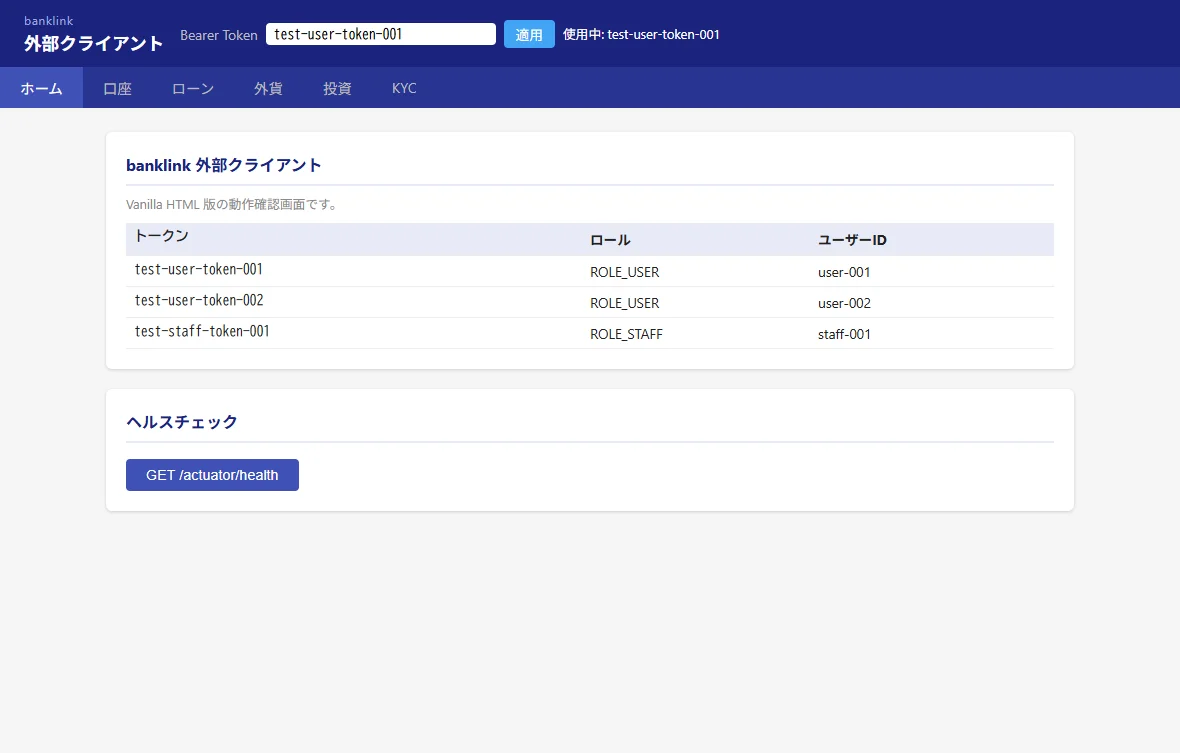
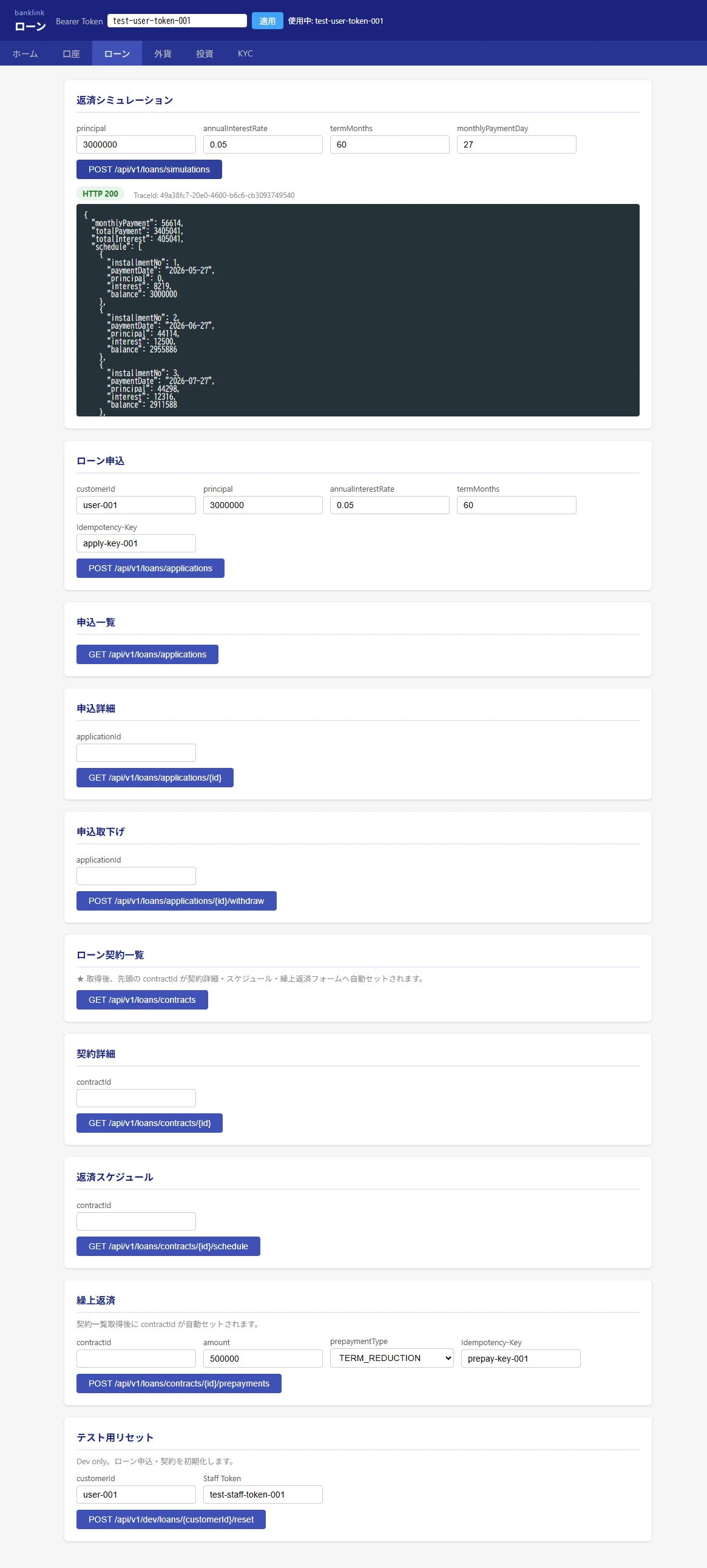
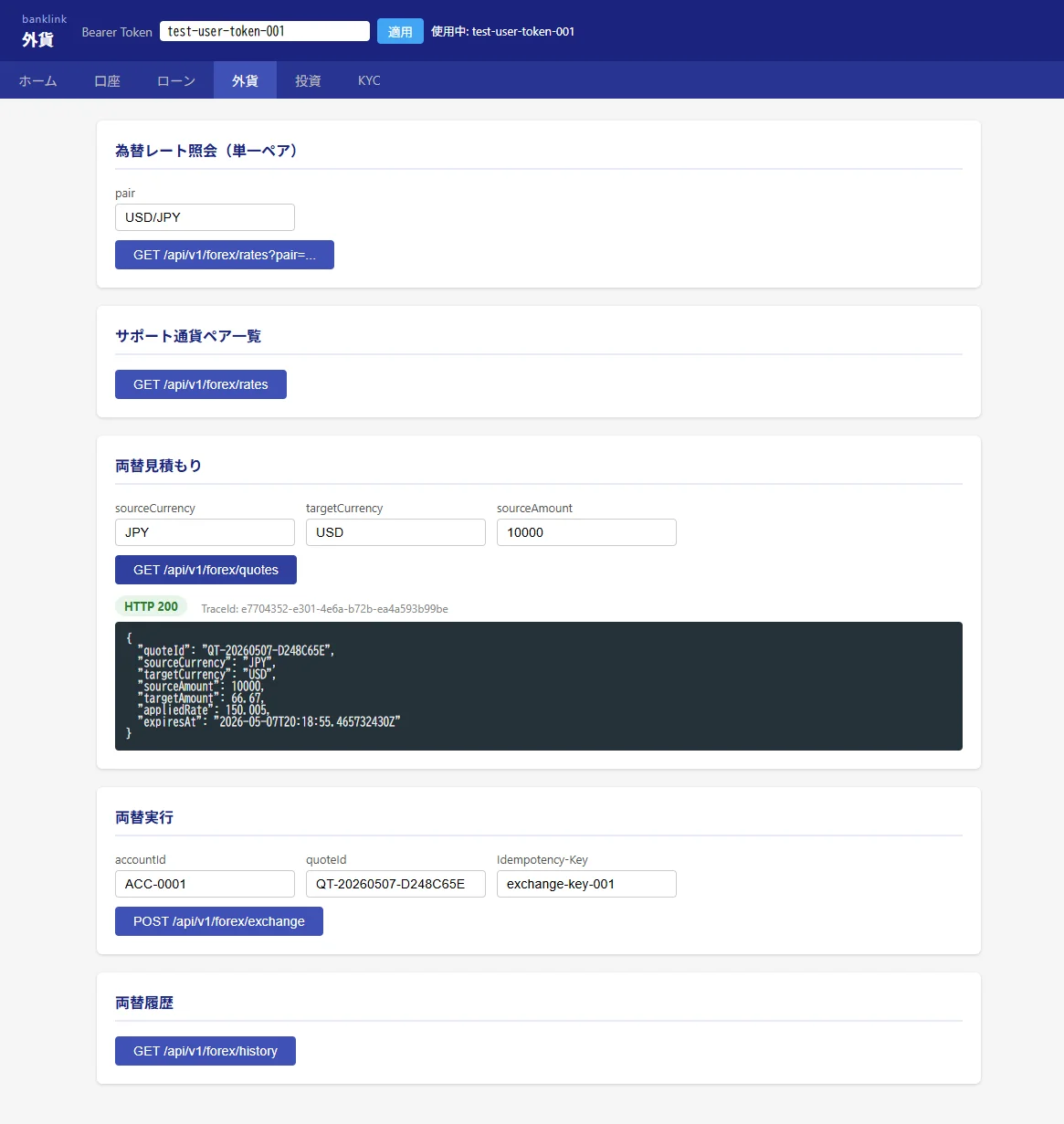
- 6 pages: Home / Account / Loan / Foreign Currency / Investment / KYC
- Multiple API operation sections per page (e.g., the account page has 5 sections: “list, get balance, deposit, withdraw, transaction history”)
- The Bearer Token input field at the top of the screen sets the API auth token
- Navigation lets you move between pages
- Pressing a button hits the API and renders the result on screen
Backend it connects to
- The same Spring Boot API (
/api/v1/accounts,/api/v1/loans, …) - Responses are JSON; errors are unified as an HTTP status + body structure
What was NOT kept identical (the points of differentiation)
- CSS appearance (intentionally different for the external UI vs. internal UI)
- Internal implementation (following each framework’s own conventions)
In other words, I built a comparison baseline where “the screen and functionality are the same, only the internals differ across 4 versions.”
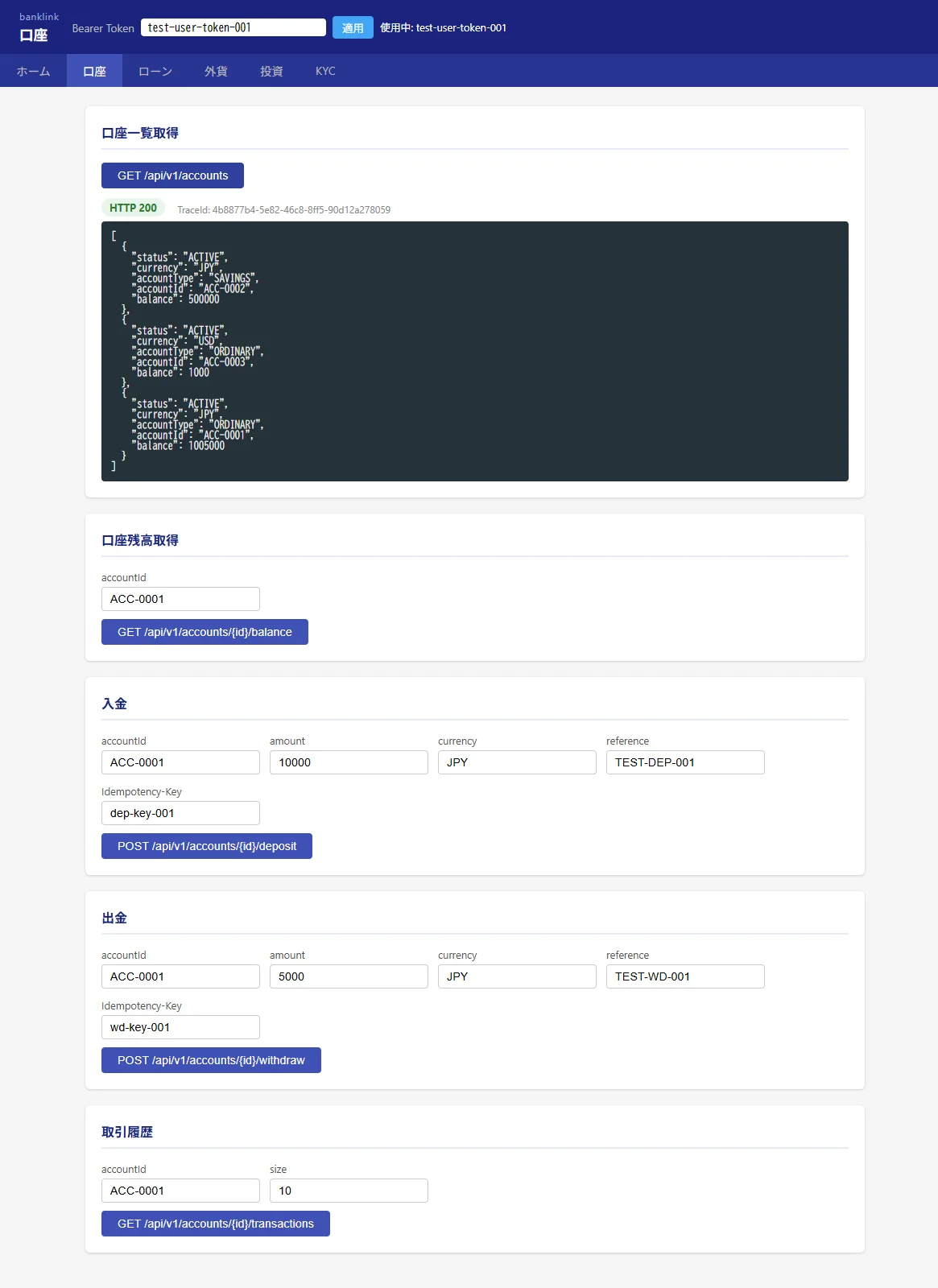
The account screen (above) has 5 sections: “get account list, get balance, deposit, withdraw, transaction history.” This same screen with the same functionality, implemented separately across 4 stacks, is what this article compares.
3. Overview of the 4 Stacks’ Structure
First, a quick look at each one’s “minimal setup.”
Vanilla HTML
banklink-web-vanilla-html/
├─ index.html         ← top page
├─ accounts.html      ← account page
├─ loans.html         ← loan page
├─ ... (4 other pages)
├─ common-external.js ← token management + shared binding
└─ shared/
    ├─ api/client.js  ← fetch wrapper
    └─ common.js      ← bindAction / renderResponse
No build tools. .html can be opened directly in a browser (or served via nginx). JS is imported with <script type="module">.
Vue
banklink-web-vue/
├─ vite.config.ts
├─ index.html         ← SPA entry
└─ src/
    ├─ main.ts         ← createApp + mount
    ├─ App.vue         ← layout + RouterView
    ├─ router/index.ts ← Vue Router config
    ├─ api/client.ts   ← fetch wrapper (TypeScript)
    └─ views/
        ├─ HomeView.vue
        ├─ AccountsView.vue   ← account page
        ├─ ... (4 other pages)
npm run build generates static files into dist/ → served via nginx.
React
banklink-web-react/
├─ vite.config.ts
├─ index.html
└─ src/
    ├─ main.tsx           ← createRoot + render
    ├─ App.tsx            ← all 6 pages consolidated into one file (since it's small)
    └─ ... (shared/api/client.ts)
Similar to Vue, but all pages are written into App.tsx (minimizing the component count).
Thymeleaf
banklink-web-thymeleaf/
├─ pom.xml
└─ banklink-external-web-thymeleaf/
    └─ src/main/
        ├─ java/com/y104autumn/banklink/external/
        │   ├─ BanklinkExternalApplication.java
        │   ├─ controller/
        │   │   ├─ ExternalTopPageController.java
        │   │   ├─ AccountsController.java
        │   │   └─ ... (4 other pages)
        │   ├─ service/
        │   │   ├─ AccountsService.java   ← calls the API via RestClient
        │   │   └─ ...
        │   └─ form/
        │       ├─ AccountsForm.java      ← for @ModelAttribute
        │       └─ ...
        └─ resources/templates/
            ├─ index.html
            ├─ accounts.html              ← with th:field
            └─ ...
mvn package produces an executable jar → started with java -jar or Docker.
Comparing the Number of Config Files
| Whole project | Files needed for one page | |
|---|---|---|
| Vanilla HTML | ~10 files | 1 (accounts.html only) |
| Vue | ~15 files | 1 (AccountsView.vue) |
| React | ~5 files | 1 (a function inside App.tsx) |
| Thymeleaf | ~25 files | 3 (Controller + Service + Form + template) |
Thymeleaf has a lot of boilerplate for splitting MVC into three layers. It has the most files, but each file’s role is clear.
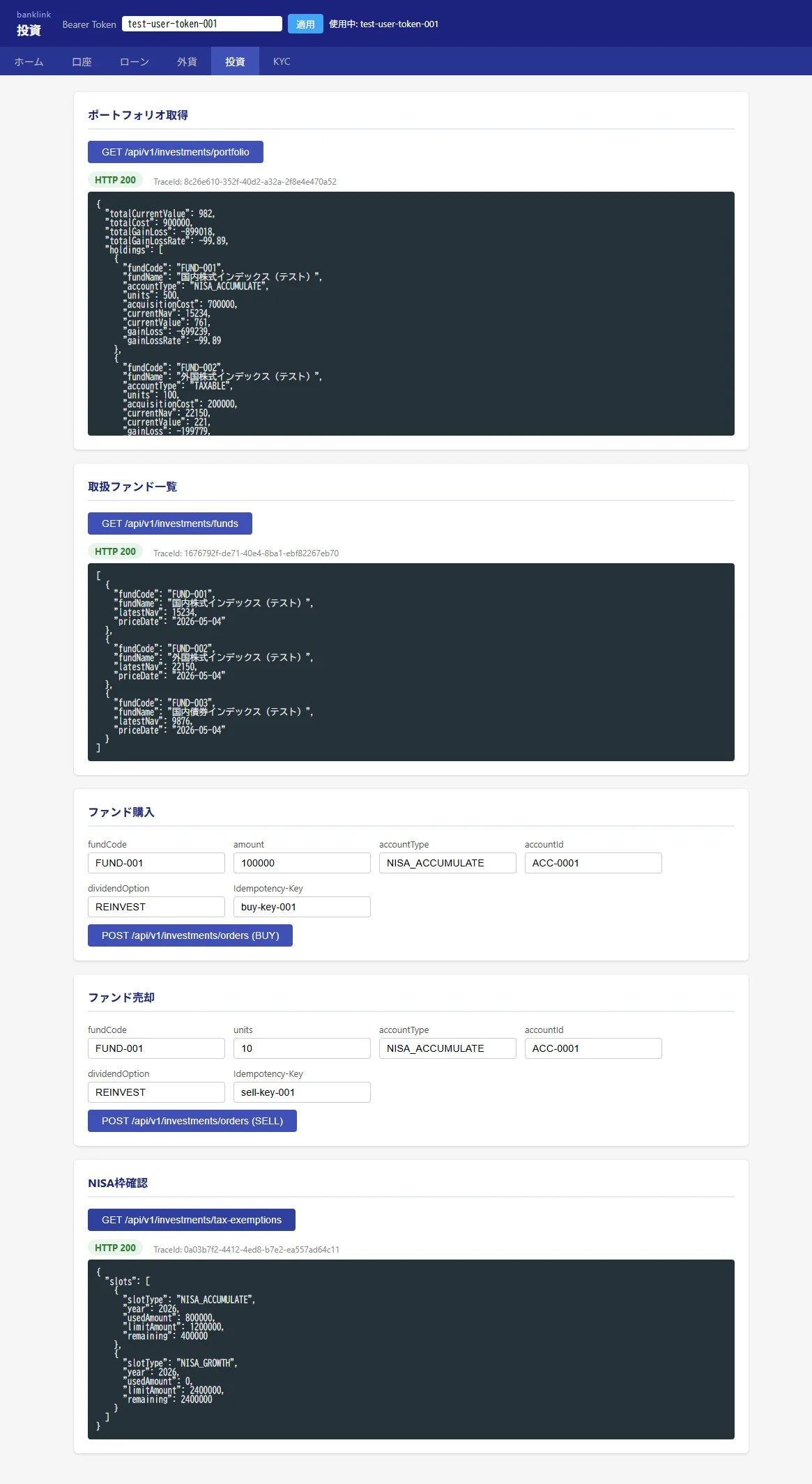
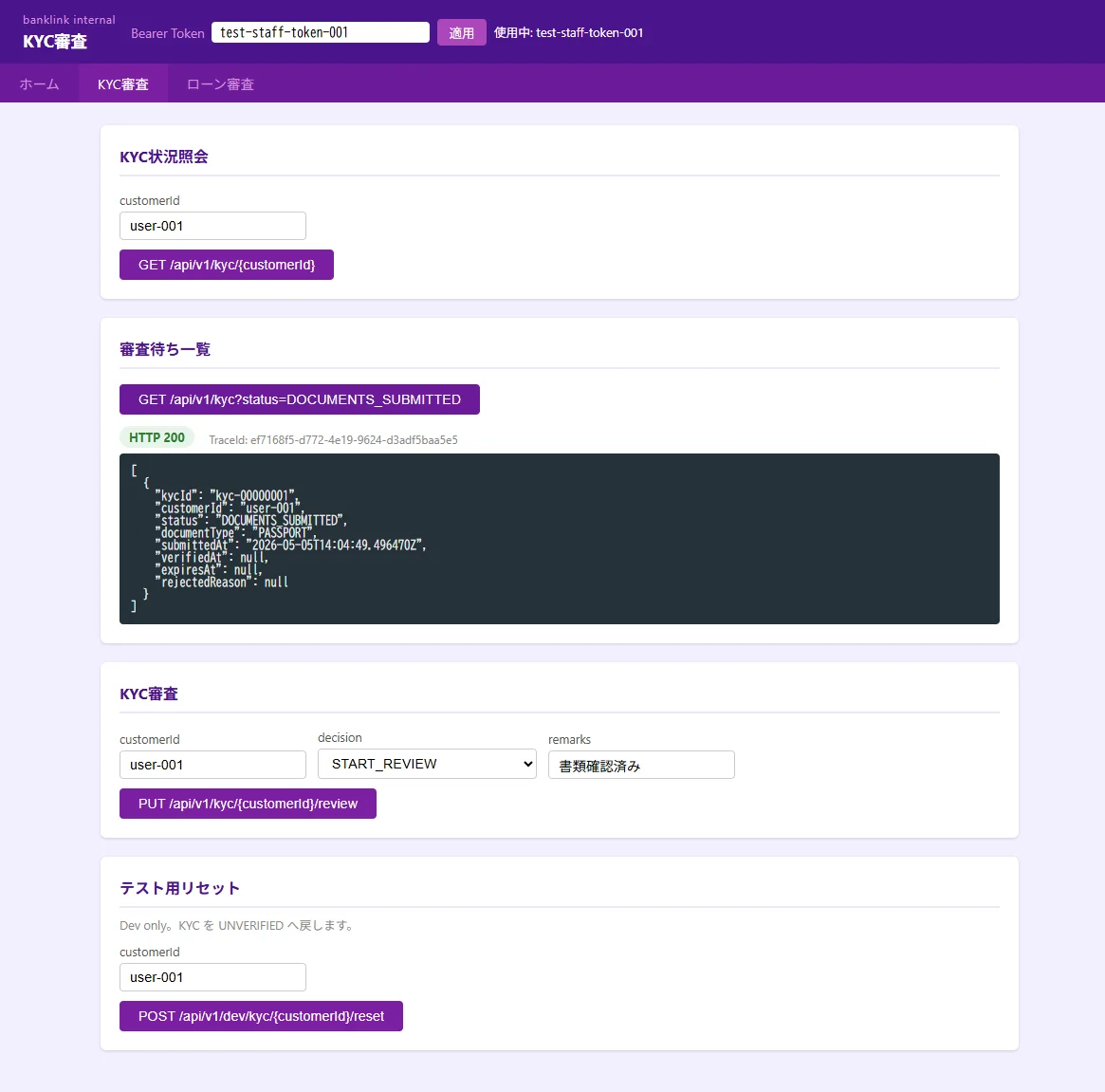
The 6 Pages I Built (reference screenshots)
The 5 pages besides the account screen all have the same functionality across all 4 stacks. For reference, here are the screens from the Vanilla HTML version.
Differentiating the External UI and Internal UI Look
I took the policy of “same functionality, but intentionally different appearance between external UI and internal UI.” The internal UI (closer to a staff terminal) looks like this.
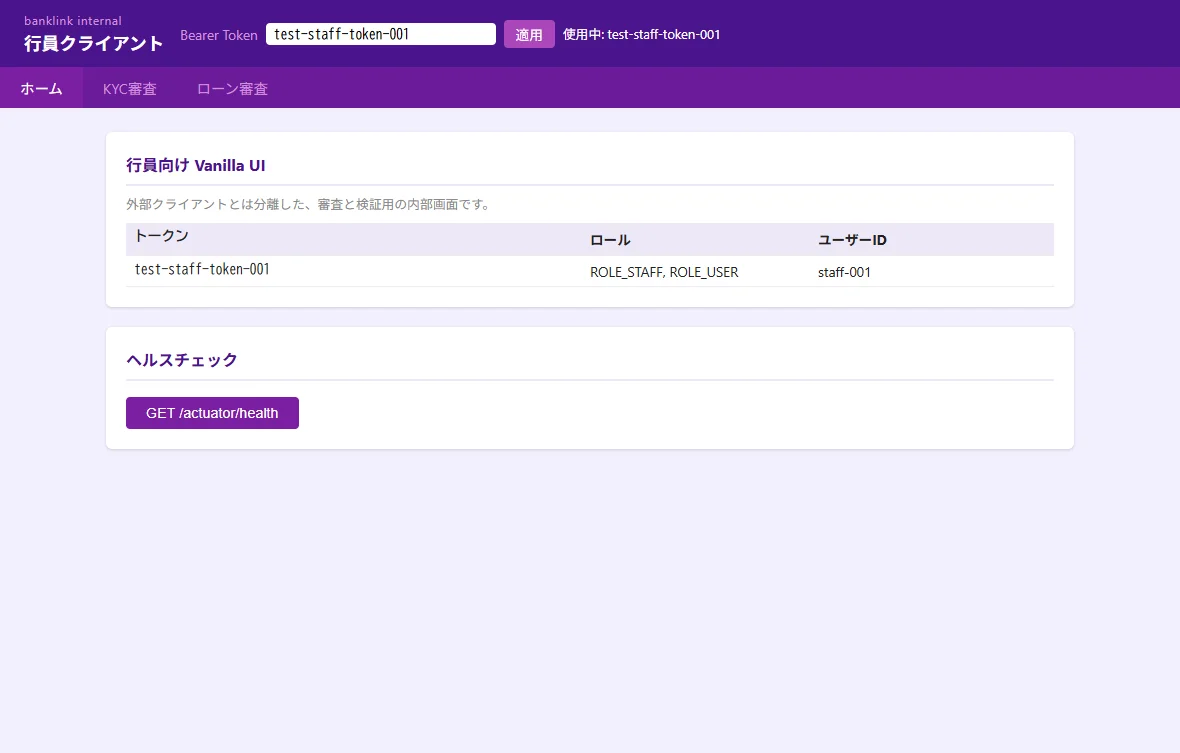
This article’s comparison uses the external UI as its subject, but each stack implements both an external and internal set, structured so that swapping just the CSS covers both.
4. Differences in Project Structure and Build
Vanilla HTML — no build config
No package.json, no tsconfig.json. Just open the file directly in a browser, or serve it statically with nginx.
# Development: open directly in a browser
open accounts.html

# Production: place it in nginx's document root
nginx -c nginx-external.conf
No dependency packages, no build process, no node_modules.
Vue — Vite + TypeScript
// package.json (main parts)
{
  "scripts": {
    "dev": "vite",
    "build": "vite build",
    "preview": "vite preview"
  },
  "dependencies": {
    "vue": "^3.4.0",
    "vue-router": "^4.3.0"
  },
  "devDependencies": {
    "@vitejs/plugin-vue": "^5.0.0",
    "typescript": "^5.5.0",
    "vite": "^5.3.0",
    "vue-tsc": "^2.0.0"
  }
}
npm install      # creates node_modules
npm run dev      # hot-reload dev server at http://localhost:5173
npm run build    # generates static files into dist/
React — Vite + TypeScript (the same Vite as Vue)
{
  "scripts": {
    "dev": "vite",
    "build": "tsc && vite build"
  },
  "dependencies": {
    "react": "^18.3.0",
    "react-dom": "^18.3.0",
    "react-router-dom": "^6.24.0"
  },
  "devDependencies": {
    "@vitejs/plugin-react": "^4.3.0",
    "typescript": "^5.5.0",
    "vite": "^5.3.0"
  }
}
Almost the same feel as Vue to operate. The only difference is @vitejs/plugin-vue vs. @vitejs/plugin-react.
Thymeleaf — Maven + Spring Boot
<!-- pom.xml (main parts) -->
<parent>
    <groupId>org.springframework.boot</groupId>
    <artifactId>spring-boot-starter-parent</artifactId>
    <version>3.4.5</version>
</parent>

<dependencies>
    <dependency>
        <groupId>org.springframework.boot</groupId>
        <artifactId>spring-boot-starter-web</artifactId>
    </dependency>
    <dependency>
        <groupId>org.springframework.boot</groupId>
        <artifactId>spring-boot-starter-thymeleaf</artifactId>
    </dependency>
</dependencies>
mvn clean package      # generates target/*.jar
java -jar target/banklink-external-web-thymeleaf.jar  # start it
Requires a JVM. The jar generated under target/ has Tomcat embedded too, so no extra application server is needed.
How the Build Time Feels
| Stack | Initial install etc. | Production build | Startup time |
|---|---|---|---|
| Vanilla HTML | 0 seconds | 0 seconds | Instant |
| Vue | 30–60s (npm install) | 5–15s | however long nginx takes to start |
| React | 30–60s | 5–15s | however long nginx takes to start |
| Thymeleaf | 30–120s (Maven dependency download) | 20–40s (mvn package) | JVM startup (5–15s) |
5. Implementing the Same Screen (the Account Page) in 4 Stacks
This is the heart of this article. Let’s go through code that implements the exact same 5 sections — get account list, get balance, deposit, withdraw, transaction history — written 4 different ways.
The Vanilla HTML Version
HTML and JS live together in the same accounts.html (as a module via <script type="module">).
<!-- accounts.html (excerpt: account list and deposit parts) -->
<section class="section-card">
  <h2>Get Account List</h2>
  <button id="accounts-list-btn">GET /api/v1/accounts</button>
  <div id="accounts-list-response"></div>
</section>

<section class="section-card">
  <h2>Deposit</h2>
  <label>accountId<input id="deposit-account-id" value="ACC-0001" /></label>
  <label>amount<input id="deposit-amount" type="number" value="10000" /></label>
  <label>Idempotency-Key<input id="deposit-key" value="dep-key-001" /></label>
  <button id="accounts-deposit-btn">POST /api/v1/accounts/{id}/deposit</button>
  <div id="accounts-deposit-response"></div>
</section>

<script type="module">
  import { bindAction, numberValue, value } from "./common-external.js";

  // maps a button id to the id of the element that displays its response
  bindAction("accounts-list-btn", "accounts-list-response", () => ({
    method: "GET",
    path: "/api/v1/accounts",
  }));

  bindAction("accounts-deposit-btn", "accounts-deposit-response", () => ({
    method: "POST",
    path: `/api/v1/accounts/${value("deposit-account-id")}/deposit`,
    idempotencyKey: value("deposit-key"),
    body: {
      amount: numberValue("deposit-amount"),
      currency: value("deposit-currency"),
      reference: value("deposit-reference"),
    },
  }));
</script>
Characteristics:
- HTML elements are identified by
id→ referenced from JS viadocument.getElementById(done inside thebindActionfunction) - Input values are read on demand with the
value("input-id")helper (not reactive — it reads “the value at the moment of the click”) - Results are rendered as a string via
innerHTML
The Vue Version
<!-- AccountsView.vue (script setup + template) -->
<script setup lang="ts">
import { inject, ref } from "vue";
import type { Ref } from "vue";
import { requestApi } from "../api/client";

const token = inject<Ref<string>>("token")!;
function fmt(r: unknown) { return JSON.stringify(r, null, 2); }

// account list
const listRes = ref<string>("");
const listStatus = ref<number | null>(null);
async function getAccounts() {
  const r = await requestApi({ method: "GET", path: "/api/v1/accounts", token: token.value });
  listStatus.value = r.status; listRes.value = fmt(r.body);
}

// deposit
const depId = ref("ACC-0001"), depAmount = ref(10000),
      depKey = ref("dep-key-001"), depCurrency = ref("JPY"), depRef = ref("TEST-DEP-001");
const depRes = ref(""); const depStatus = ref<number | null>(null);
async function deposit() {
  const r = await requestApi({
    method: "POST",
    path: `/api/v1/accounts/${depId.value}/deposit`,
    token: token.value,
    idempotencyKey: depKey.value,
    body: { amount: depAmount.value, currency: depCurrency.value, reference: depRef.value },
  });
  depStatus.value = r.status; depRes.value = fmt(r.body);
}
</script>

<template>
  <section class="section-card">
    <h2>Get Account List</h2>
    <button @click="getAccounts">GET /api/v1/accounts</button>
    <pre v-if="listStatus !== null">HTTP {{ listStatus }}\n{{ listRes }}</pre>
  </section>

  <section class="section-card">
    <h2>Deposit</h2>
    <label>accountId<input v-model="depId" /></label>
    <label>amount<input v-model.number="depAmount" type="number" /></label>
    <label>Idempotency-Key<input v-model="depKey" /></label>
    <button @click="deposit">POST /api/v1/accounts/{id}/deposit</button>
    <pre v-if="depStatus !== null">HTTP {{ depStatus }}\n{{ depRes }}</pre>
  </section>
</template>
Characteristics:
- Declares reactive variables with
ref(), two-way bound withv-model - Gets the shared token from the parent with
inject<Ref<string>>("token") - Conditionally branches the response display with
v-if, embeds variables with{{ }}
The React Version
// the AccountsPage function inside App.tsx (excerpt)
function AccountsPage({ token }: PageProps) {
  const [listResponse, setListResponse] = useState<ApiResult | null>(null);
  const [depositResponse, setDepositResponse] = useState<ApiResult | null>(null);

  const [depositAccountId, setDepositAccountId] = useState("ACC-0001");
  const [depositAmount, setDepositAmount] = useState("10000");
  const [depositKey, setDepositKey] = useState("dep-key-001");
  const [depositCurrency, setDepositCurrency] = useState("JPY");
  const [depositReference, setDepositReference] = useState("TEST-DEP-001");

  return (
    <div className="page-grid">
      <Section title="Get Account List">
        <button
          onClick={async () =>
            setListResponse(await requestApi({ method: "GET", path: "/api/v1/accounts", token }))
          }
        >
          GET /api/v1/accounts
        </button>
        <ResponsePanel response={listResponse} />
      </Section>

      <Section title="Deposit">
        <label>accountId
          <input value={depositAccountId} onChange={e => setDepositAccountId(e.target.value)} />
        </label>
        <label>amount
          <input type="number" value={depositAmount} onChange={e => setDepositAmount(e.target.value)} />
        </label>
        <label>Idempotency-Key
          <input value={depositKey} onChange={e => setDepositKey(e.target.value)} />
        </label>
        <button
          onClick={async () =>
            setDepositResponse(await requestApi({
              method: "POST",
              path: `/api/v1/accounts/${depositAccountId}/deposit`,
              token,
              idempotencyKey: depositKey,
              body: {
                amount: Number(depositAmount),
                currency: depositCurrency,
                reference: depositReference,
              },
            }))
          }
        >
          POST /api/v1/accounts/{"{id}"}/deposit
        </button>
        <ResponsePanel response={depositResponse} />
      </Section>
    </div>
  );
}
Characteristics:
- A
useStatedeclared for every input field and every response (more declarations than Vue’sref) - Every input needs its own
onChange={e => setX(e.target.value)}handler written out (there’s no sugar syntax like Vue’sv-model) - Async handlers for buttons can be written directly inline inside
JSX
The Thymeleaf Version
A 3-layer structure: template + controller + service + form object.
<!-- accounts.html (excerpt: account list and deposit parts) -->
<section class="section-card">
  <h2>Get Account List (server-side Form)</h2>
  <form id="accounts-form" th:action="@{/api/v1/accounts}" th:object="${accountsForm}" method="post">
    <input type="hidden" th:field="*{authorization}" />
    <button type="submit" class="action-button">POST /api/v1/accounts</button>
  </form>
  <div th:if="${accountsForm != null and accountsForm.apiResponse != null}" class="response-box">
    <p><strong>Status:</strong> <span th:text="${accountsForm.apiResponse.statusCode}">0</span></p>
    <pre th:text="${accountsForm.apiResponse.body}"></pre>
  </div>
</section>

<section class="section-card">
  <h2>Deposit</h2>
  <form th:action="@{/api/v1/accounts/deposit}" th:object="${accountsForm}" method="post">
    <input type="hidden" th:field="*{authorization}" />
    <label>accountId<input th:field="*{depositAccountId}" /></label>
    <label>amount<input th:field="*{depositAmount}" type="number" /></label>
    <label>Idempotency-Key<input th:field="*{depositIdempotencyKey}" /></label>
    <button type="submit" class="action-button">POST /api/v1/accounts/deposit</button>
  </form>
</section>
// AccountsController.java
@Controller
@RequiredArgsConstructor
public class AccountsController {
    private final AccountsService accountsService;

    @PostMapping("/api/v1/accounts")
    public String listAccounts(
            @ModelAttribute("accountsForm") AccountsForm form,
            Model model) {
        applyToken(form.getAuthorization());
        form.setApiResponse(accountsService.listAccounts());
        model.addAttribute("accountsForm", form);
        return "accounts";  // re-renders accounts.html
    }

    @PostMapping("/api/v1/accounts/deposit")
    public String deposit(
            @ModelAttribute("accountsForm") AccountsForm form,
            Model model) {
        applyToken(form.getAuthorization());
        Map<String, Object> body = Map.of(
            "amount", form.getDepositAmount(),
            "currency", form.getDepositCurrency(),
            "reference", form.getDepositReference()
        );
        form.setApiResponse(accountsService.deposit(
            form.getDepositAccountId(), body, form.getDepositIdempotencyKey()));
        model.addAttribute("accountsForm", form);
        return "accounts";
    }
}
// AccountsForm.java (excerpt)
@Data
public class AccountsForm {
    private String authorization;
    private String depositAccountId;
    private Integer depositAmount;
    private String depositCurrency;
    private String depositReference;
    private String depositIdempotencyKey;
    private ExternalApiResponse apiResponse;
    // ... (other fields)
}
Characteristics:
- Each operation follows the traditional web flow of HTTP POST → server-side processing → page re-render
th:field="*{depositAmount}"two-way binds an input to a Form Object field (Spring passes the value both ways automatically)- Results are also rendered into HTML server-side → client-side JS is kept to a minimum
Comparing Line Counts (the whole account page)
| Lines of code | Language / Files | |
|---|---|---|
| Vanilla HTML | ~130 lines | HTML + JS (1 file) |
| Vue | ~130 lines | TypeScript + Template (1 file) |
| React | ~350 lines | TypeScript JSX (1 function) |
| Thymeleaf | ~250 lines | HTML + Java (spread across 5 files) |
Why React is so much longer: each input field’s
useStatedeclaration andonChangehandler, and each button’s async callback, all have to be written out individually. Without sugar syntax like Vue’sv-model, the amount of code tends to grow.
6. Differences in the API Client
All of them hit the same backend API (/api/v1/accounts, etc.), but the client implementation differs subtly.
Vanilla HTML / Vue / React — JavaScript’s fetch
// the Vue version's client.ts
export interface ApiResult {
  status: number;
  body: unknown;
}

export async function requestApi(opts: {
  method: string;
  path: string;
  token: string;
  idempotencyKey?: string;
  body?: unknown;
}): Promise<ApiResult> {
  const headers: Record<string, string> = {
    "Content-Type": "application/json",
    Authorization: `Bearer ${opts.token}`,
  };
  if (opts.idempotencyKey) {
    headers["Idempotency-Key"] = opts.idempotencyKey;
  }

  try {
    const res = await fetch(opts.path, {
      method: opts.method,
      headers,
      body: opts.body !== undefined ? JSON.stringify(opts.body) : undefined,
    });
    const text = await res.text();
    const responseBody = text ? JSON.parse(text) : null;
    return { status: res.status, body: responseBody };
  } catch (e) {
    return { status: 0, body: String(e) };
  }
}
Vanilla / Vue / React are nearly identical. The only difference is whether type annotations exist (Vanilla is .js, Vue / React are .ts).
Thymeleaf — Spring Boot’s RestClient
// AccountsService.java
@Service
@RequiredArgsConstructor
public class AccountsService {
    private final RestClient restClient;
    private String token;

    public ExternalApiResponse listAccounts() {
        ResponseEntity<String> response = restClient
            .get()
            .uri("/api/v1/accounts")
            .header("Authorization", "Bearer " + token)
            .retrieve()
            .toEntity(String.class);

        return new ExternalApiResponse(
            response.getStatusCode().value(),
            true,
            response.getBody()
        );
    }
}
Java’s RestClient (Spring 6.1+) with its builder-style API. Compared to fetch, the types are stricter and IDE autocomplete works better.
Commonalities and Differences
| Aspect | Vanilla/Vue/React | Thymeleaf |
|---|---|---|
| Language | JavaScript / TypeScript | Java |
| HTTP client | fetch (standard) | RestClient (Spring standard) |
| Error handling | try/catch + status code | try/catch + HttpClientErrorException |
| Type safety | TypeScript type annotations | Type-safe by default in Java |
| Where the network call happens | Browser → API | Server → API |
That last row, “where the network call happens,” is the most architecturally important difference.
- SPA-style stacks (Vanilla/Vue/React) hit the API directly from the browser → CORS config is needed / API credentials reach the client
- Thymeleaf has the server hit the API → no CORS needed / credentials stay contained on the server
7. Differences in State Management and Data Binding
How each stack holds onto “the on-screen input values, the fetched response, and the token” is where each one’s personality shows.
Vanilla HTML — the DOM is the source of state
// input value: always pulled from the DOM
const accountId = document.getElementById("balance-account-id").value;

// displaying a response: write the string straight into innerHTML
document.getElementById("balance-response").innerHTML = formatResponse(result);

// token: saved to localStorage
localStorage.setItem("banklink_token", token);
There’s no concept of “state.” You always go read the value from the DOM or localStorage. It’s simple, but keeping things in sync gets painful as the app grows.
Vue — reactive declarations with ref
const balanceId = ref("ACC-0001");    // a reactive variable holding a string value
const balanceRes = ref("");           // write {{ balanceRes }} in the template and it updates automatically

// on the template side, writing <input v-model="balanceId" />
// automatically reflects user input into balanceId.value (two-way binding)
The model is “declare a reactive variable → the template follows automatically.” The author doesn’t have to think about keeping state in sync.
React — declaring state hooks with useState
const [balanceId, setBalanceId] = useState("ACC-0001");
const [balanceRes, setBalanceRes] = useState<ApiResult | null>(null);

// on the template side: value and handler are passed separately
<input value={balanceId} onChange={e => setBalanceId(e.target.value)} />
The model is “declare a variable/setter pair → update via the setter → re-render.” There’s no sugar syntax like Vue’s v-model, so an onChange has to be written for each input field, which increases the amount of code.
Thymeleaf — a Form Object centralizes state on the server
@Data
public class AccountsForm {
    private String authorization;
    private String balanceAccountId;
    private ExternalApiResponse apiResponse;
    // ... other fields
}
<input th:field="*{balanceAccountId}" />
The server-side Form Object is the “single source of truth” for state. Every POST packs the input values into the Form Object, the Controller processes it → the result gets packed back into the Form Object and re-rendered. It’s the classic web model of “no state held on the client.”
Which Fits Which Situation
| App characteristics | Well-suited stack |
|---|---|
| Small, single-screen, almost no state | Vanilla HTML |
| Heavy use of reactive UI, lots of forms | Vue |
| Lots of component reuse, ecosystem matters | React |
| Want state to live on the server (business-system style) | Thymeleaf |
8. Differences in Form Handling
How the deposit form (5 fields: accountId / amount / currency / reference / Idempotency-Key) is implemented.
Vanilla HTML
// give each input an id
<input id="deposit-account-id" value="ACC-0001" />

// read all the values together at click time
const body = {
  accountId: document.getElementById("deposit-account-id").value,
  amount: Number(document.getElementById("deposit-amount").value),
  // ...
};
Writing a helper function value() reduces the repetition, but the concept of a “form” only exists on the HTML/JS side.
Vue — done in 5 lines with v-model
<label>accountId<input v-model="depId" /></label>
<label>amount<input v-model.number="depAmount" type="number" /></label>
<label>currency<input v-model="depCurrency" /></label>
<label>reference<input v-model="depRef" /></label>
<label>Idempotency-Key<input v-model="depKey" /></label>
v-model.number converts to a numeric type automatically. The least amount of code to write.
React — useState + onChange per field
const [depositAccountId, setDepositAccountId] = useState("ACC-0001");
const [depositAmount, setDepositAmount] = useState("10000");
const [depositCurrency, setDepositCurrency] = useState("JPY");
// ... and so on for each field

<input value={depositAccountId} onChange={e => setDepositAccountId(e.target.value)} />
<input type="number" value={depositAmount} onChange={e => setDepositAmount(e.target.value)} />
// ...
5 fields = useState × 5 + onChange × 5. An external library like react-hook-form can cut this down, but this article compares “plain React.”
Thymeleaf — th:field binds automatically to the Form Object
<form th:action="@{/api/v1/accounts/deposit}" th:object="${accountsForm}" method="post">
  <input type="hidden" th:field="*{authorization}" />
  <label>accountId<input th:field="*{depositAccountId}" /></label>
  <label>amount<input th:field="*{depositAmount}" type="number" /></label>
  <label>Idempotency-Key<input th:field="*{depositIdempotencyKey}" /></label>
  <button type="submit">Submit</button>
</form>
A single th:field auto-sets the name, id, and value attributes, and ties the field to the server-side Form Object. It feels close to Vue’s v-model.
9. Differences in Error and Loading Display
The display pattern when an API call fails.
Vanilla HTML
function renderResponse(targetId, response) {
  const target = document.getElementById(targetId);
  const badgeClass = response.status >= 200 && response.status < 300 ? "ok" : "err";
  target.innerHTML = `
    <div class="response-panel">
      <span class="badge ${badgeClass}">HTTP ${response.status}</span>
      <pre>${escapeHtml(JSON.stringify(response.body, null, 2))}</pre>
    </div>
  `;
}
Escaping has to be done manually. Either write your own escapeHtml function, or use textContent.
Vue / React — automatic escaping + conditional rendering
<!-- Vue -->
<div v-if="status !== null" class="response-panel">
  <span :class="status < 400 ? 'badge-ok' : 'badge-err'">HTTP {{ status }}</span>
  <pre>{{ response }}</pre>
</div>
// React
{response && (
  <div className="response-panel">
    <span className={response.status < 400 ? "badge-ok" : "badge-err"}>HTTP {response.status}</span>
    <pre>{JSON.stringify(response.body, null, 2)}</pre>
  </div>
)}
Embedding a value with {{ }} or {} gets it auto-escaped. There’s no need to think about XSS.
Thymeleaf — th:text auto-escapes
<div th:if="${accountsForm.apiResponse != null}" class="response-box">
  <p>Status: <span th:text="${accountsForm.apiResponse.statusCode}"></span></p>
  <pre th:text="${accountsForm.apiResponse.body}"></pre>
</div>
th:text also auto-escapes. Using th:utext un-escapes it (an XSS risk).
10. Differences in Startup and Deployment Setup
Vanilla HTML — served statically by nginx
# nginx-external.conf
server {
  listen 8080;
  root /app/banklink-external-web-vanilla-html;
  index index.html;

  location /api/ {
    proxy_pass http://banklink-api:8080;  # reverse-proxied to the API
  }
}
FROM nginx:alpine
COPY banklink-web-vanilla-html /app/
COPY nginx-external.conf /etc/nginx/conf.d/default.conf
The minimal setup. HTML/JS/CSS served as-is.
Vue / React — Vite build → served by nginx
# build stage
FROM node:20-alpine AS builder
WORKDIR /app
COPY package*.json ./
RUN npm ci
COPY . .
RUN npm run build   # generates dist/

# serve stage
FROM nginx:alpine
COPY --from=builder /app/dist /usr/share/nginx/html
COPY nginx-external.conf /etc/nginx/conf.d/default.conf
The build output gets placed into nginx. The only difference from Vanilla is the added build stage.
Thymeleaf — an executable Spring Boot jar
FROM eclipse-temurin:21-jdk-alpine AS builder
WORKDIR /app
COPY pom.xml .
COPY src ./src
RUN mvn clean package -DskipTests

FROM eclipse-temurin:21-jre-alpine
COPY --from=builder /app/target/*.jar app.jar
ENTRYPOINT ["java", "-jar", "/app.jar"]
Requires a JVM. The container is dozens of MB plus the JVM (around 200 MB).
Comparing Image Sizes
| Container image size | Startup time | |
|---|---|---|
| Vanilla HTML (nginx) | ~25 MB | < 1 second |
| Vue (served via nginx) | ~30 MB | < 1 second |
| React (served via nginx) | ~30 MB | < 1 second |
| Thymeleaf (Spring Boot + JVM) | ~200 MB | 5–15 seconds |
If minimizing size is the priority, the nginx-served group (the first three) has the advantage. Spring Boot is heavier, but in exchange it can handle server-side logic, API proxying, and auth integration all within the same process.
11. Side-by-Side Comparison Table
| Aspect | Vanilla HTML | Vue 3 | React | Thymeleaf |
|---|---|---|---|---|
| Language | JS | TS | TS (TSX) | Java |
| Build | Not needed | Vite | Vite | Maven |
| Learning cost | Low | Medium | Medium–High | Medium (low if you already know Java) |
| Lines of code (account page) | ~130 | ~130 | ~350 | ~250 (spread out) |
| State model | DOM | Reactive ref | useState | Form Object (server) |
| Form binding | Manual | v-model | onChange per field | th:field |
| XSS auto-escape | Manual | Automatic | Automatic | Automatic |
| Where API calls happen | Browser | Browser | Browser | Server |
| Where credentials live | localStorage | localStorage | localStorage | Server session |
| CORS required | Yes | Yes | Yes | No |
| Dependency package count | 0 | ~10 | ~10 | ~20 (Maven) |
| Container image | ~25 MB | ~30 MB | ~30 MB | ~200 MB |
| Startup time | Instant | Instant | Instant | 5–15s (JVM) |
| Dynamic UI | Weak | Strong | Strong | Weak (assumes reload) |
| Ecosystem | None | Mid-sized | Huge | The Spring ecosystem |
12. How to Choose — Strengths, Weaknesses, and Decision Points for the 4 Stacks
Vanilla HTML
Strengths:
- Zero dependencies, zero build, zero learning cost (just HTML/JS basics)
- Minimal delivery cost, minimal container image
- Unbeatable for “build a working demo in 30 minutes”
Weaknesses:
- State management breaks down as the app grows (the limits of direct DOM manipulation)
- No TypeScript type safety
- Bad fit for reactive UI
When to choose it:
- API verification tools, internal test forms, simple dashboards
- “I don’t want a framework, I just want a screen”
- A prototype you plan to replace with an SPA later
Vue
Strengths:
- Sugar syntax like
v-modelmeans less code than React - Template syntax is close to HTML, easy to read even for beginners
- Single-file components (.vue) fit logic/template/style into one file
Weaknesses:
- Smaller ecosystem than React
- Fewer hiring/job listings than React
When to choose it:
- Business SPAs with lots of forms and input UI
- “If you’re stuck deciding on a framework, try Vue first”
- Projects where the web engineering hiring pool is mostly domestic
React
Strengths:
- A huge ecosystem (UI libraries, state management, testing, mobile)
- Plays well with TypeScript (rich type definitions)
- The most job postings in the hiring market
Weaknesses:
- Tends to need more lines than Vue to write the same functionality
- Learning to use
useState,useEffect,useMemo,useCallbackcorrectly is its own cost - Understanding function component re-renders is essential
When to choose it:
- Large-scale SPAs, or with Next.js / React Native in view
- Organizations that prioritize engineer hiring
- You want to reuse UI libraries (MUI / Mantine / shadcn, etc.)
Thymeleaf
Strengths:
- Client-side JS can be kept to a minimum (business-system style)
- Credentials and API tokens stay contained on the server (an advantage under strict security requirements)
- Full use of the Spring Security / Spring Boot ecosystem
- Java engineers can build web UIs with skills they already have
Weaknesses:
- Every page transition needs a server round trip (feels sluggish next to an SPA)
- Not suited to reactive UI
- The JVM container image is heavy
When to choose it:
- Business systems / internal admin screens
- Security requirements mean you don’t want to expose API keys to the client
- Organizations with lots of Java engineers, already on Spring Boot
- “Submit a form, show the result” is enough — you don’t need a rich UI
Decision Flow
Q1. Does the UI need to be reactive?
   ├─ No (submit-a-form-and-show-the-result is enough)
   │   ├─ Want to aggregate state server-side → Thymeleaf
   │   └─ Want to keep it lightweight → Vanilla HTML
   └─ Yes (reactive UI is needed)
       ├─ Ecosystem/hiring matters → React
       └─ Want less code / a lower learning cost → Vue
13. Summary and Takeaways
- The 4 stacks aren’t “correct vs. incorrect” — which one has the advantage shifts with the project’s requirements. Lining up the same spec across all of them is what makes the differences visible.
- Looking only at lines of code, Vanilla / Vue come out low and React comes out high. But React more than makes up for it in hiring market and ecosystem.
- Thymeleaf isn’t obsolete — it still often fits the security and operational requirements of business systems today.
- The conclusion is: “pick your framework by working backward from the requirements.” Picking based on trends bites you a few years later.
- Running all 4 implementations in parallel made it clear that the difference in build tooling (Vite vs. Maven vs. none) makes a huge difference to the experience on day one of a project. At the prototype stage, the Vanilla / Vite side is overwhelmingly faster.
I hope this comparison serves as one piece of material when you’re making that choice.