Resetting the Dev DB to the Same State Every Time With DevPortSeedInitializer — Spring Boot's CommandLineRunner in Practice
What You’ll Learn
- A pattern for inserting fixed test data at startup using Spring Boot’s
CommandLineRunner+@Profile("dev") - An
upsert(findById + save) approach that doesn’t double-insert on restart - A distribution algorithm that lays out multiple ports in a ring around stations
- A design that intentionally mixes in anomaly data (full ports, broken scooters) for verification
Target Audience
- Anyone tired of doing
truncate + insertevery time on a dev DB - People who want fixed “full port” / “broken scooter” anomaly data on hand for E2E checks
- Anyone wanting a seed mechanism in Spring Boot stdlib only (lighter than Flyway / Liquibase)
Environment
| Item | Version |
|---|---|
| Java | 21 |
| Spring Boot | 3.4.5 |
| PostgreSQL | 17.2 |
| Spring Data JPA | 3.x |
Series article (in active development) — This article is part of Building Street-Level E-Scooter Sharing From Scratch to Understand It — Design, Implementation, and Operations Series. The project is ongoing; new articles and design notes are added continuously. The series motivation, technology stack, screen-ID glossary, and the full article index are collected at the link above.
Introduction
In the PoC phase with PostgreSQL, you keep hitting:
- Recreating the DB wipes the master data and screens go empty
- Sharing the dev environment with a teammate via “I’ll DM you the SQL” workflow
- Crafting “full port” / “under maintenance” anomalies by hand every time
We fixed this by injecting the data in Java code at app startup.
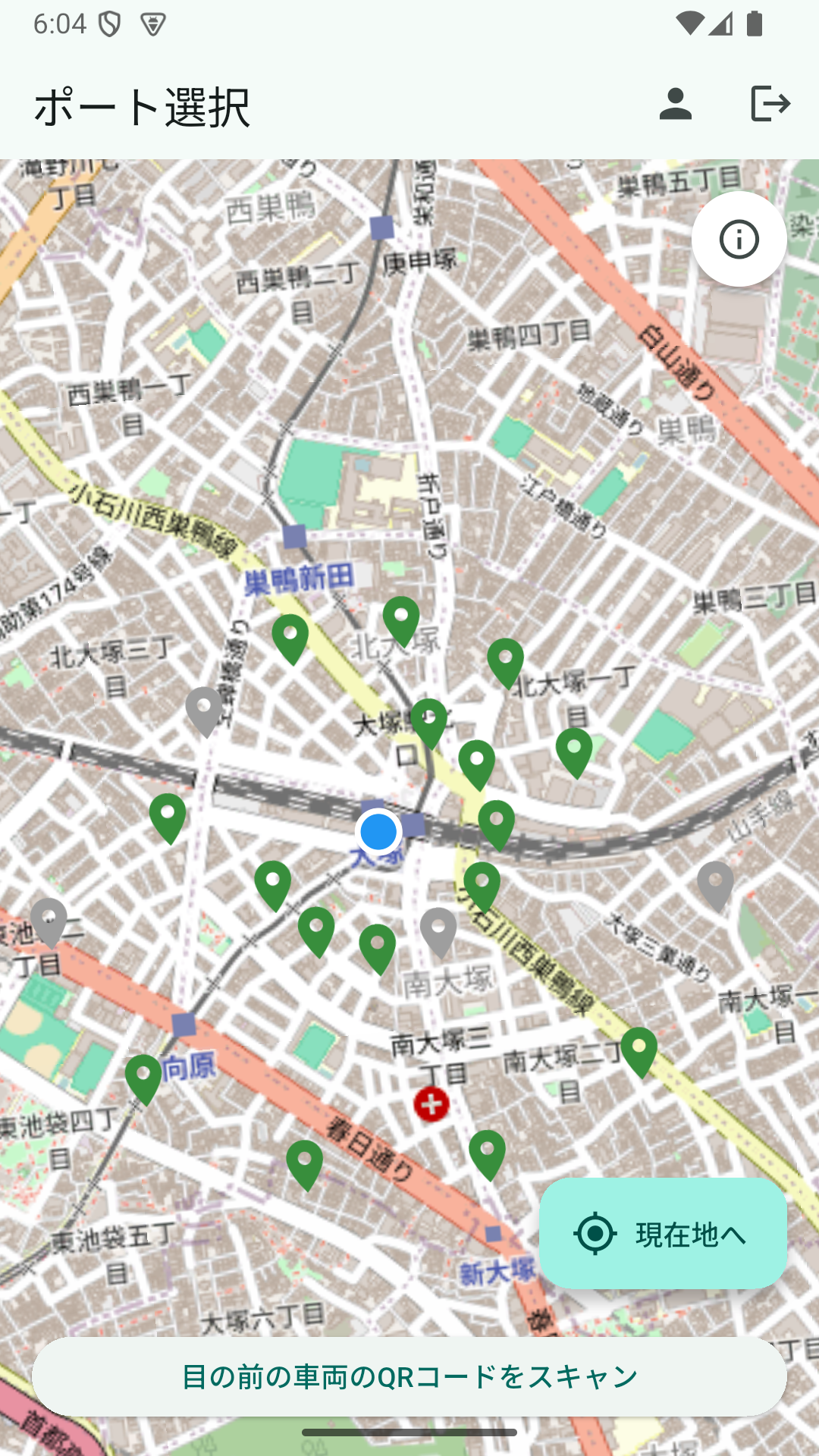
Green pins are “ports with available scooters,” gray ones are “zero available or full ports.” That variance itself is intentionally produced by the seed code — the theme of this article.
Overall Structure
@Component
@Profile("dev")
@RequiredArgsConstructor
public class DevPortSeedInitializer implements CommandLineRunner {

    private final PortRepository portRepository;
    private final ScooterRepository scooterRepository;

    @Override
    public void run(String... args) {
        seedStation("TOKYO", "Tokyo Station area", 35.681236, 139.767125);
        seedStation("IKEBUKURO", "Ikebukuro Station area", 35.728926, 139.710380);
        seedStation("OTSUKA", "Otsuka Station area", 35.731401, 139.728662);
        seedStation("SHINJUKU", "Shinjuku Station area", 35.690921, 139.700258);
    }
    // ...
}
Points:
@Profile("dev")means the bean isn’t created in prod. No accidental seed in productionCommandLineRunner.runis called once at the very end of Spring Boot startup- One method per station consolidates geographic distribution and count management in one place
Upsert Logic for Restart Safety
A plain save causes a duplicate-key violation on every restart. Instead, findById to check, then build new or update existing:
private void seedStation(String code, String stationLabel, double centerLat, double centerLng) {
    for (int i = 1; i <= 20; i++) {
        String index = String.format("%02d", i);
        String portId = "PORT-" + code + "-" + index;
        String portName = stationLabel + " Port " + index;

        LatLng latLng = distributedPoint(centerLat, centerLng, i);
        Port port = portRepository.findById(portId)
            .orElseGet(() -> Port.builder().portId(portId).build());
        port.setName(portName);
        port.setLatitude(BigDecimal.valueOf(latLng.lat));
        port.setLongitude(BigDecimal.valueOf(latLng.lng));
        port.setTotalCapacity(12);
        portRepository.save(port);

        // Same upsert for scooters
        upsertScooter(port, "SC-" + code + "-" + index + "-A", "AVAILABLE");
        upsertScooter(port, "SC-" + code + "-" + index + "-B", "AVAILABLE");
        upsertScooter(port, "SC-" + code + "-" + index + "-C", "MAINTENANCE");
    }
}

private void upsertScooter(Port port, String scooterId, String status) {
    Scooter scooter = scooterRepository.findById(scooterId)
        .orElseGet(() -> Scooter.builder().scooterId(scooterId).build());
    scooter.setStatus(status);
    scooter.setBatteryLevel("AVAILABLE".equals(status) ? 85 : 45);
    scooter.setCurrentLatitude(port.getLatitude());
    scooter.setCurrentLongitude(port.getLongitude());
    scooter.setCurrentPort(port);
    scooterRepository.save(scooter);
}
Effects:
- First start: all rows INSERTed
- Subsequent starts: existing rows UPDATED (lat/lng or status follow changes)
- States users mutated during runtime (e.g. IN_USE) snap back to AVAILABLE/MAINTENANCE on next restart
The last point gives a “dev startup always returns to a known initial state” effect. Even if state breaks during verification, a restart resets it — a real comfort.
Ring-Shaped Distribution Around Stations
Putting all 20 ports at the same coordinate causes overlap. We spread them out by distance:
private LatLng distributedPoint(double centerLat, double centerLng, int index) {
    int ring = index <= 8 ? 0 : (index <= 14 ? 1 : 2);
    double radiusMeters = ring == 0 ? 180 : (ring == 1 ? 320 : 520);
    double angleDeg = (index * 31) % 360;

    double latDelta = (radiusMeters / 111_320.0) * Math.cos(Math.toRadians(angleDeg));
    double lngScale = Math.max(Math.cos(Math.toRadians(centerLat)), 0.1);
    double lngDelta = (radiusMeters / (111_320.0 * lngScale)) * Math.sin(Math.toRadians(angleDeg));
    return new LatLng(centerLat + latDelta, centerLng + lngDelta);
}
Algorithm:
- index 1〜8 → inner ring (180m radius)
- index 9〜14 → middle ring (320m radius)
- index 15〜20 → outer ring (520m radius)
- angle:
index * 31 % 360(31 is coprime to 360, so successive indices don’t cluster)
111_320.0 is meters per degree of latitude near the equator. Longitude varies with latitude, so we correct with cos(centerLat).
The result is ports arranged in concentric circles around each station, all visible on the map.
Intentionally Mixing In Anomalies
During verification you sometimes want a “full port” or “all-maintenance port.” Seed them in deliberately:
for (int i = 1; i <= 20; i++) {
    // i % 7 == 0 (i=7 and i=14 per station) becomes a "full port" — totalCapacity equals scooter count,
    // making available_empty_slots = 0
    boolean isFullPort = i % 7 == 0;
    String nameSuffix = isFullPort ? " (full)" : "";
    int totalCapacity = isFullPort ? 3 : 12;

    Port port = portRepository.findById(portId)
        .orElseGet(() -> Port.builder().portId(portId).build());
    port.setName(portName + nameSuffix);
    port.setTotalCapacity(totalCapacity);
    portRepository.save(port);

    int availableCount = i % 5 == 0 ? 0 : 2;
    upsertScooter(port, "SC-" + code + "-" + index + "-A",
        availableCount >= 1 ? "AVAILABLE" : "MAINTENANCE");
    upsertScooter(port, "SC-" + code + "-" + index + "-B",
        availableCount >= 2 ? "AVAILABLE" : "MAINTENANCE");
    upsertScooter(port, "SC-" + code + "-" + index + "-C", "MAINTENANCE");
}
Properties encoded into i:
i % 7 == 0(i=7, 14) → full ports. 2 per station × 4 stations = 8 totali % 5 == 0(i=5, 10, 15, 20) → ports with zero AVAILABLE. 4 per station × 4 = 16 total- Otherwise → 2 AVAILABLE + 1 MAINTENANCE
Open the map and you’ll see green pins (normal) and gray pins (full or zero-available) mixed. Client-side “pin coloring” / “button disabling” logic gets verified from the moment of startup.
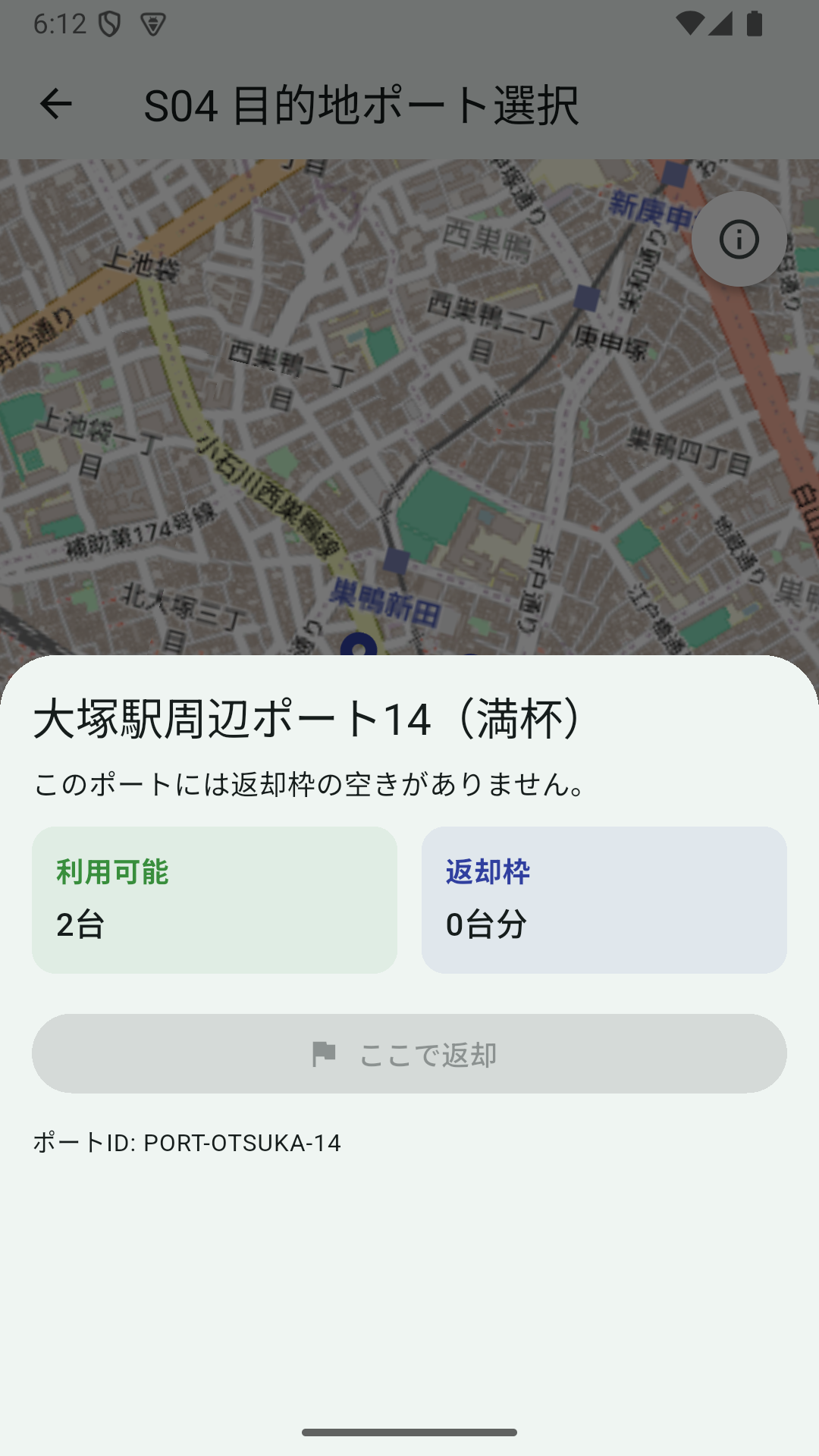
The “(full)” suffix in the port name is also produced by the seed code as isFullPort ? " (full)" : "", so at a glance you can tell “this is exactly what the seed intended.” A fixed, reproducible verification fixture for checking that “button disabling shows up as expected.”
Why Not Flyway / Liquibase
Migration tools (Flyway / Liquibase) can seed too. But for dev test data, Java has reasons:
- Hundreds of lines of loops and coordinate math in SQL hurt readability
- Putting the coordinate generation logic in SQL makes it unreusable in tests
@Profile("dev")can completely confine it to dev (Flyway is often expected to run in prod too)
The natural division of labor becomes: schema management with Flyway / Liquibase, test data with CommandLineRunner.
Lessons
- A dev seed is simple and strong as
@Profile("dev")+CommandLineRunner - Upsert logic (findById → save) gives restart resilience — runtime state damage isn’t scary anymore
- Stations / coordinates / counts / anomalies are declarative in code, so reviewable
- Modulo branches like
i % N == 0deliberately seed anomalies, making routine verification easier
In the early PoC phase, “running and verifying design” is the priority. “Every time you open the DB you see the same view” stabilizes the dev experience more than you’d expect.