Building an End-User DVD Rental App — Vue 3 + Spring Boot Paired with the Admin App, with Article Map
Introduction
I previously built an admin app based on the PostgreSQL sample DB dvdrental.
The admin app is a “system staff use for daily operations.” It has customer management, inventory management, rental management, payment management, and sales reporting all in place.
But this alone is only a “tool for the managing side.”
There’s no app for the side that actually rents the DVDs.
This article is the continuation of that. It’s the story of building an end-user-facing app to pair with the admin app — an app where customers can search for titles themselves and apply for a rental online.
This app is still under development. This article isn’t a completion report — it’s a record of ongoing design decisions and technology choices. It’ll be updated as features are added and changed.
Where This App Fits
The admin app and the end-user app share the same dvdrental database, while being built as completely separate applications.
                      ┌─────────────────────┐
                      │    PostgreSQL       │
                      │    (dvdrental)      │
                      └──────────┬──────────┘
                                 │ Shared DB
              ┌──────────────────┴───────────────────┐
              │                                      │
   ┌──────────▼──────────┐              ┌────────────▼────────────┐
   │     Admin App        │              │      End-User App       │
   │  Spring Boot         │              │  Spring Boot (REST API) │
   │  + Thymeleaf         │              │  + Vue 3 + TypeScript   │
   │                      │              │                         │
   │  Staff only          │              │  For customers          │
   │  Internal network    │              │  Public internet        │
   └─────────────────────┘              └─────────────────────────┘
| App | Tech Stack | Target Users | Exposure |
|---|---|---|---|
| Admin App | Spring Boot + Thymeleaf | Staff | Internal network |
| End-User App | Spring Boot (REST API) + Vue 3 + TypeScript | Customers | Public internet |
Both apps share the same dvdrental PostgreSQL database and run as independent applications.
The admin app is “the side that runs operations,” the end-user app is “the side that uses the service.” Since the roles differ, the tech stack and authentication are separated too.
Technology Shared by the Two Apps, and How to Read This Article Series
| Admin App | End-User App | |
|---|---|---|
| Language | Java | Java |
| Backend Framework | Spring Boot | Spring Boot |
| Frontend | Thymeleaf (server-side rendering) + TypeScript | Vue 3 + TypeScript |
| API Style | MVC (Controller → View) | REST API (Controller → JSON) |
The backend is Java + Spring Boot for both apps. The frontend architecture is where they diverge. The admin app does server-side rendering with Thymeleaf, while the end-user app is a Vue 3 SPA. Both use TypeScript, so they share the same policy of type-safe UI implementation.
Building this two-pillar setup made it possible to record Spring Boot / Java / Vue 3 / TypeScript implementation patterns from both sides. This article series is written to work as “a record of what was built” while also functioning as a reference and textbook to come back to later for these four technologies. Each article stays focused on one theme, so it can be looked up standalone when researching a specific technology or implementation pattern.
The Big Difference from the Admin App: There’s a Public Area That Doesn’t Require Login
In the admin app, every feature requires login. It’s designed on the assumption that only staff can access it, and there’s no screen reachable while logged out.
The end-user app, on the other hand, has a public area usable without logging in.
| Admin App | End-User App | |
|---|---|---|
| Available while logged out | None (every screen requires login) | Film list, detail, stock check, recommendations |
| Available after login | Customer management, inventory management, sales reports, etc. | My page, rental requests, checkout, history |
| Target users | Internal staff | General users (including before registration) |
To make the flow of “look at titles first, then register once you want to rent” work, this public area was a required part of the design. Search, browsing, and stock checks can all be completed without authentication.
Why they’re kept in separate repositories rather than one — the details of that decision are in a separate article.
→ Why We Separated the Admin Panel and Customer App into Different Repositories — Gains and Tradeoffs
Tech Stack Choices
| Layer | Technology |
|---|---|
| Backend | Spring Boot 3 + MyBatis + Spring Security |
| Frontend | Vue 3 + TypeScript + Vite |
| Database | PostgreSQL (based on dvdrental + extended with Flyway) |
| Payment | PayPay Dynamic QR Code API / PAY.JP |
| Deployment | Frontend bundled into the jar with a single mvn package |
Whereas the admin app was Spring Boot + Thymeleaf, this app takes a separated approach where Spring Boot is dedicated purely to the REST API, and the UI is built with Vue 3. Why that choice was made is covered in detail in the next article.
→ Why We Chose Spring Boot Backend + Vue 3 Frontend Separation, and How We Connected Them
Screen Structure
The overall screen transitions are managed by a single App.vue with a currentPage state.
Vue Router isn’t used — screen switching is done by conditionally rendering components.
On copyright considerations The UI’s structure and layout are an original implementation that doesn’t depend on any existing service’s design, while taking cues from real major services such as EC sites and video streaming services. Title images and preview videos follow the same policy — AI-generated assets are used instead of existing works or existing characters.
① Common Header / Navigation
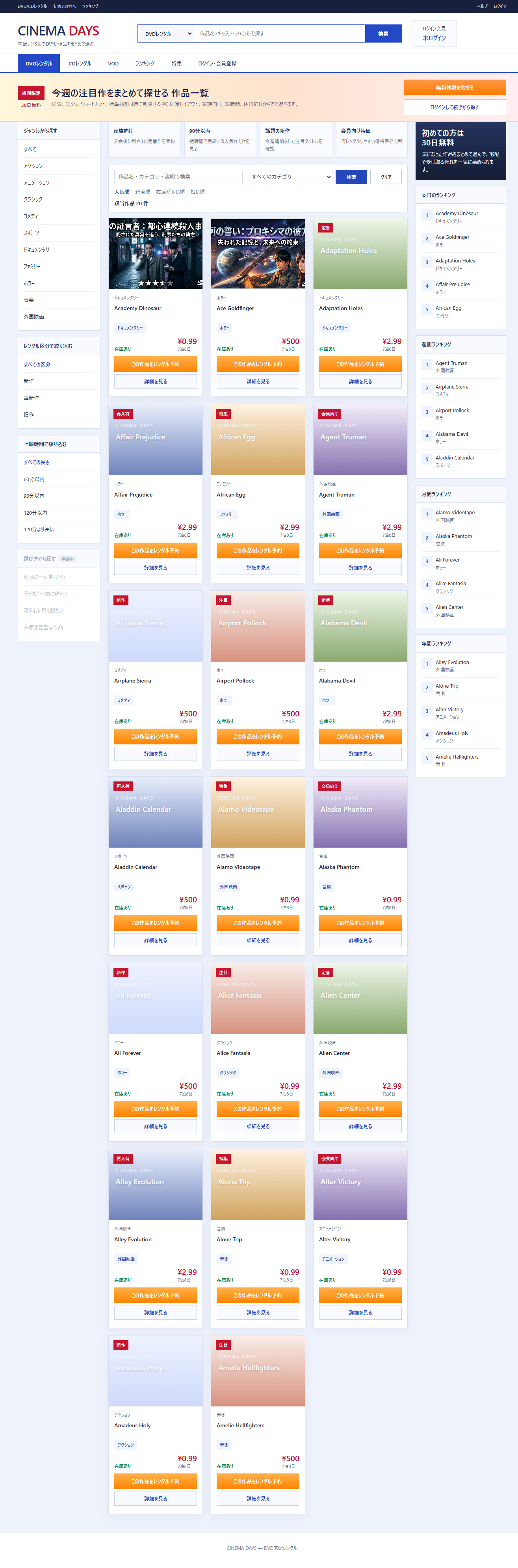
The header has a 3-layer structure (top bar, masthead, global tabs). When entering the checkout screen, the normal header is hidden and switched to a simpler “Isolated Checkout” header.
<!-- App.vue (excerpt) -->
<header class="masthead" v-if="!isCheckoutFlow">
  <!-- Normal header -->
</header>
<header class="checkout-masthead" v-if="isCheckoutFlow">
  <div class="brand">CINEMA DAYS</div>
  <div class="secure-note">🔒 Payment is processed over a secure connection</div>
</header>
→ Why Checkout Should Be “Isolated Checkout” and How to Implement It
The currentPage type is defined as a union literal, and Vue Router isn’t used. Not having to design routing for tab transitions means state transitions stay simple in a small app.
// App.vue (currentPage type definition excerpt)
type PageType =
  | 'films' | 'cd-rentals' | 'streaming'
  | 'ranking' | 'feature' | 'detail'
  | 'auth' | 'member-register' | 'member-register-confirm'
  | 'mypage' | 'checkout'

const currentPage = ref<PageType>('films')
→ The Design Decision to Manage App.vue Page State with a Simple currentPage Variable
② Film List Screen (FilmsView.vue)
The film filter is implemented using only Vue 3’s computed, so no additional API calls happen.
The sidebar’s open/close state is persisted with localStorage.
<!-- FilmsView.vue (filter section excerpt) -->
<ul class="filter-list">
  <li
    v-for="cat in categoryOptions"
    :key="cat"
    :class="{ 'filter-active': selectedCategory === cat }"
    @click="applyCategoryFilter(cat)"
  >{{ cat }}</li>
</ul>
→ Implementing Front-End Complete Filter Search with Vue 3 computed
→ Preserving Sidebar Open/Close State with localStorage While Preventing Initial Render Flicker
③ Film Detail Screen (FilmDetailView.vue)
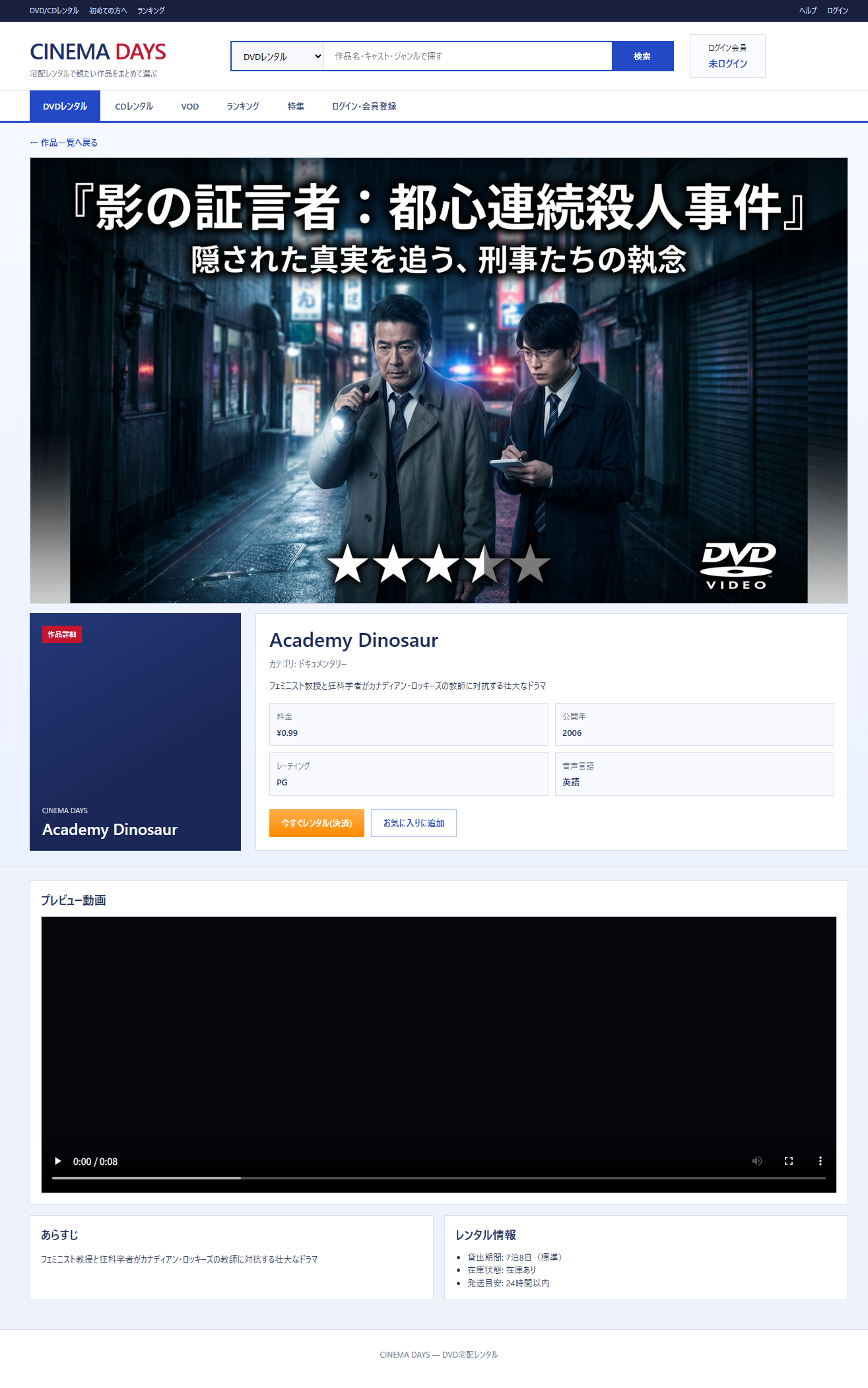
Title Images and Preview Videos Generated with Gemini Ultra
The title images (poster visuals) and preview videos shown on the film detail page were made with Google Gemini Ultra’s image and video generation features.
- Generated under conditions that don’t depend on existing works or existing characters, out of copyright consideration
- Didn’t fix the generation prompts too tightly — ran it closer to “leave it to the AI”
- The result: assets that aren’t overly polished and have a distinct feel, which gave them a strong presence in the UI
As a way to make the screens look good during development while also keeping these articles interesting to read, AI-generated assets turned out to be quite practical.
That said, a fallback setup is also in place, assuming there will be cases where the image or video is missing.
// FilmDetailView.vue (title image fallback excerpt)
const buildTitleImageCandidates = (filmId: number): string[] => [
  `/media/film-${filmId}-title.jpg`,
  `/media/film-${filmId}-title.png`,
]
It tries the candidates in order, and falls back to a placeholder display if all of them fail.
The film detail page has two buttons: “Rent Now” and “Add to Cart.” The reason for separating these two is a UX design decision.
<!-- FilmDetailView.vue (CTA buttons excerpt) -->
<template v-if="isRentalSection">
  <button class="btn-primary" @click="emit('direct-checkout', film)">
    Rent Now (Checkout)
  </button>
  <button v-if="isAuthenticated" class="btn-secondary"
          @click="emit('add-to-cart', film)">
    Add to Cart
  </button>
</template>
→ Why an EC Site Should Separate ‘Add to Cart’ and ‘Buy Now’, and How to Implement It
When navigating to the detail screen, resetDetailViewport forces a scroll to the top and clears focus so the previous screen’s scroll position doesn’t linger. Calling it from both the film.filmId watcher and onMounted covers both the initial mount and the case where the same component is reused.
// FilmDetailView.vue (scroll/focus reset excerpt)
const resetDetailViewport = () => {
  window.scrollTo({ top: 0, left: 0, behavior: 'auto' })
  const activeElement = document.activeElement
  if (activeElement instanceof HTMLElement) {
    activeElement.blur()
  }
}

watch(() => film.filmId, () => {
  resetDetailViewport()
  void resolveInitialMedia()
})

onMounted(() => {
  resetDetailViewport()
  void resolveInitialMedia()
})
→ Why I Added scrollTo(0, 0) and blur() on Detail Navigation
④ Login / Registration Screen (AuthView.vue)
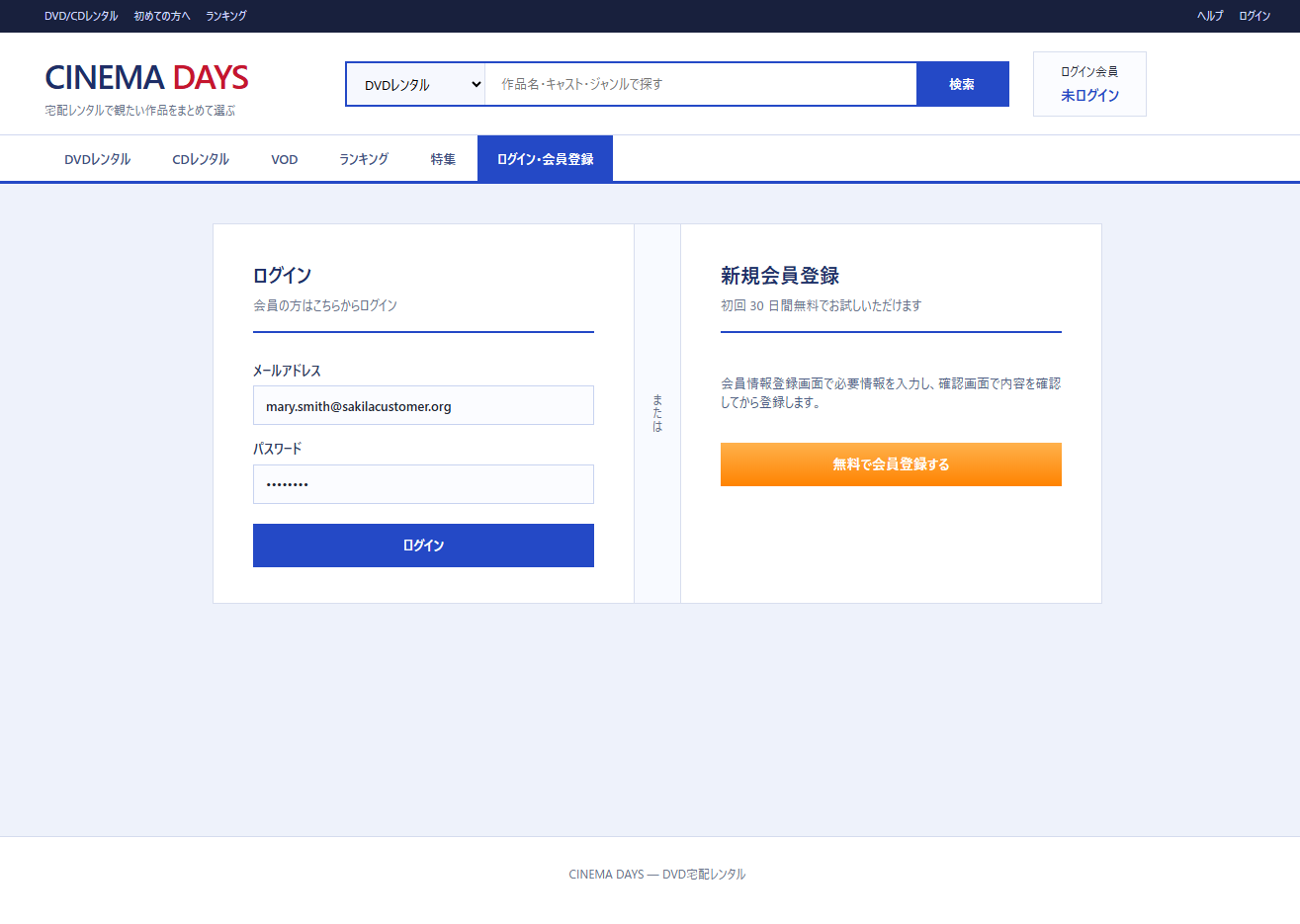
Login is handled as a normal REST call from the frontend to the backend API.
Spring Security’s filter chain isn’t used — verification is done manually with BCryptPasswordEncoder.
// AuthController.java (login excerpt)
@PostMapping("/login")
public ResponseEntity<LoginResponse> login(@RequestBody LoginRequest request) {
    AuthMapper.AuthRecord record = authMapper.findByEmail(request.email());

    if (record == null) {
        // Return the same message even when the email doesn't exist (prevents enumeration)
        return ResponseEntity.status(401)
                .body(new LoginResponse(false, "Invalid email or password.", ""));
    }

    if (!passwordEncoder.matches(request.password(), record.passwordHash())) {
        return ResponseEntity.status(401)
                .body(new LoginResponse(false, "Invalid email or password.", ""));
    }

    authMapper.updateLastLoginAt(record.customerId());
    return ResponseEntity.ok(new LoginResponse(true, "Login successful.", "/films"));
}
⑤ Member Registration Form (MemberRegistrationView.vue)
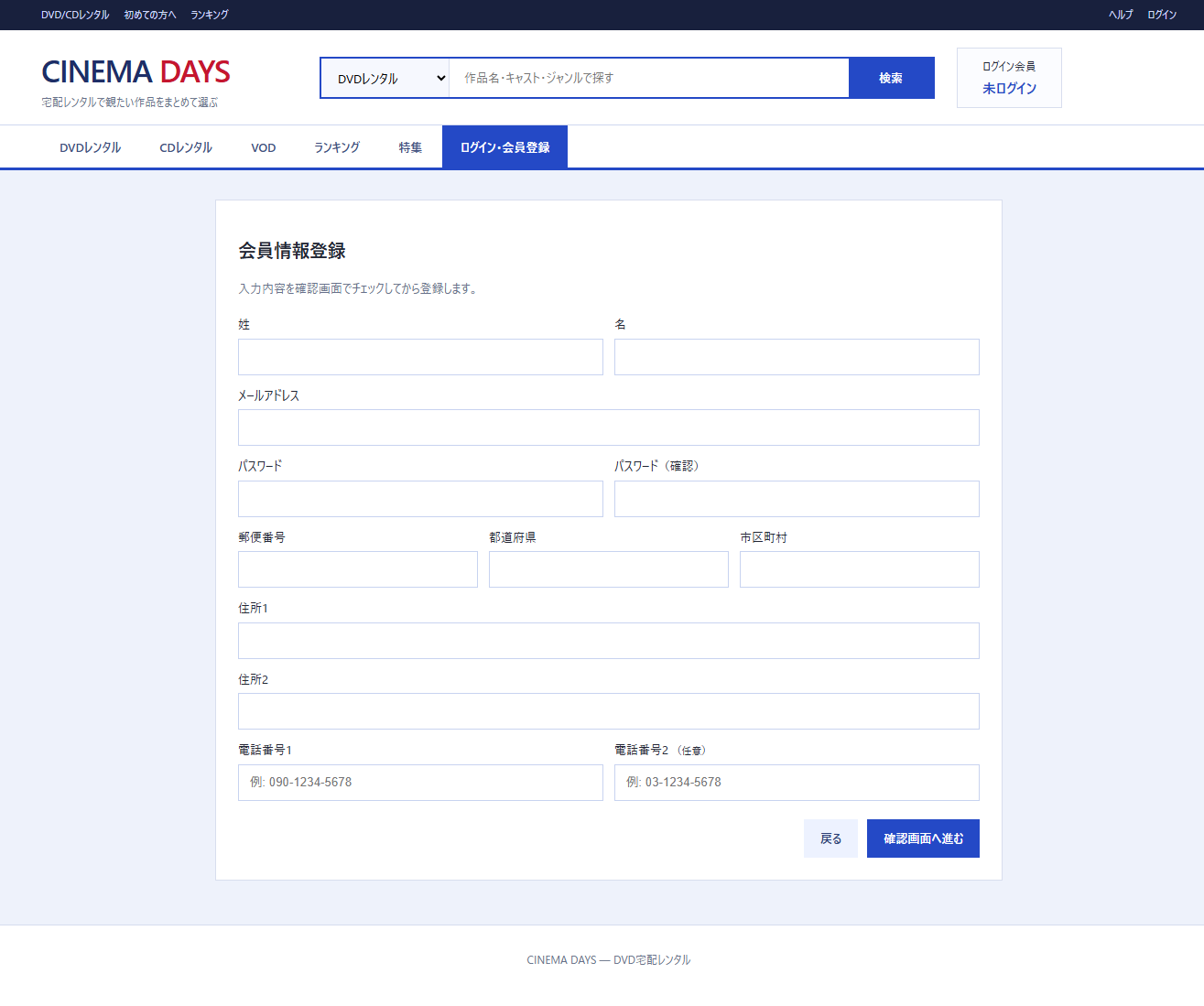
A 3-step flow: Input → Confirm → Registration Complete. The confirm screen shows the entered values read-only, and you can go back to edit.
How Step Management Works
Screen transitions don’t use Vue Router — they’re managed by the currentPage ref in App.vue.
Form input values are temporarily saved in registerDraft and passed straight to the confirm screen as props.
// App.vue (registration flow excerpt)
const registerDraft = ref<RegisterRequest | null>(null)

const openMemberRegisterConfirm = (payload: RegisterRequest) => {
  registerDraft.value = payload           // temporarily save the input values
  currentPage.value = 'member-register-confirm'
}
<!-- App.vue (template excerpt) -->
<MemberRegistrationView
  v-else-if="currentPage === 'member-register'"
  @confirm="openMemberRegisterConfirm"
  @back-auth="currentPage = 'auth'"
/>
<MemberRegistrationConfirmView
  v-else-if="currentPage === 'member-register-confirm' && registerDraft"
  :payload="registerDraft"
  @back-edit="currentPage = 'member-register'"
  @registered="currentPage = 'auth'"
/>
MemberRegistrationView just hands the input values to the parent via emit('confirm', { ...form }) — it doesn’t know “where to navigate” on its own. This pattern centralizes navigation control in the parent component.
Input Validation
Password validation happens inside @submit.prevent="goConfirm". Rather than relying on HTML’s required, TypeScript explicitly checks password match, length, and alphanumeric mixing.
// MemberRegistrationView.vue (validation excerpt)
const goConfirm = () => {
  passwordError.value = ''
  if (form.password !== form.passwordConfirmation) {
    passwordError.value = 'Passwords do not match.'
    return
  }
  if (form.password.length < 8) {
    passwordError.value = 'Password must be at least 8 characters.'
    return
  }
  if (!/[a-zA-Z]/.test(form.password) || !/[0-9]/.test(form.password)) {
    passwordError.value = 'Password must contain both letters and numbers.'
    return
  }
  emit('confirm', { ...form })
}
Calling the API from the Confirm Screen
The confirm screen (MemberRegistrationConfirmView.vue) holds the “Register” button, and calls the API from there.
A loading flag prevents double submission, and errors are shown inline.
// MemberRegistrationConfirmView.vue (registration excerpt)
const submit = async () => {
  loading.value = true
  try {
    const result = await registerMember(props.payload)
    message.value = result.message
    emit('registered')           // the parent switches to the 'auth' page
  } catch (error) {
    isError.value = true
    message.value = error instanceof Error ? error.message : 'Registration failed.'
  } finally {
    loading.value = false
  }
}
⑥ Cart Drawer (CartDrawer.vue)
A drawer UI that slides in from the right edge. It opens when the cart icon is clicked on the film list or detail screen.
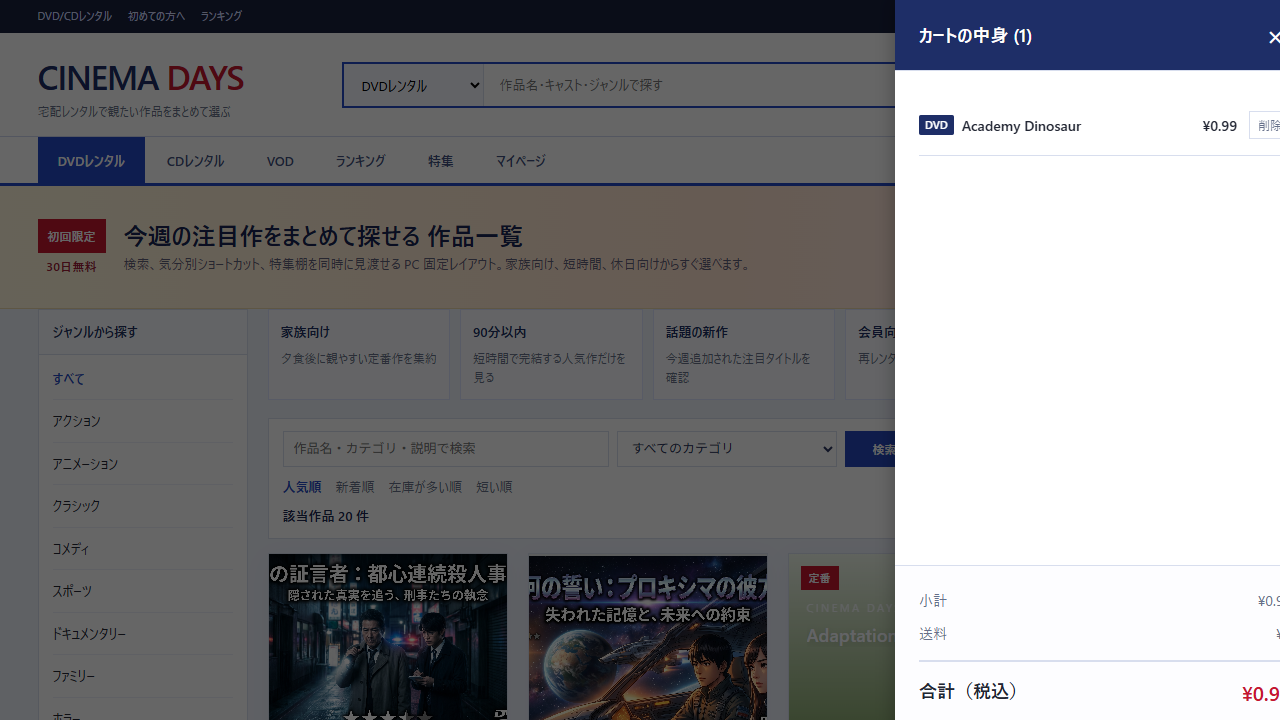
Cart state is persisted to localStorage, so the contents are kept even after closing the page.
// useCart.ts (add to cart excerpt)
function addToCart(film: PublicFilmSummary): boolean {
  ensureInitialized()
  const exists = itemsRef.value.some((item) => item.filmId === film.filmId)
  if (exists) return false  // prevent duplicate additions

  const next: CartItem = { ...film, addedAt: new Date().toISOString() }
  itemsRef.value = [next, ...itemsRef.value]
  saveToStorage(itemsRef.value)
  return true
}
⑦ My Page (MyPageView.vue)
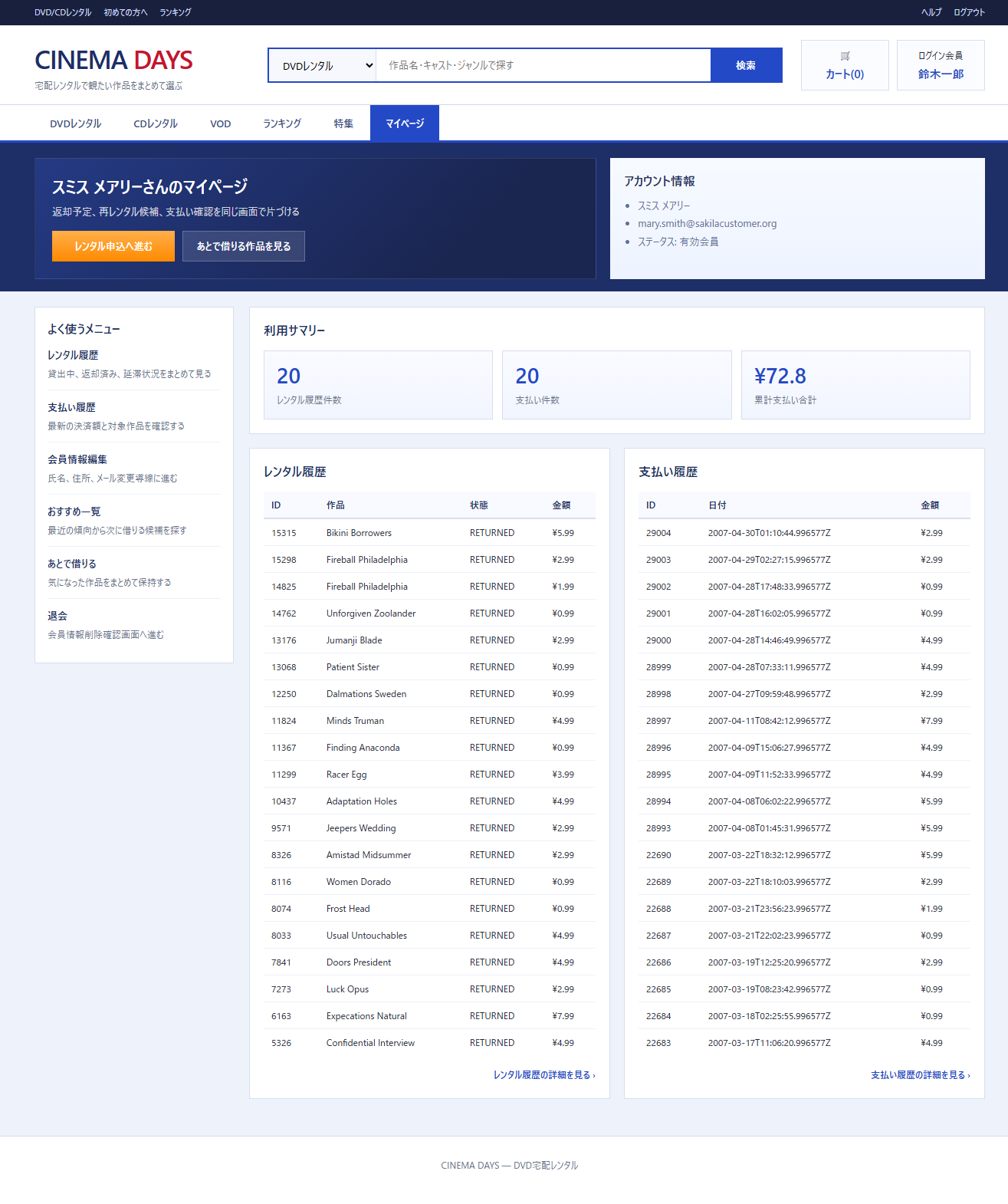
My page data is fetched by JOINing dvdrental’s existing tables. Rental status is calculated dynamically with a SQL CASE expression.
// MyPageMapper.java (rental history excerpt)
@Select("""
        SELECT
            r.rental_id,
            f.title AS film_title,
            CASE
                WHEN r.return_date IS NOT NULL THEN 'RETURNED'
                WHEN r.rental_date < CURRENT_TIMESTAMP - INTERVAL '7 days' THEN 'OVERDUE'
                ELSE 'OPEN'
            END AS rental_status,
            COALESCE(SUM(p.amount), 0) AS billed_amount
        FROM rental r
        JOIN inventory i ON i.inventory_id = r.inventory_id
        JOIN film f ON f.film_id = i.film_id
        LEFT JOIN payment p ON p.rental_id = r.rental_id
        WHERE r.customer_id = #{customerId}
        GROUP BY r.rental_id, r.rental_date, r.return_date, f.title
        ORDER BY r.rental_date DESC
        LIMIT #{size} OFFSET #{offset}
        """)
List<RentalHistoryItemResponse> selectRentalHistory(
        @Param("customerId") int customerId,
        @Param("size") int size,
        @Param("offset") int offset);
⑧ Checkout Screen (CheckoutView.vue)
The checkout screen uses an “Isolated Checkout” layout with the normal header and nav hidden.
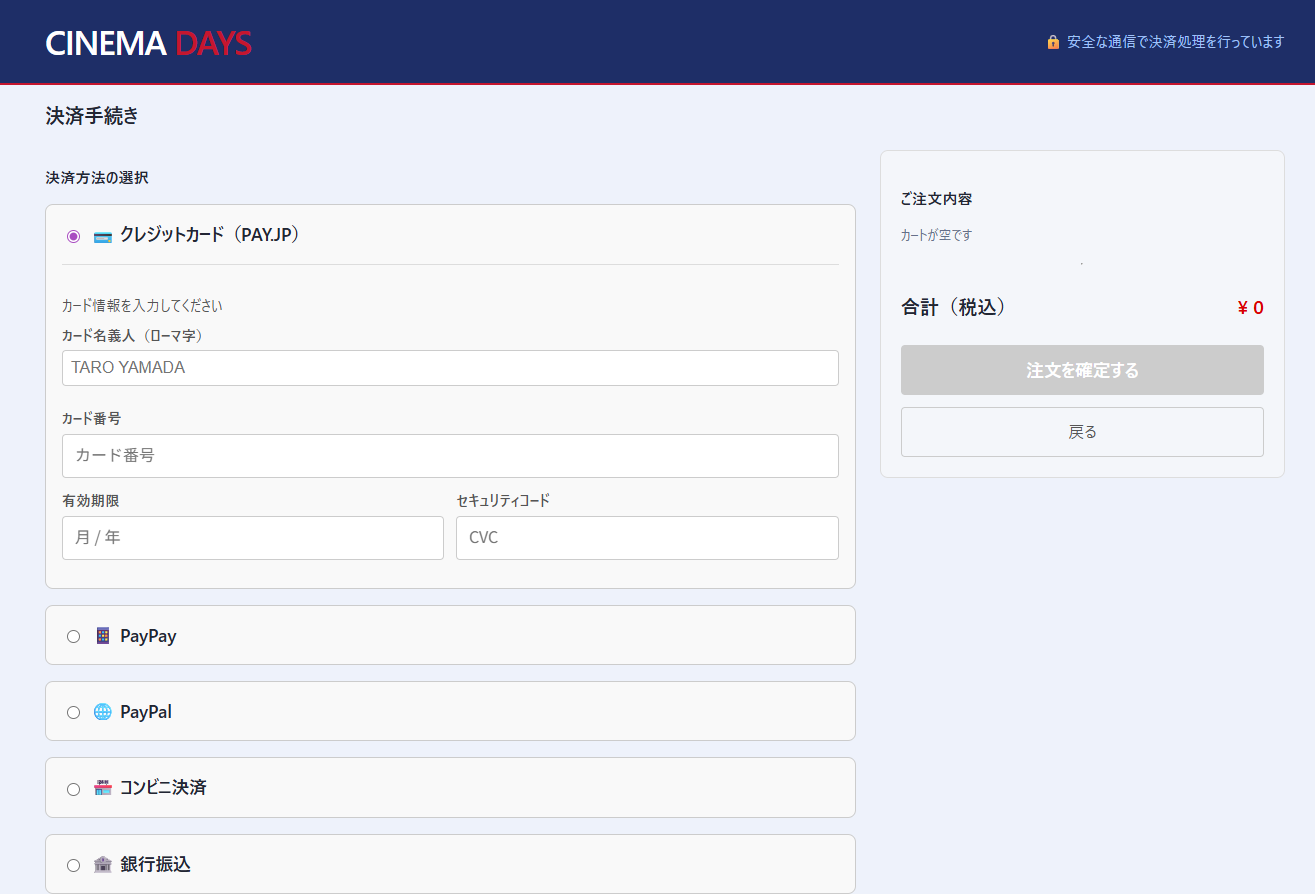
Two payment methods are implemented: PAY.JP and PayPay.
For PayPay, a Dynamic QR Code is generated and the user is sent to the PayPay app. Payment completion is detected by polling.
// PayPayService.java (QR code generation excerpt)
public QRCodeDetails createQRCode(int amount, String merchantPaymentId, String redirectUrl)
        throws ApiException {

    QRCode qrCode = new QRCode();
    qrCode.setMerchantPaymentId(merchantPaymentId);
    qrCode.setAmount(new MoneyAmount().amount(amount).currency(MoneyAmount.CurrencyEnum.JPY));
    qrCode.setCodeType("ORDER_QR");
    qrCode.setOrderDescription("DVD Rental Payment");
    qrCode.setRequestedAt(Instant.now().getEpochSecond());

    return paymentApi.createQRCode(qrCode);
}
For PAY.JP, Payjp.js is mounted on the frontend, and card information never passes through our own server at all (PCI DSS compliant).
DB Customizations to dvdrental
Since dvdrental is a sample DB, tables needed to run the end-user app have been added. Schema changes are managed with Flyway.
→ Incrementally Growing Schema Migrations with Flyway
Added Table ① customer_authentication
The dvdrental customer table only holds business data (name, address, etc.) and has no password hash needed for authentication. So a dedicated authentication table was created separately.
CREATE TABLE public.customer_authentication (
    customer_id   INTEGER      PRIMARY KEY
                               REFERENCES public.customer(customer_id),
    email         VARCHAR(255) NOT NULL UNIQUE,
    password_hash VARCHAR(255) NOT NULL,
    auth_status   VARCHAR(20)  NOT NULL DEFAULT 'ACTIVE',
    last_login_at TIMESTAMPTZ,
    created_at    TIMESTAMPTZ  NOT NULL DEFAULT NOW(),
    updated_at    TIMESTAMPTZ  NOT NULL DEFAULT NOW()
);
The MyBatis Mapper references this table directly.
// AuthMapper.java (excerpt)
@Select("""
        SELECT customer_id, email, password_hash, auth_status
        FROM public.customer_authentication
        WHERE LOWER(email) = LOWER(#{email})
        LIMIT 1
        """)
AuthRecord findByEmail(@Param("email") String email);
Added Table ② rental_tier
The rental_rate in dvdrental’s film table is just a flat number.
A tier master table was added so titles can be filtered by categories like “New Release,” “Semi-New,” and “Standard.”
CREATE TABLE public.rental_tier (
    rental_tier_id SERIAL       PRIMARY KEY,
    code           VARCHAR(20)  NOT NULL UNIQUE,   -- 'NEW', 'SEMI_NEW', 'STANDARD'
    label          VARCHAR(50)  NOT NULL,
    default_rate   NUMERIC(5,2) NOT NULL
);

-- Add FK column to the film table
ALTER TABLE public.film
    ADD COLUMN rental_tier_id INTEGER REFERENCES public.rental_tier(rental_tier_id);
The film list API JOINs this rental_tier and returns tier_code, which is used for filtering on the frontend.
// PublicFilmMapper.java (excerpt)
@Select("""
        SELECT
            f.film_id, f.title, f.release_year,
            c.name AS category_name,
            COALESCE(f.rental_rate, rt.default_rate) AS rental_rate,
            rt.code AS tier_code
        FROM film f
        JOIN film_category fc ON fc.film_id = f.film_id
        JOIN category c ON c.category_id = fc.category_id
        JOIN rental_tier rt ON rt.rental_tier_id = f.rental_tier_id
        ORDER BY f.film_id
        LIMIT #{size} OFFSET #{offset}
        """)
List<PublicFilmSummaryResponse> selectPublicFilms(@Param("size") int size, @Param("offset") int offset);
Added Column ③ film.taste_tags
An LLM (Ollama / OpenAI) auto-generates mood tags for each film, saved in the taste_tags column of the film table.
ALTER TABLE film ADD COLUMN IF NOT EXISTS taste_tags TEXT[];
A Spring Boot batch job passes the movie title and description to the LLM, and stores the returned tag array as TEXT[].
The PostgreSQL array type mapping with Spring Boot, and the batch implementation, are covered in separate articles.
→ Incorporating an LLM Batch (Ollama/OpenAI) for Auto-Generating Film Tags into Spring Boot
→ How to Map PostgreSQL Array Types (text[]) with Spring Boot + JPA
Backend API Structure
The REST API is split into public endpoints and authentication-required endpoints.
Public API (no auth required)
  GET  /api/public/health       health check
  GET  /api/public/films        film list (paginated)

Authenticated API (logged in)
  POST /api/auth/login          login
  GET  /api/me/profile          own member info
  GET  /api/me/rentals          own rental history
  GET  /api/me/payments         own payment history
  POST /api/payments/paypay     PayPay QR code generation
  GET  /api/payments/paypay/{id} payment status check (polling)
  POST /api/payments/payjp      PAY.JP card registration / charge
During development it’s a separate-origin setup: localhost:5173 (Vue) → localhost:8082 (Spring Boot).
In production, a single mvn package bundles the frontend build output into static/, and Spring Boot serves it.
→ The Record of Breaking Through CORS and Proxy in Vue 3 + Vite + Spring Boot
→ Bundling Vue3/React Frontend Builds with Spring Boot for Automatic Serving
Implemented Features
Public Area (No Login Required)
- Film list (category, rental tier, runtime filters, free-text search)
- Film detail (title image, preview video, stock status, cast)
- Recommendations for logged-out users
- Filtering by LLM auto-generated mood tags (in progress)
Member Area (After Login)
- Member registration (3 steps: input → confirm → complete)
- Login / logout
- My page (usage summary, rental history, payment history)
- Editing member info, changing email address
- Account deletion flow (with a confirmation screen)
- Recommendations for logged-in members, “watch later” list
Payment & Rental
- “Add to Cart” flow that adds a film to the cart (cart drawer)
- “Rent Now” flow that goes straight into an immediate rental
- PAY.JP credit card payment (card registration and reuse)
- PayPay Dynamic QR Code payment (completion detected by polling)
Trouble During Development
An Encoding Accident from a Bulk Text Edit
During work, an encoding-related garbling occurred when a bulk text-replace tool wrote its output, and it broke the syntax of several Vue files.
- “Regenerating the correct version in full” turned out to be faster than “chasing it with partial fixes”
- After recovery, the list, feature, ranking, and detail screens were re-checked in order before finally merging into develop
I learned that for work centered on string replacement, it’s important to decide on a recovery procedure ahead of time, assuming an encoding accident will happen.
→ The Encoding Accident That Happened During Batch Text Editing, and Recovery via Full Regeneration
Features In Progress / Not Yet Started
This section is updated as development progresses.
- Fully wiring the registration flow to the
customer_authenticationtable - Production-ready inventory reservation logic (currently just reads sample data)
- Rental period management (extension / return flow)
- Email confirmation notifications for orders
- Deploying to AWS (the same ECS/Fargate setup as the admin app)
Article Map (Articles Written / Being Written for This Series)
This lists the articles written along the way while building this app. Each article stays focused on one theme, so it can also be referenced standalone when researching a specific Spring Boot / Java / Vue 3 / TypeScript topic.
Titles ending in ※Draft are in draft or pre-publication state.
■ Overall Project Design Decisions
| Theme | Article |
|---|---|
| Why a separate repo from the admin app | Why We Separated the Admin Panel and Customer App into Different Repositories — Gains and Tradeoffs |
| Future vision as a platform | The Vision of Evolving a DVD Rental System into a DMM-Style Platform — Where to Place the First Step |
| Why not design the DB from scratch | The Choice Not to Design Tables from Scratch — Development on the PostgreSQL Sample DB dvdrental |
■ Backend Structure
| Theme | Article |
|---|---|
| Why we chose a Vue 3 + REST API separation | Why We Chose Spring Boot Backend + Vue 3 Frontend Separation, and How We Connected Them |
| Why we chose MyBatis over JPA | Why We Chose MyBatis Instead of JPA for the Spring Boot API Server |
| Growing the DB schema incrementally with Flyway | Incrementally Growing Schema Migrations with Flyway |
| An LLM batch that auto-generates film tags | Incorporating an LLM Batch (Ollama/OpenAI) for Auto-Generating Film Tags into Spring Boot |
| Mapping PostgreSQL array types with Spring Boot | How to Map PostgreSQL Array Types (text[]) with Spring Boot + JPA |
■ Frontend Structure
■ UX Design & Payment Flow
| Theme | Article |
|---|---|
| Why “Add to Cart” and “Buy Now” should be separated | Why an EC Site Should Separate ‘Add to Cart’ and ‘Buy Now’, and How to Implement It |
| Why checkout should be “Isolated Checkout” | Why Checkout Should Be “Isolated Checkout” and How to Implement It |
■ Development Environment
| Theme | Article |
|---|---|
| Running Maven / Node on Windows without depending on PATH | Self-Contained Project Configuration: Running Maven / Node / Java on Windows Without PATH Dependencies |
■ Articles from the Paired Admin App
Articles written on the admin app side that are directly related to this end-user app are also listed here.
Closing
When I built the admin app, the issue that kept nagging at me was: “there’s now a place for staff to manage customer data, but no place for customers themselves to use.”
This end-user app is the project I started to answer that question.
That said, it’s not finished yet.
Parts needed to make this stand up as a “genuinely working service” — like the payment flow and inventory reservation logic — aren’t all in place yet. I’m bringing it closer to completion little by little, while leaving a record of design decisions and implementations in each article.
This entire article series is written to function as a reference and textbook that gathers Spring Boot / Java / Vue 3 / TypeScript implementation patterns through real app development. When looking up a specific technology or topic, refer directly to the relevant category in the article map.
Links for each article will be filled in progressively as they’re published.