Why Checkout Should Be "Isolated Checkout" and How to Implement It
Introduction
When designing an EC site’s checkout screen, there’s the question of “what to do with the header and navigation.”
You might think “just use the normal header,” but major EC sites like Amazon, Stripe Checkout, and Rakuten
hide the normal navigation on checkout screens.
This is called Isolated Checkout.
Why Isolate the Checkout Screen?
Reason 1: Prevent User Drop-Off
When navigation is visible during the checkout flow, users think “oh, I should check out that other item too” and leave.
Cart abandonment is partly caused by excess links present during the checkout flow.
Reason 2: Create a Sense of Trust and Security
The simpler the checkout screen, the more the user’s awareness shifts to “I’m in the middle of a payment.”
Rather than seeing a cluttered nav, they feel “this is a secure screen.”
Reason 3: Prevent Misoperations
This prevents accidents like accidentally clicking a nav link when trying to go back,
or focus shifting to the search bar while filling in a form.
Amazon’s Isolated Checkout
Looking at Amazon’s checkout flow:
- Normal header (search bar, cart icon, menu) → hidden
- Simple header with only the
amazonlogo → shown - Footer also minimal (only customer service links)
This is the typical design for Isolated Checkout.
Implementation in Vue 3
Switch Layout in Router Configuration
// router/index.ts
import { createRouter, createWebHistory } from 'vue-router'

const routes = [
  // Normal pages (with standard header/footer)
  {
    path: '/',
    component: () => import('@/layouts/DefaultLayout.vue'),
    children: [
      { path: '', component: () => import('@/views/HomeView.vue') },
      { path: 'films', component: () => import('@/views/FilmsView.vue') },
    ],
  },

  // Checkout pages (Isolated Checkout layout)
  {
    path: '/checkout',
    component: () => import('@/layouts/CheckoutLayout.vue'),  // ← separate layout
    children: [
      { path: '', component: () => import('@/views/CheckoutView.vue') },
      { path: 'confirm', component: () => import('@/views/CheckoutConfirmView.vue') },
      { path: 'complete', component: () => import('@/views/CheckoutCompleteView.vue') },
    ],
  },
]
DefaultLayout.vue (Normal Pages)
<!-- layouts/DefaultLayout.vue -->
<template>
  <div class="layout-default">
    <AppHeader />     <!-- With search bar, cart, nav -->
    <main>
      <RouterView />
    </main>
    <AppFooter />
  </div>
</template>
CheckoutLayout.vue (Checkout Pages)
<!-- layouts/CheckoutLayout.vue -->
<template>
  <div class="layout-checkout">
    <!-- Simple header: logo only -->
    <header class="checkout-header">
      <div class="checkout-header-inner">
        <RouterLink to="/" class="checkout-logo">
          DVD Rental
        </RouterLink>
        <!-- No nav, no search, no cart icon -->
        <div class="checkout-security-badge">
          <i class="bi bi-shield-lock-fill" />
          <span>Secure Checkout</span>
        </div>
      </div>
    </header>

    <main class="checkout-main">
      <RouterView />
    </main>

    <!-- Minimal footer -->
    <footer class="checkout-footer">
      <a href="/help">Help</a>
      <a href="/privacy">Privacy Policy</a>
    </footer>
  </div>
</template>

<style scoped>
.checkout-header {
  border-bottom: 1px solid #ddd;
  padding: 12px 0;
  background: #fff;
}

.checkout-header-inner {
  max-width: 800px;
  margin: 0 auto;
  padding: 0 16px;
  display: flex;
  justify-content: space-between;
  align-items: center;
}

.checkout-logo {
  font-size: 1.4rem;
  font-weight: bold;
  color: #333;
  text-decoration: none;
}

.checkout-security-badge {
  display: flex;
  align-items: center;
  gap: 6px;
  color: #28a745;
  font-size: 0.9rem;
}

.checkout-main {
  max-width: 800px;
  margin: 0 auto;
  padding: 32px 16px;
}

.checkout-footer {
  border-top: 1px solid #ddd;
  padding: 16px;
  text-align: center;
  font-size: 0.85rem;
  color: #666;
}

.checkout-footer a {
  margin: 0 12px;
  color: #666;
}
</style>
Step Indicator in Checkout Flow
Inside the checkout flow, display a progress bar showing which step the user is on.
<!-- CheckoutProgressBar.vue -->
<template>
  <div class="checkout-progress">
    <div
      v-for="step in steps"
      :key="step.id"
      class="step"
      :class="{
        'step--active': currentStep === step.id,
        'step--completed': currentStep > step.id,
      }"
    >
      <div class="step-number">{{ step.id }}</div>
      <div class="step-label">{{ step.label }}</div>
    </div>
  </div>
</template>

<script setup lang="ts">
defineProps<{ currentStep: number }>()

const steps = [
  { id: 1, label: 'Review' },
  { id: 2, label: 'Payment' },
  { id: 3, label: 'Complete' },
]
</script>
”Back” Button Design
In Isolated Checkout, users can leave the checkout flow using the browser’s back button.
This is the intended behavior.
However, be careful that “back” on the payment confirmation/completion screen doesn’t cause a resubmission:
// CheckoutCompleteView.vue
import { onMounted } from 'vue'
import { useRouter } from 'vue-router'

const router = useRouter()

onMounted(() => {
  // Replace history so pressing back on completion screen goes to top
  router.replace('/checkout/complete')
})
Summary
| Normal Pages | Checkout Pages (Isolated Checkout) |
|---|---|
| Normal header (search, nav) | Simple header with logo only |
| Full-featured footer | Minimal links footer |
| UI that encourages browsing | UI focused on completing payment |
In Vue 3, using layout component switching
lets you separate layouts at the routing level.
“Different layout only for checkout” takes only a few dozen lines,
and it’s an important UX design choice that also affects user completion rate (conversion).
Implementation in This App
This DVD rental app doesn’t use Vue Router and instead achieves Isolated Checkout
using a single-file approach with currentPage ref.
isCheckoutFlow Determination (Actual Code)
// App.vue
const currentPage = ref<
  'films' | 'cd-rentals' | 'streaming' | 'ranking' | 'feature' |
  'detail' | 'auth' | 'mypage' | 'member-register' | 'member-register-confirm' |
  'member-edit' | 'checkout' | 'checkout-complete' | ...
>('films')

// Determine if currently in checkout flow
const isCheckoutFlow = computed(() => {
  return currentPage.value === 'checkout' || currentPage.value === 'checkout-complete'
})
Layout Switching in Template (Actual Code)
<!-- App.vue -->

<!-- Normal header (hidden during checkout flow) -->
<header class="masthead" v-if="!isCheckoutFlow">
  <!-- Logo, cart icon, navigation, etc. -->
</header>

<!-- Checkout-only header (shown only during checkout flow) -->
<header class="checkout-masthead" v-if="isCheckoutFlow">
  <!-- Logo only, security badge -->
</header>

<!-- Global nav (hidden during checkout flow) -->
<nav class="global-tabs" v-if="!isCheckoutFlow">
  <!-- Film list, ranking, etc. tabs -->
</nav>

<!-- Footer (hidden during checkout flow) -->
<footer class="site-footer" v-if="!isCheckoutFlow">
  <!-- Normal footer -->
</footer>
Compared to Vue Router layout routing, this uses less code:
just adding v-if="!isCheckoutFlow" to normal UI elements hides header, nav, and footer all at once.
Rent Now → Transition to Checkout (Actual Code)
// App.vue
const selectedFilm = ref<PublicFilmSummary | null>(null)

const handleDirectCheckout = (film: PublicFilmSummary) => {
  selectedFilm.value = film   // Hold the target film for checkout
  currentPage.value = 'checkout'  // Switch to Isolated Checkout
}
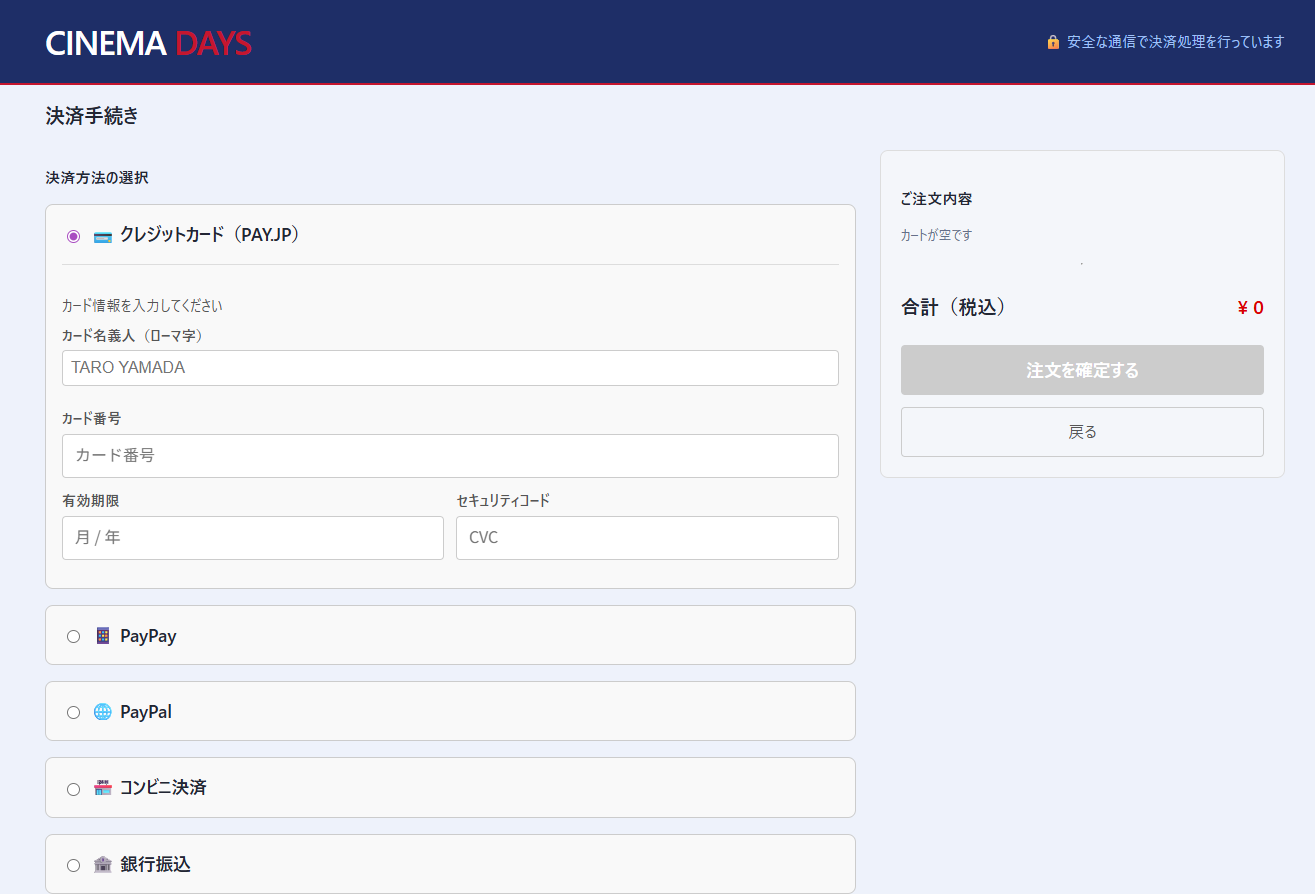
Actual Screen
Checkout screen (Isolated Checkout). Header shows logo only, no navigation: