Preserving Sidebar Open/Close State with localStorage While Preventing Initial Render Flicker
Introduction
The film list page of the DVD rental app has a left sidebar.
We implemented the requirements: “close the sidebar after using filter conditions” and “maintain the closed state when next opened.”
Saving state to localStorage is simple, but when implemented we encountered a “flicker (FOUC: Flash of Unstyled Content)” where the sidebar briefly opens then closes on page load.
This article covers implementation methods to prevent that flicker.
First, a Working Implementation (with Flicker)
<!-- FilmsView.vue -->
<script setup lang="ts">
import { ref, watch, onMounted } from 'vue'

// Default is open
const sidebarOpen = ref(true)

onMounted(() => {
  // Read from localStorage after mount
  const saved = localStorage.getItem('sidebarOpen')
  if (saved !== null) {
    sidebarOpen.value = saved === 'true'
  }
})

watch(sidebarOpen, (val) => {
  localStorage.setItem('sidebarOpen', String(val))
})
</script>

<template>
  <div class="layout">
    <aside :class="{ 'sidebar--closed': !sidebarOpen }">
      <!-- Sidebar content -->
    </aside>
    <main>
      <!-- Main content -->
    </main>
  </div>
</template>
The problem with this implementation:
- DOM is constructed with sidebar open in the initial value
ref(true)state onMountedreadslocalStorageand it becomesfalse- Vue reactively runs the close animation → briefly opens then closes
Solutions to Prevent Flicker
Solution 1: Read Initial Value from localStorage
// Function to get initial sidebar state from localStorage
function getInitialSidebarState(): boolean {
  const saved = localStorage.getItem('sidebarOpen')
  if (saved !== null) return saved === 'true'
  return true // Default is open
}

const sidebarOpen = ref(getInitialSidebarState())
By getting the initial value of ref() from localStorage, the DOM is constructed with the correct state from the start.
No need to wait until the onMounted timing.
Solution 2: Considerations for SSR Environments (Nuxt, etc.)
When using SSR (Server-Side Rendering) with Next.js (React) or Nuxt.js (Vue), localStorage doesn’t exist on the server side, causing errors.
function getInitialSidebarState(): boolean {
  if (typeof window === 'undefined') return true // SSR environment
  const saved = localStorage.getItem('sidebarOpen')
  return saved !== null ? saved === 'true' : true
}
This project uses Vite + Vue 3 (CSR) so it’s not needed, but writing it as generic code makes it easier to port.
Combining with Animation
When using CSS Transition for smooth open/close animation, the animation may also run on initial render.
Solution: Enable Animation After Mount
<script setup lang="ts">
import { ref, watch, onMounted } from 'vue'

function getInitialSidebarState(): boolean {
  const saved = localStorage.getItem('sidebarOpen')
  return saved !== null ? saved === 'true' : true
}

const sidebarOpen = ref(getInitialSidebarState())
const animationEnabled = ref(false)  // Initially animation disabled

onMounted(() => {
  // Enable animation after mount
  animationEnabled.value = true
})

watch(sidebarOpen, (val) => {
  localStorage.setItem('sidebarOpen', String(val))
})
</script>

<template>
  <aside
    :class="{
      'sidebar--closed': !sidebarOpen,
      'sidebar--animated': animationEnabled  // Apply animation CSS after mount
    }">
  </aside>
</template>
/* Enable transition only when sidebar--animated is attached */
.sidebar--animated {
  transition: width 0.3s ease, opacity 0.3s ease;
}

.sidebar--closed {
  width: 0;
  opacity: 0;
  overflow: hidden;
}
On initial render, display the correct state instantly without animation, and animation only runs for subsequent user interactions.
The Complete Code
<script setup lang="ts">
import { ref, watch, onMounted } from 'vue'

function getInitialSidebarState(): boolean {
  try {
    const saved = localStorage.getItem('sidebarOpen')
    return saved !== null ? saved === 'true' : true
  } catch {
    // Environments where localStorage is unavailable (private browsing, etc.)
    return true
  }
}

const sidebarOpen = ref(getInitialSidebarState())
const animationEnabled = ref(false)

onMounted(() => {
  // Enable animation on next frame (use requestAnimationFrame just in case)
  requestAnimationFrame(() => {
    animationEnabled.value = true
  })
})

function toggleSidebar() {
  sidebarOpen.value = !sidebarOpen.value
}

watch(sidebarOpen, (val) => {
  try {
    localStorage.setItem('sidebarOpen', String(val))
  } catch {
    // Ignore in environments where localStorage can't be written
  }
})
</script>
When Using Pinia
When managing state with Vuex or Pinia, you can persist it as a plugin.
npm install pinia-plugin-persistedstate
// stores/sidebar.ts
import { defineStore } from 'pinia'

export const useSidebarStore = defineStore('sidebar', {
  state: () => ({
    isOpen: true,
  }),
  actions: {
    toggle() {
      this.isOpen = !this.isOpen
    }
  },
  persist: true,  // Auto-persist to localStorage
})
However this only works with CSR. SSR requires configuration.
Summary
| Problem | Cause | Solution |
|---|---|---|
| Flicker (FOUC) | Reading localStorage after onMounted | Read directly in initial value of ref() |
| Animation runs on initial render | CSS already applied at DOM mount | Enable animation CSS after onMounted |
| Environments where localStorage is unavailable | Private browsing, etc. | Protect with try-catch |
Implementing with “just make it work” tends to leave flickering, so it’s important to be mindful of how you get initial values and when you enable animation.
Implementation in This App
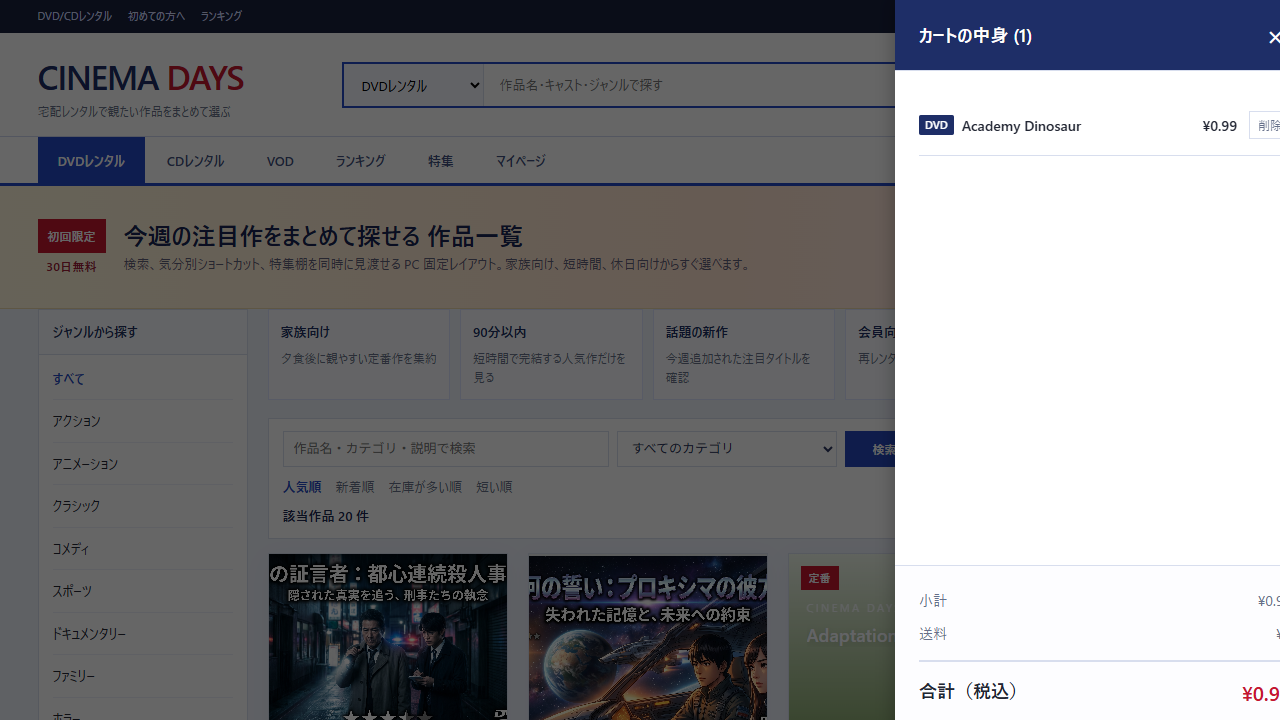
In this DVD rental app, rather than the sidebar state, we persist the cart and watch-later list to localStorage.
This is the mechanism that prevents “films added to cart” from disappearing even on page reload.
Applying the pattern introduced in the article of “passing the initial value directly to ref,” and further implementing it as a singleton composable, allows any component to reference the same state.
useCart composable (Actual Code)
// composables/useCart.ts
import { computed, ref } from 'vue'
import type { PublicFilmSummary } from '../api/client'

type CartItem = PublicFilmSummary & { addedAt: string }

const STORAGE_KEY = 'dvd-rental-customer.cart'
const itemsRef = ref<CartItem[]>([])  // Module-scope ref (singleton)
let initialized = false

function loadFromStorage(): CartItem[] {
  try {
    const raw = localStorage.getItem(STORAGE_KEY)
    if (!raw) return []
    const parsed = JSON.parse(raw) as CartItem[]
    if (!Array.isArray(parsed)) return []
    // Type validation: exclude invalid data
    return parsed.filter((item) => typeof item.filmId === 'number' && typeof item.title === 'string')
  } catch {
    return []  // Also handles environments where localStorage is unavailable (private browsing, etc.)
  }
}

function ensureInitialized() {
  if (initialized) return
  if (typeof window === 'undefined') return  // SSR safety (anticipating future Nuxt migration)
  itemsRef.value = loadFromStorage()          // ← Set initial value of ref on first call
  initialized = true
}

function addToCart(film: PublicFilmSummary): boolean {
  ensureInitialized()
  const exists = itemsRef.value.some((item) => item.filmId === film.filmId)
  if (exists) return false  // Prevent duplicate addition
  const next: CartItem = { ...film, addedAt: new Date().toISOString() }
  itemsRef.value = [next, ...itemsRef.value]
  localStorage.setItem(STORAGE_KEY, JSON.stringify(itemsRef.value))
  return true
}

export function useCart() {
  ensureInitialized()
  return {
    cartItems: computed(() => itemsRef.value),
    cartCount: computed(() => itemsRef.value.length),
    cartTotal: computed(() => itemsRef.value.reduce((sum, item) => sum + (item.rentalRate ?? 0), 0)),
    addToCart,
    removeFromCart,
    clearCart,
    isInCart,
  }
}
By structuring the initialization of ref() as lazy initialization via an ensureInitialized() function rather than onMounted,
it works safely at any call timing without depending on the component lifecycle.
Actual Screen
Cart drawer with items added to cart preserved after reload: