Implementing Front-End Complete Filter Search with Vue 3 computed
Introduction
When adding search and filter features to a film list page,
there’s a choice: “Call the API on every filter, or narrow down on the frontend?”
This project adopted the approach of fetching all data once and narrowing down with computed.
Why We Chose Frontend-Complete
| Approach | Advantages | Disadvantages |
|---|---|---|
| API call on each filter | Not dependent on data volume | Loading on every response wait |
| Full fetch + computed | Operations respond instantly | Not suitable for large data volumes |
This project has about 1,000 films (sample DB).
Fetching 1,000 items of JSON is a size that browsers can handle comfortably.
Implementation
Data Fetching
// FilmsView.vue
import { ref, computed, onMounted } from 'vue'
import { fetchFilms } from '@/api/filmsApi'
import type { Film } from '@/types/film'

const allFilms = ref<Film[]>([])

onMounted(async () => {
  allFilms.value = await fetchFilms()
})
Filter Condition State
// Filter conditions
const searchKeyword = ref('')
const selectedCategory = ref<string | null>(null)
const selectedRating = ref<string | null>(null)
const minRentalRate = ref<number | null>(null)
const maxRentalRate = ref<number | null>(null)
const sortOrder = ref<'title_asc' | 'title_desc' | 'rate_asc' | 'rate_desc'>('title_asc')
Filtering with computed
const filteredFilms = computed(() => {
  let result = allFilms.value

  // Keyword search (title and description)
  if (searchKeyword.value.trim()) {
    const keyword = searchKeyword.value.trim().toLowerCase()
    result = result.filter(film =>
      film.title.toLowerCase().includes(keyword) ||
      film.description?.toLowerCase().includes(keyword)
    )
  }

  // Category filter
  if (selectedCategory.value) {
    result = result.filter(film =>
      film.categoryName === selectedCategory.value
    )
  }

  // Rating filter
  if (selectedRating.value) {
    result = result.filter(film =>
      film.rating === selectedRating.value
    )
  }

  // Rental rate range filter
  if (minRentalRate.value !== null) {
    result = result.filter(film =>
      film.rentalRate >= minRentalRate.value!
    )
  }
  if (maxRentalRate.value !== null) {
    result = result.filter(film =>
      film.rentalRate <= maxRentalRate.value!
    )
  }

  // Sort
  return [...result].sort((a, b) => {
    switch (sortOrder.value) {
      case 'title_asc':  return a.title.localeCompare(b.title)
      case 'title_desc': return b.title.localeCompare(a.title)
      case 'rate_asc':   return a.rentalRate - b.rentalRate
      case 'rate_desc':  return b.rentalRate - a.rentalRate
      default: return 0
    }
  })
})
Using in the Template
<template>
  <div>
    <!-- Search form -->
    <input v-model="searchKeyword" placeholder="Search by title..." />

    <select v-model="selectedCategory">
      <option :value="null">All Categories</option>
      <option v-for="cat in categories" :key="cat" :value="cat">
        {{ cat }}
      </option>
    </select>

    <!-- Count display -->
    <p>{{ filteredFilms.length }} / {{ allFilms.length }} results</p>

    <!-- Result list -->
    <div class="films-grid">
      <FilmCard
        v-for="film in paginatedFilms"
        :key="film.filmId"
        :film="film"
      />
    </div>
  </div>
</template>
Pagination Also with computed
computed is also convenient for paginating filter results.
const ITEMS_PER_PAGE = 20
const currentPage = ref(1)

// Reset to page 1 when filter changes
watch(filteredFilms, () => {
  currentPage.value = 1
})

const totalPages = computed(() =>
  Math.ceil(filteredFilms.value.length / ITEMS_PER_PAGE)
)

const paginatedFilms = computed(() => {
  const start = (currentPage.value - 1) * ITEMS_PER_PAGE
  return filteredFilms.value.slice(start, start + ITEMS_PER_PAGE)
})
Filter Reset
function resetFilters() {
  searchKeyword.value = ''
  selectedCategory.value = null
  selectedRating.value = null
  minRentalRate.value = null
  maxRentalRate.value = null
  sortOrder.value = 'title_asc'
}
Dynamically Generating Category List with computed
Category options are generated dynamically from the fetched data.
By not hardcoding, when a category is added to the DB, it automatically reflects in the filter.
const categories = computed(() => {
  const set = new Set(
    allFilms.value
      .map(film => film.categoryName)
      .filter((cat): cat is string => cat !== null && cat !== undefined)
  )
  return Array.from(set).sort()
})
Performance Characteristics of computed
Vue 3’s computed doesn’t recalculate and returns the cached previous result
as long as reactive dependencies don’t change.
searchKeywordchanges →filteredFilmsrecalculates- As long as nothing changes
allFilms→ cache is used
For data of about 1,000 items, even if recalculated every time, there’s no perceptible performance issue.
If the data volume exceeds 100,000 items, we’d consider switching to server-side filtering.
Summary
Cases where frontend-complete filtering is suitable:
- Total data volume is in the thousands
- Users frequently change filter conditions
- Don't want to show loading on every operation

Cases where server-side filtering is suitable:
- Total data volume is in the tens of thousands or more
- Want to keep initial load light
- Full-text search (morphological analysis, etc.) is required
Vue 3’s computed automatically tracks dependencies,
so “recalculate when searchKeyword changes” works without being explicitly written.
Leveraging this mechanism lets you simply combine filtering, sorting, and pagination.
Actual Implementation in This App
This DVD rental app actually adopts the pattern described in this article.
However, the filter conditions are slightly more than the article example, combining 4 types: category, tier (new/semi-new/old), length, and keyword.
Actual Code for filteredFilms (FilmsView.vue)
const searchKeyword = ref('')
const selectedCategory = ref('ALL')
const appliedKeyword = ref('')    // Confirmed when search button is pressed
const appliedCategory = ref('ALL')
const selectedTierCode = ref('ALL')   // New/semi-new/old
const selectedLengthFilter = ref('ALL')

const filteredFilms = computed(() => {
  const keyword = appliedKeyword.value.trim().toLowerCase()
  return films.value.filter((film) => {
    // Category filter (considering both sidebar and toolbar select)
    const catFilter = selectedCategory.value !== 'ALL' ? selectedCategory.value : appliedCategory.value
    const categoryMatched = catFilter === 'ALL' || catFilter === (film.categoryName ?? 'Other')
    if (!categoryMatched) return false

    // Tier filter (new/semi-new/old)
    if (selectedTierCode.value !== 'ALL' && film.tierCode !== selectedTierCode.value) return false

    // Length filter
    if (selectedLengthFilter.value !== 'ALL') {
      const len = film.length ?? 0
      if (selectedLengthFilter.value === 'U60'     && len > 60)   return false
      if (selectedLengthFilter.value === 'U90'     && len > 90)   return false
      if (selectedLengthFilter.value === 'U120'    && len > 120)  return false
      if (selectedLengthFilter.value === 'OVER120' && len <= 120) return false
    }

    // Keyword search (title, category, description)
    if (!keyword) return true
    const title = film.title.toLowerCase()
    const description = (film.shortDescription ?? '').toLowerCase()
    return title.includes(keyword) || (film.categoryName ?? '').toLowerCase().includes(keyword) || description.includes(keyword)
  })
})
Dynamic Category List Generation (Actual Code)
const categoryOptions = computed(() => {
  const categories = new Set<string>()
  films.value.forEach((film) => categories.add(film.categoryName ?? 'Other'))
  return Array.from(categories).sort((a, b) => a.localeCompare(b, 'ja'))
})
Same as the article example, using Set + Array.from for deduplication, sorted with Japanese locale.
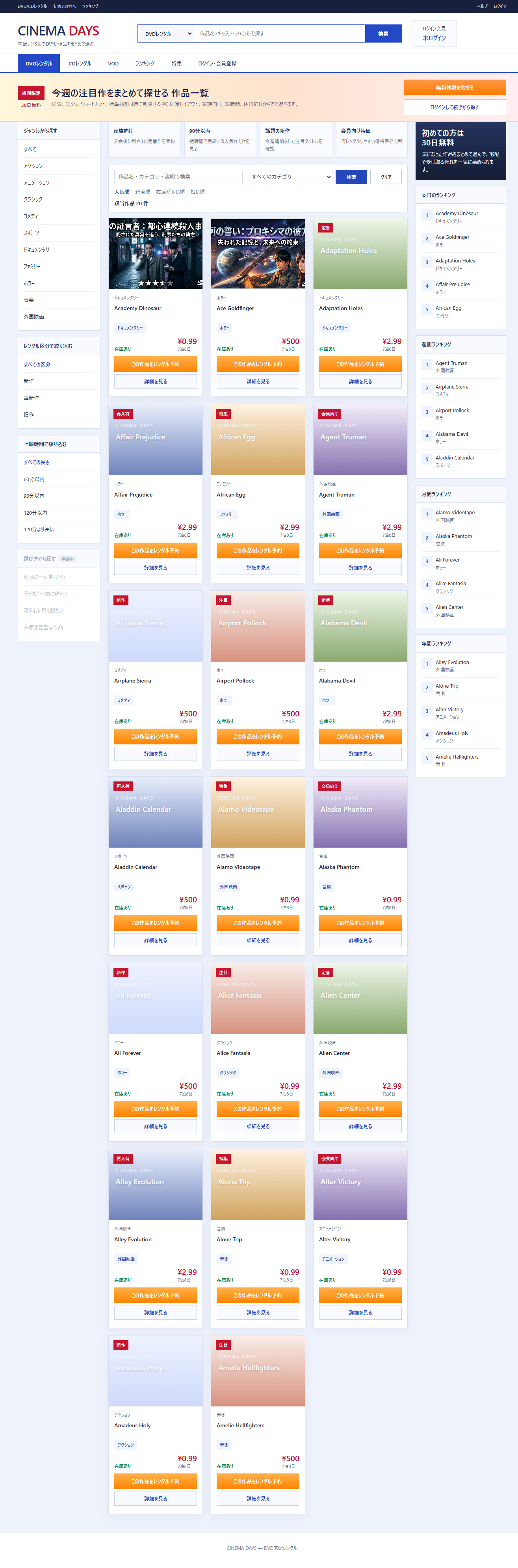
Actual Screen
Film list filtered by conditions: