การ Implement Front-End Complete Filter Search ด้วย Vue 3 computed
บทนำ
เมื่อเพิ่มฟีเจอร์ค้นหาและกรองในหน้ารายชื่อภาพยนตร์
มีทางเลือก: “เรียก API ทุกครั้งที่กรอง หรือ narrow down ใน frontend?”
โปรเจกต์นี้เลือกวิธี fetch ข้อมูลทั้งหมดครั้งเดียวและ narrow down ด้วย computed
ทำไมเราเลือก Frontend-Complete
| วิธีการ | ข้อดี | ข้อเสีย |
|---|---|---|
| เรียก API ทุกครั้งที่กรอง | ไม่ขึ้นกับปริมาณข้อมูล | มี loading ทุกครั้งที่รอ response |
| Fetch ทั้งหมด + computed | Operations ตอบสนองทันที | ไม่เหมาะกับข้อมูลปริมาณมาก |
โปรเจกต์นี้มีประมาณ 1,000 ภาพยนตร์ (sample DB)
การ fetch JSON 1,000 รายการเป็นขนาดที่ browser จัดการได้สบาย
การ Implement
การ Fetch ข้อมูล
// FilmsView.vue
import { ref, computed, onMounted } from 'vue'
import { fetchFilms } from '@/api/filmsApi'
import type { Film } from '@/types/film'

const allFilms = ref<Film[]>([])

onMounted(async () => {
  allFilms.value = await fetchFilms()
})
State ของเงื่อนไขการกรอง
// เงื่อนไขการกรอง
const searchKeyword = ref('')
const selectedCategory = ref<string | null>(null)
const selectedRating = ref<string | null>(null)
const minRentalRate = ref<number | null>(null)
const maxRentalRate = ref<number | null>(null)
const sortOrder = ref<'title_asc' | 'title_desc' | 'rate_asc' | 'rate_desc'>('title_asc')
การกรองด้วย computed
const filteredFilms = computed(() => {
  let result = allFilms.value

  // Keyword search (title และ description)
  if (searchKeyword.value.trim()) {
    const keyword = searchKeyword.value.trim().toLowerCase()
    result = result.filter(film =>
      film.title.toLowerCase().includes(keyword) ||
      film.description?.toLowerCase().includes(keyword)
    )
  }

  // Category filter
  if (selectedCategory.value) {
    result = result.filter(film =>
      film.categoryName === selectedCategory.value
    )
  }

  // Rating filter
  if (selectedRating.value) {
    result = result.filter(film =>
      film.rating === selectedRating.value
    )
  }

  // Rental rate range filter
  if (minRentalRate.value !== null) {
    result = result.filter(film =>
      film.rentalRate >= minRentalRate.value!
    )
  }
  if (maxRentalRate.value !== null) {
    result = result.filter(film =>
      film.rentalRate <= maxRentalRate.value!
    )
  }

  // Sort
  return [...result].sort((a, b) => {
    switch (sortOrder.value) {
      case 'title_asc':  return a.title.localeCompare(b.title)
      case 'title_desc': return b.title.localeCompare(a.title)
      case 'rate_asc':   return a.rentalRate - b.rentalRate
      case 'rate_desc':  return b.rentalRate - a.rentalRate
      default: return 0
    }
  })
})
การใช้งานใน Template
<template>
  <div>
    <!-- Search form -->
    <input v-model="searchKeyword" placeholder="ค้นหาตามชื่อ..." />

    <select v-model="selectedCategory">
      <option :value="null">ทุก Category</option>
      <option v-for="cat in categories" :key="cat" :value="cat">
        {{ cat }}
      </option>
    </select>

    <!-- แสดงจำนวน -->
    <p>{{ filteredFilms.length }} / {{ allFilms.length }} ผลลัพธ์</p>

    <!-- Result list -->
    <div class="films-grid">
      <FilmCard
        v-for="film in paginatedFilms"
        :key="film.filmId"
        :film="film"
      />
    </div>
  </div>
</template>
Pagination ก็ด้วย computed
computed ก็สะดวกสำหรับ pagination ผลลัพธ์การกรองด้วย
const ITEMS_PER_PAGE = 20
const currentPage = ref(1)

// Reset เป็นหน้า 1 เมื่อ filter เปลี่ยน
watch(filteredFilms, () => {
  currentPage.value = 1
})

const totalPages = computed(() =>
  Math.ceil(filteredFilms.value.length / ITEMS_PER_PAGE)
)

const paginatedFilms = computed(() => {
  const start = (currentPage.value - 1) * ITEMS_PER_PAGE
  return filteredFilms.value.slice(start, start + ITEMS_PER_PAGE)
})
Filter Reset
function resetFilters() {
  searchKeyword.value = ''
  selectedCategory.value = null
  selectedRating.value = null
  minRentalRate.value = null
  maxRentalRate.value = null
  sortOrder.value = 'title_asc'
}
การสร้าง Category List แบบ Dynamic ด้วย computed
ตัวเลือก category สร้างแบบ dynamic จากข้อมูลที่ fetch มา
โดยไม่ hardcode เมื่อเพิ่ม category ใน DB ก็จะสะท้อนใน filter โดยอัตโนมัติ
const categories = computed(() => {
  const set = new Set(
    allFilms.value
      .map(film => film.categoryName)
      .filter((cat): cat is string => cat !== null && cat !== undefined)
  )
  return Array.from(set).sort()
})
คุณลักษณะ Performance ของ computed
computed ของ Vue 3 จะไม่คำนวณใหม่และ return ผลลัพธ์ที่ cache ไว้ก่อนหน้า
ตราบเท่าที่ reactive dependencies ไม่เปลี่ยนแปลง
searchKeywordเปลี่ยน →filteredFilmsคำนวณใหม่- ตราบเท่าที่ไม่มีอะไรเปลี่ยน
allFilms→ cache ถูกใช้
สำหรับข้อมูลประมาณ 1,000 รายการ แม้จะคำนวณใหม่ทุกครั้ง ก็ไม่มีปัญหา performance ที่รู้สึกได้
ถ้าปริมาณข้อมูลเกิน 100,000 รายการ เราจะพิจารณาสลับไปใช้ server-side filtering
สรุป
กรณีที่ frontend-complete filtering เหมาะ:
- ปริมาณข้อมูลรวมอยู่ในหลักพัน
- ผู้ใช้เปลี่ยนเงื่อนไขการกรองบ่อย
- ไม่ต้องการแสดง loading ทุกครั้งที่ operation

กรณีที่ server-side filtering เหมาะ:
- ปริมาณข้อมูลรวมอยู่ในหลักหมื่นหรือมากกว่า
- ต้องการให้ initial load เบา
- ต้องการ full-text search (morphological analysis ฯลฯ)
computed ของ Vue 3 track dependencies โดยอัตโนมัติ
ดังนั้น “คำนวณใหม่เมื่อ searchKeyword เปลี่ยน” ทำงานโดยไม่ต้องเขียนอย่างชัดเจน
การใช้ประโยชน์จาก mechanism นี้ช่วยให้รวม filtering, sorting และ pagination ได้อย่างง่ายดาย
การ Implement จริงในแอพนี้
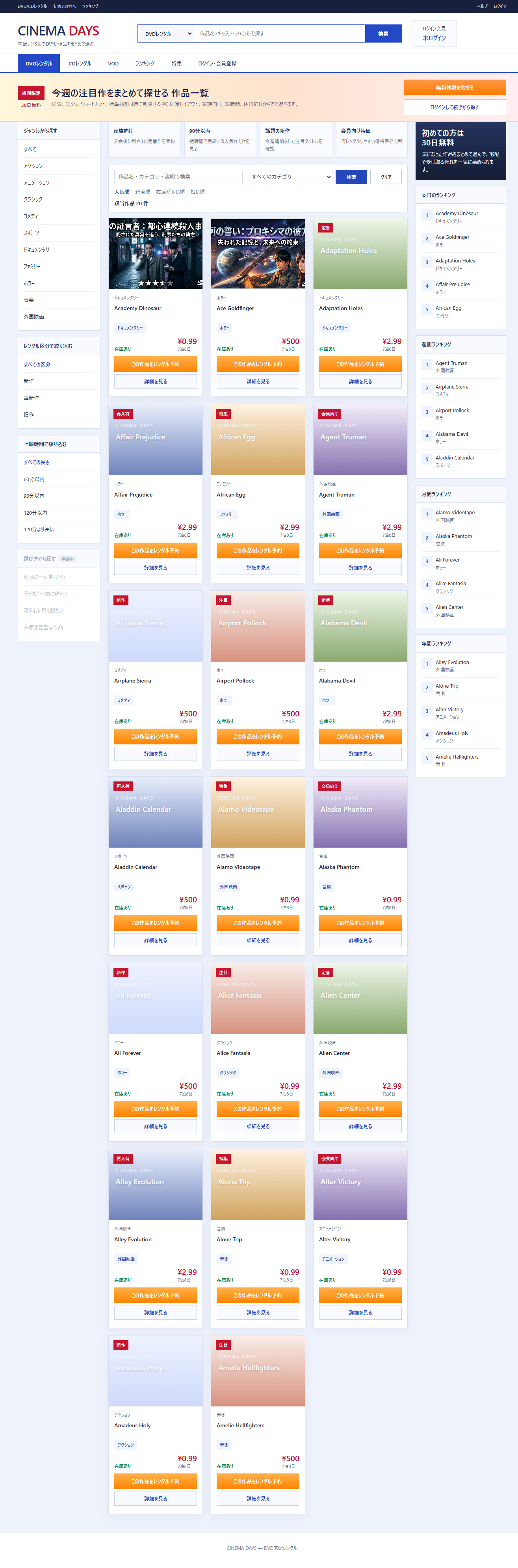
แอพ DVD rental นี้ใช้ pattern ที่อธิบายในบทความนี้จริงๆ
อย่างไรก็ตาม เงื่อนไขการกรองมากกว่าตัวอย่างในบทความเล็กน้อย รวม 4 ประเภท: category, tier (ใหม่/กึ่งใหม่/เก่า), ความยาว และ keyword
Code จริงสำหรับ filteredFilms (FilmsView.vue)
const searchKeyword = ref('')
const selectedCategory = ref('ALL')
const appliedKeyword = ref('')    // ยืนยันเมื่อกดปุ่มค้นหา
const appliedCategory = ref('ALL')
const selectedTierCode = ref('ALL')   // ใหม่/กึ่งใหม่/เก่า
const selectedLengthFilter = ref('ALL')

const filteredFilms = computed(() => {
  const keyword = appliedKeyword.value.trim().toLowerCase()
  return films.value.filter((film) => {
    // Category filter (พิจารณาทั้ง sidebar และ toolbar select)
    const catFilter = selectedCategory.value !== 'ALL' ? selectedCategory.value : appliedCategory.value
    const categoryMatched = catFilter === 'ALL' || catFilter === (film.categoryName ?? 'Other')
    if (!categoryMatched) return false

    // Tier filter (ใหม่/กึ่งใหม่/เก่า)
    if (selectedTierCode.value !== 'ALL' && film.tierCode !== selectedTierCode.value) return false

    // Length filter
    if (selectedLengthFilter.value !== 'ALL') {
      const len = film.length ?? 0
      if (selectedLengthFilter.value === 'U60'     && len > 60)   return false
      if (selectedLengthFilter.value === 'U90'     && len > 90)   return false
      if (selectedLengthFilter.value === 'U120'    && len > 120)  return false
      if (selectedLengthFilter.value === 'OVER120' && len <= 120) return false
    }

    // Keyword search (title, category, description)
    if (!keyword) return true
    const title = film.title.toLowerCase()
    const description = (film.shortDescription ?? '').toLowerCase()
    return title.includes(keyword) || (film.categoryName ?? '').toLowerCase().includes(keyword) || description.includes(keyword)
  })
})
การสร้าง Category List แบบ Dynamic (Code จริง)
const categoryOptions = computed(() => {
  const categories = new Set<string>()
  films.value.forEach((film) => categories.add(film.categoryName ?? 'Other'))
  return Array.from(categories).sort((a, b) => a.localeCompare(b, 'ja'))
})
เหมือนกับตัวอย่างในบทความ ใช้ Set + Array.from สำหรับการ deduplicate เรียงลำดับด้วย Japanese locale
หน้าจอจริง
รายชื่อภาพยนตร์ที่กรองตามเงื่อนไข: