การสร้างแอพจัดการ DVD Rental ด้วย Spring Boot + Thymeleaf บน PostgreSQL dvdrental Sample DB
เมื่อสร้างแอพจัดการ DVD rental สิ่งแรกที่ตัดสินใจไม่ใช่ UI — แต่เป็น “จะใช้ข้อมูลอะไรเป็นฐาน”
ครั้งนี้แทนที่จะออกแบบ table ตั้งแต่ต้น ฉันดำเนินการโดยใช้ dvdrental ซึ่งเป็นที่รู้จักในฐานะ PostgreSQL sample database เป็นฐาน แล้วสร้างหน้าจัดการทับขึ้นไป
พูดอีกแบบคือ บทความนี้รวบรวมวิธีการแมพ dvdrental เป็นแอพหน้าจัดการโดยใช้ Java / Spring Boot / Thymeleaf / PostgreSQL
Sample DB ที่ใช้เป็นฐานครั้งนี้สามารถดูได้ที่หน้านี้
บทความนี้รวบรวมแนวคิดที่ใช้ประกอบแอพจัดการ DVD rental ตัวนี้ขึ้นมา
สำหรับคนที่กำลังค้นหาคำอย่าง admin screen ของ Spring Boot ที่ใช้ PostgreSQL sample database dvdrental, Thymeleaf admin screen, ระบบจัดการ DVD rental, การออกแบบหน้าจอโดยใช้ ER diagram ของ dvdrental บทความนี้รวบรวม flow การ implement และแนวคิดการออกแบบหน้าจอไว้ให้เชื่อมโยงกันด้วย
สิ่งที่จะเรียนรู้จากบทความนี้
- ทำไมถึงใช้ PostgreSQL sample DB
dvdrentalเป็นฐานสำหรับ business app - ขั้นตอนการสร้าง admin app ด้วย Spring Boot + Thymeleaf
- วิธีการแมพ customers, stores, staff, inventory, rentals, และ payments เป็นหน้าจอโดยอิงจาก ER diagram
- วิธีการใช้ JPA และ SQL ต่างกัน
- เทคนิคทำให้ใช้งานได้เป็น business app เช่น การเก็บ search condition และหน้ายืนยัน
ฟีเจอร์หลักที่สร้างครั้งนี้ได้แก่
- Login
- Dashboard
- Customer management
- Store management
- Staff management
- Inventory management
- Payment management
- Rental management
- Sales report
ทำไมถึงใช้ PostgreSQL Sample DB dvdrental เป็นฐาน
สิ่งแรกสุดที่กำหนดในแอพนี้คือการใช้ PostgreSQL sample DB เป็นฐาน
dvdrental มา pre-loaded พร้อม table ที่จำเป็นสำหรับ DVD rental operations ตั้งแต่ต้น: stores, staff, customers, films, inventory, rentals, และ payments
สิ่งนี้ค่อนข้างสำคัญ — สามารถเริ่มพัฒนาพร้อม subject matter ต่อไปนี้ทันที
- Search screens เช่น customer lists และ staff lists
- Reference screens เช่น customer details และ payment details
- Aggregations จาก rentals และ payments
- CRUD screens สำหรับ stores, inventory, และ customers
รู้สึกว่าง่ายกว่าที่จะเข้าใจ existing schema และข้อมูลก่อน แล้วสร้างหน้าจอทับขึ้นไป แทนที่จะออกแบบ business table ตั้งแต่ต้น
ก่อนอื่น ทำให้ Sample DB ใช้งานได้ตามเดิม
ใน repository นี้ docker/postgres/init/01-dvdrental-full.sql ถูก load เมื่อเริ่ม local PostgreSQL
นอกจากนี้ยัง apply docker/postgres/init/02-convert-currency-to-jpy.sql เพื่อให้ verify หน้าจอได้ด้วยจำนวนเงินที่แปลงเป็นเยนแล้ว
ฉัน localize dvdrental เป็นภาษาญี่ปุ่นอย่างไร แบ่งงานระหว่าง CSV กับ SQL อย่างไร และสร้าง full dataset ที่แปลงเป็นเยนอย่างไร เขียนสรุปไว้ในบทความนี้
จัดระเบียบ dvdrental ER Diagram และความสัมพันธ์ Table หลัก
ก่อนเริ่มสร้างหน้าจอ ฉันจัดระเบียบคร่าวๆ ก่อนว่า table ไหนที่เป็นศูนย์กลางของ admin screen นี้และมีความสัมพันธ์กันอย่างไร
dvdrental มีหลาย table แต่การพยายาม trace ทั้งหมดในรายละเอียดตั้งแต่ต้นมักทำให้ความคิดกระจายมากกว่าช่วย จึงโฟกัสที่ table หลักที่เชื่อมโยงโดยตรงกับหน้าจอก่อน: customers, staff, stores, films, inventory, rentals, และ payments
ความสัมพันธ์หลักที่กลายมาเป็นศูนย์กลางของ admin screen นี้เมื่อทำให้เรียบง่าย จะเป็นแบบนี้
erDiagram
	STORE ||--o{ STAFF : has
	STORE ||--o{ CUSTOMER : has
	STORE ||--o{ INVENTORY : stocks
	STAFF ||--o{ RENTAL : handles
	STAFF ||--o{ PAYMENT : handles
	CUSTOMER ||--o{ RENTAL : rents
	CUSTOMER ||--o{ PAYMENT : pays
	FILM ||--o{ INVENTORY : stocked_as
	INVENTORY ||--o{ RENTAL : rented_as
	RENTAL ||--o{ PAYMENT : billed_by

	STORE {
		int store_id PK
		int manager_staff_id FK
		int address_id FK
	}

	STAFF {
		int staff_id PK
		int store_id FK
		int address_id FK
		string username
		boolean active
	}

	CUSTOMER {
		int customer_id PK
		int store_id FK
		int address_id FK
		boolean activebool
	}

	FILM {
		int film_id PK
		int language_id FK
		string title
		decimal rental_rate
	}

	INVENTORY {
		int inventory_id PK
		int film_id FK
		int store_id FK
	}

	RENTAL {
		int rental_id PK
		int inventory_id FK
		int customer_id FK
		int staff_id FK
		datetime rental_date
		datetime return_date
	}

	PAYMENT {
		int payment_id PK
		int customer_id FK
		int staff_id FK
		int rental_id FK
		decimal amount
		datetime payment_date
	}
การกำหนดแผนภาพนี้ไว้ล่วงหน้าทำให้จัดบทบาทของแต่ละหน้าจอง่ายขึ้นด้วย เช่น customer management เป็นหน้าจอที่ศูนย์กลางคือ customer และดู store กับ payment ด้วย, rental management เป็นหน้าจอที่ศูนย์กลางคือ rental และ trace inventory, film, customer, payment management เป็นหน้าจอที่ศูนย์กลางคือ payment และดู customer, staff, rental
พูดอีกแบบคือ ER diagram ไม่ได้ใช้แค่ยืนยัน DB design เท่านั้น แต่ใช้เป็นฐานสำหรับตัดสินใจว่า “หน้าจอไหนควรรวม table กลุ่มไหนมาแสดง”
แอพจัดการแบบไหนที่สร้างด้วย Spring Boot + Thymeleaf
แอพหลักเป็น admin screen แบบ server-rendered โดยใช้ Spring Boot + Thymeleaf
พูดอีกแบบคือ เป็นโครงสร้างที่ทำให้ตาม track ได้อย่างเป็นรูปธรรมว่า business web admin screen ที่ใช้ Java และ PostgreSQL ถูกประกอบขึ้นด้วย Spring Boot และ Thymeleaf อย่างไร
Tech stack หลักได้แก่
- Java 25
- Spring Boot 4
- Thymeleaf
- Spring Security
- Spring Data JPA
- NamedParameterJdbcTemplate
- PostgreSQL
- Flyway
- Docker
แทนที่จะเอียงไปทาง SPA ฉันสร้างโดยซ้อน search, details, registration, updates, และ confirmation ตามลำดับ วิธีนี้สร้าง business screen ได้ตรงไปตรงมากว่า และการจัดการ state ก็คิดง่ายกว่า
ก่อนอื่นเตรียมหน้า login ไว้ แล้วเข้าถึงแต่ละ function ได้จากตรงนั้น
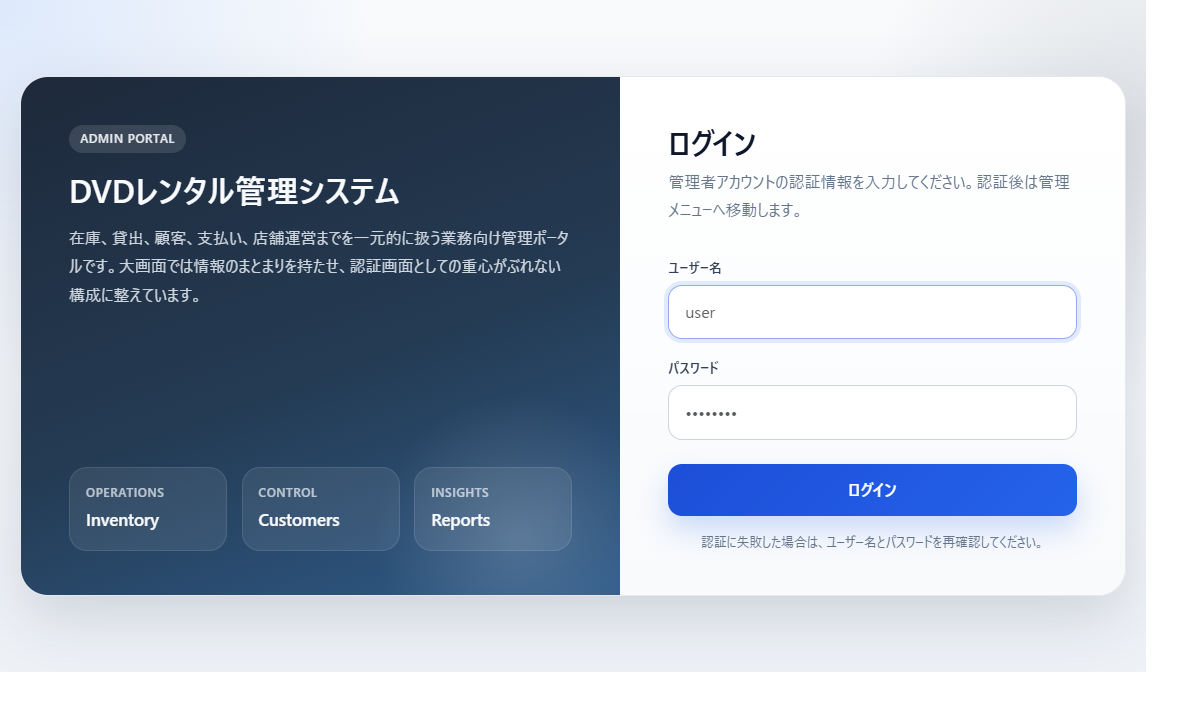
หลัง login dashboard ทำหน้าที่เป็น entry point ให้ดูสถานะ rental และ sales ได้
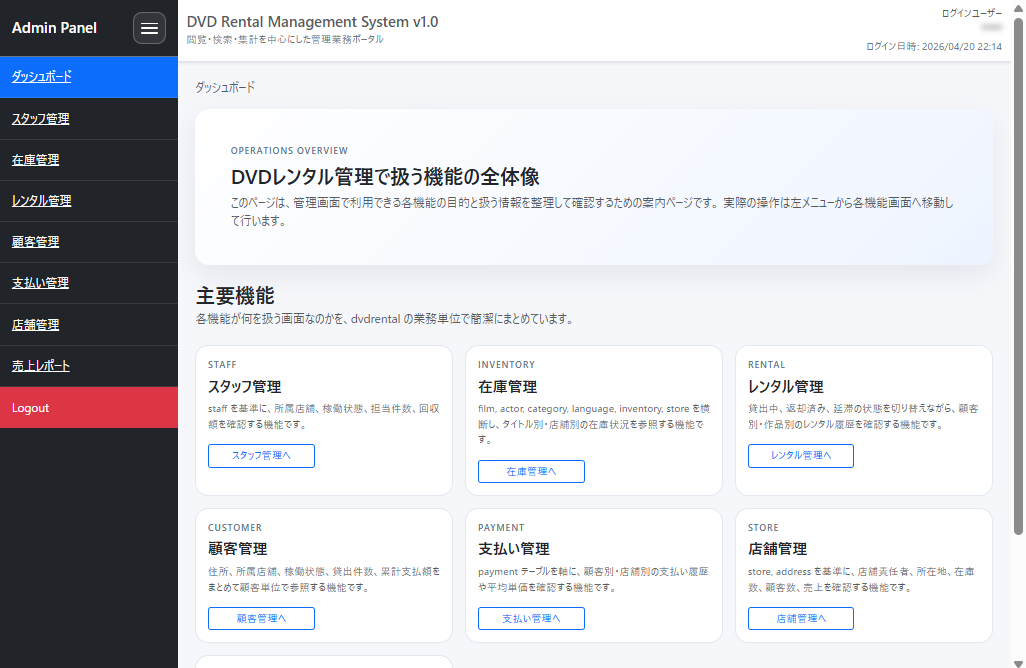
แบ่ง Spring Boot + Thymeleaf Admin Screen ตาม Business Unit
โดยดูจาก dvdrental schema ฉันแบ่งบทบาทหน้าจอตาม business unit ก่อน
หน้าจอหลักที่เตรียมครั้งนี้ได้แก่
- Login
- Dashboard
- Customer management
- Store management
- Staff management
- Inventory management
- Payment management
- Rental management
- Sales report
Template แบ่งตาม function เช่น functions/customers.html และ functions/payments.html
ฝั่ง Java ก็แบ่งเช่น feature/customer, feature/store, feature/staff โดยรวม Controller, Service, Form ไว้ตาม feature เพราะอยากได้โครงสร้างที่ตามได้ง่ายแม้จำนวนหน้าจอจะเพิ่มขึ้น
แต่ละ feature แบ่งข้อมูลที่จัดการไว้ค่อนข้างชัดเจน
Dashboard
Dashboard ทำหน้าที่เป็น entry point ของ admin screen ทั้งหมด ให้ภาพรวมว่าแต่ละ function จัดการอะไร แทนที่จะเป็นแค่รายการ link มันให้ความเข้าใจเริ่มต้นว่า staff, inventory, rentals, customers, payments, stores, และ reports แต่ละอย่างเป็นหน้าจอเกี่ยวกับอะไร เหตุผลที่สร้างส่วนนี้คือ business screen ยิ่ง feature เพิ่มขึ้น entry point ก็ยิ่งเข้าใจยาก การมีหน้าจอที่แสดงภาพรวมตั้งแต่แรกช่วยให้ผู้ใช้หลงทางน้อยลง
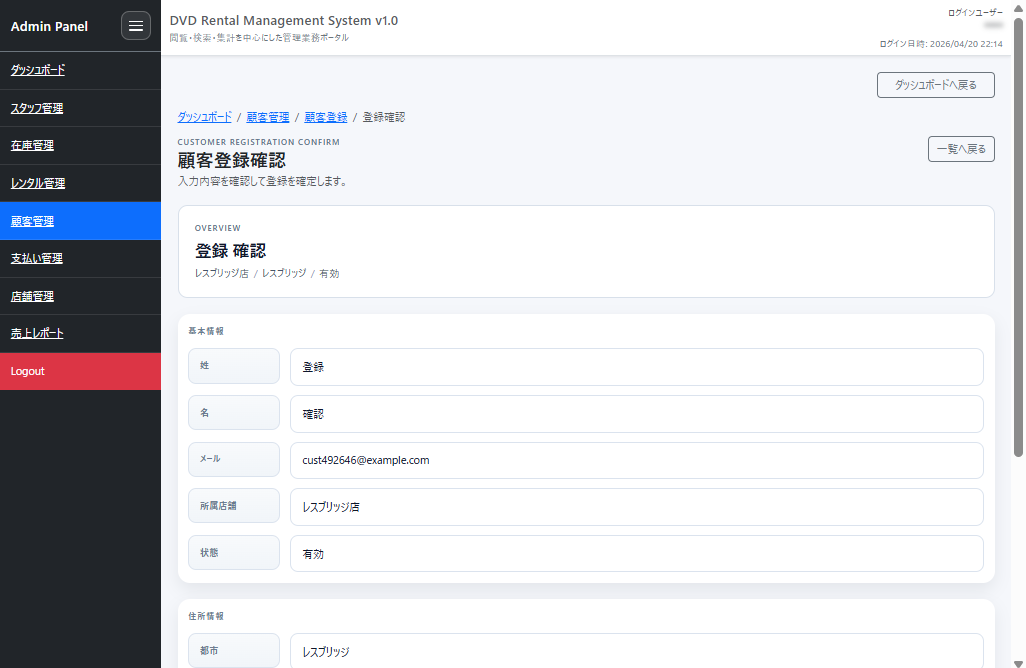
Customer Management
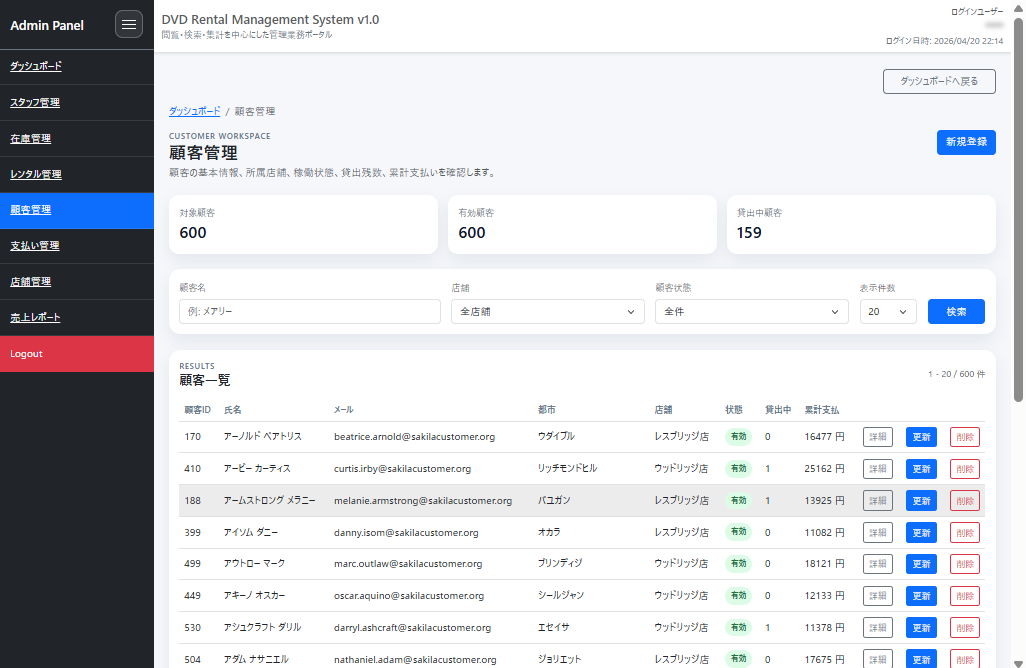
Customer management ช่วยให้ดูไม่เพียงแค่ข้อมูลพื้นฐานของ customer แต่ยังรวม store ที่สังกัด, active status, จำนวน rental ที่เหลือ, และยอดชำระสะสมด้วย เนื่องจาก business screen แค่เห็นชื่อกับอีเมลไม่พอ จึงทำให้ตาม track สถานะรวมของ customer ได้ในที่เดียว เหตุผลที่สร้าง customer management คือมันมักเป็นจุดเริ่มต้นของการตอบคำถามและตรวจสอบสถานะ rental หากดูรวมตาม customer ไม่ได้ จะต้องไปมาระหว่างหลายหน้าจอทุกครั้ง
หน้าจอจริงเป็นแบบนี้
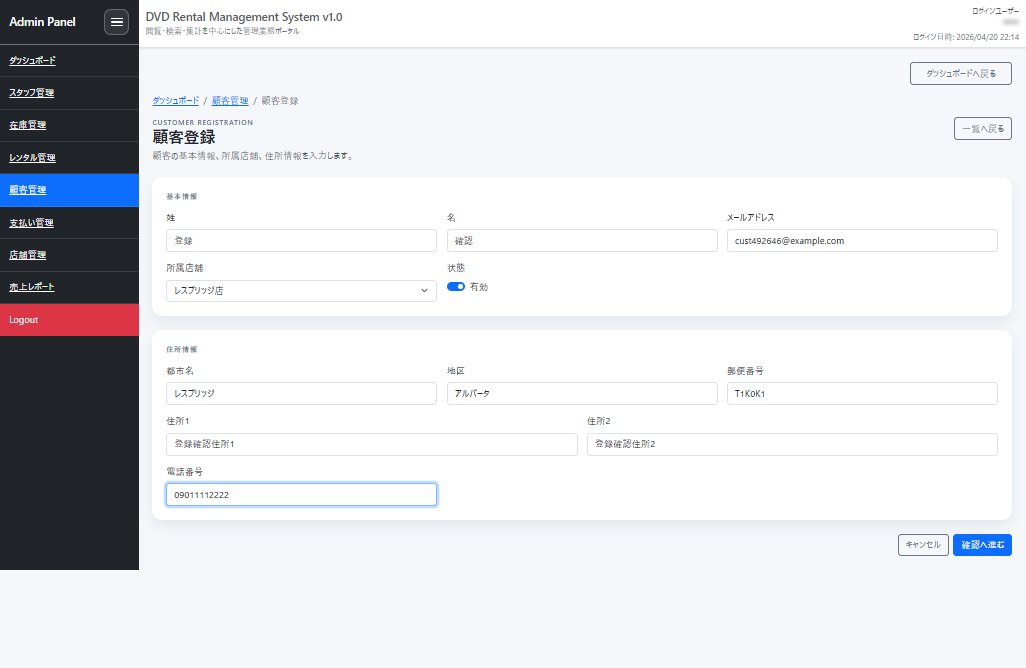
หน้า registration และหน้ายืนยัน registration เป็นแบบนี้
Staff Management
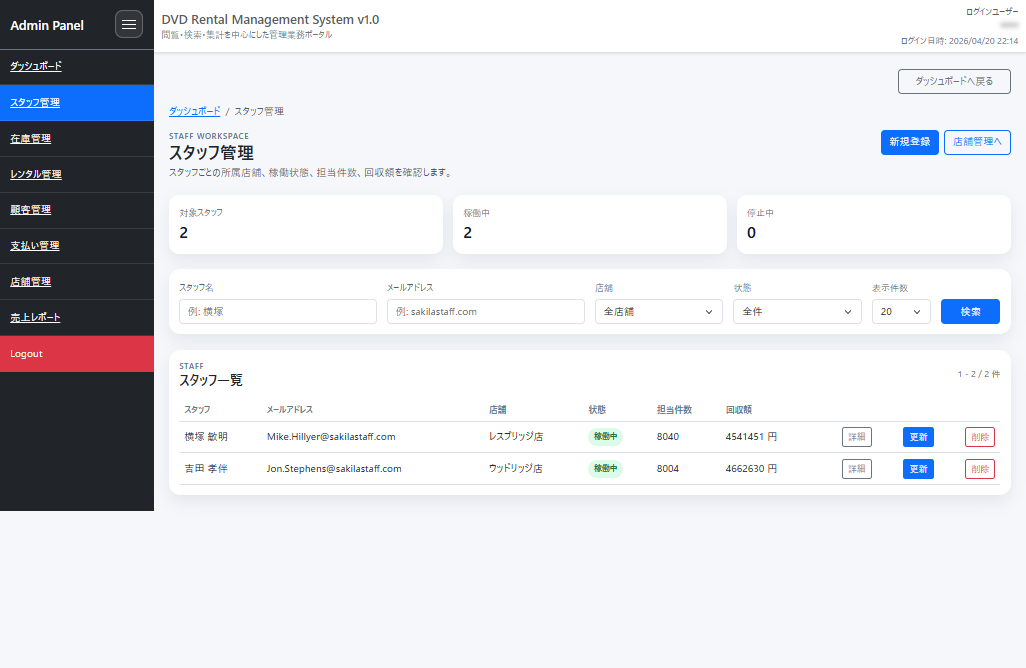
Staff management ช่วยให้ยืนยัน store ที่สังกัด, active status, จำนวน assignment, และยอดที่เก็บได้ ไม่ได้จบแค่ master data management ของข้อมูล staff แต่โน้มไปทางแสดงให้เห็นว่าทำงานจริงมากแค่ไหน เหตุผลที่ใส่ staff management คือไม่ใช่แค่จัดการ account แต่อยากให้ตาม track ผู้รับผิดชอบงานจริงของการบริหาร store ได้ด้วย เมื่อเห็นว่าใครสังกัด store ไหน รับผิดชอบมากแค่ไหน admin screen ก็มีความหมายขึ้นมา
Staff management ให้ความสำคัญกับการเห็นสถานะการรับผิดชอบเป็นรายการเดียว
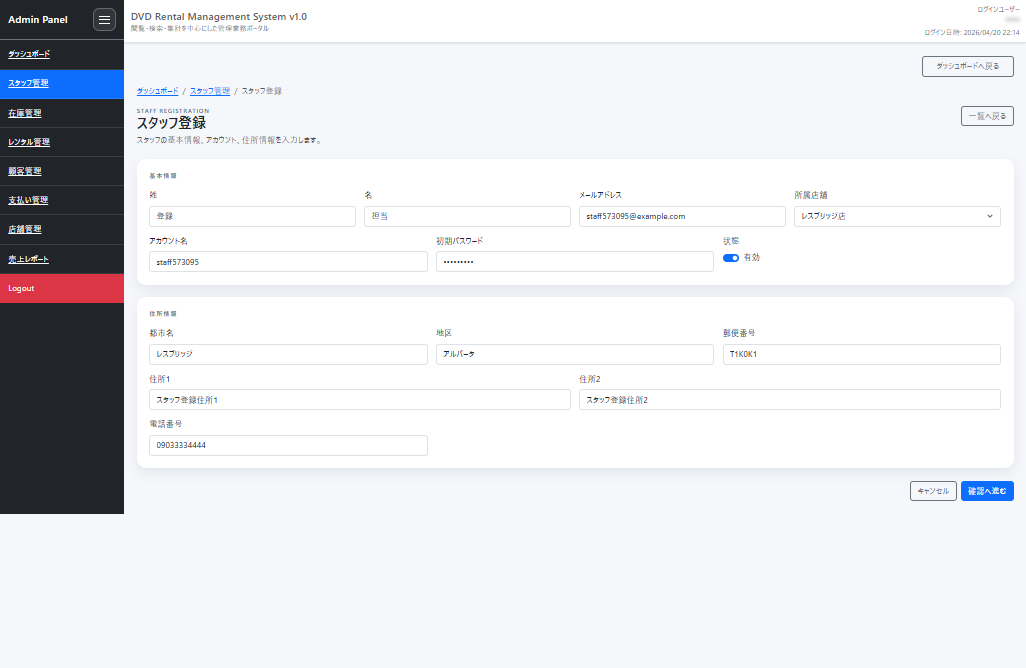
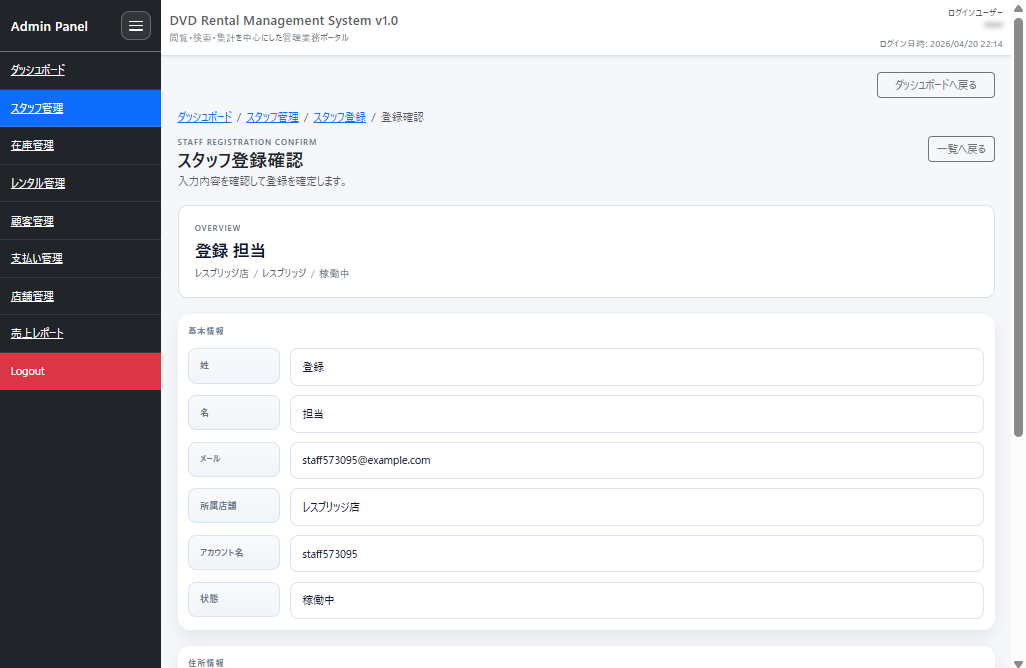
หน้า registration และหน้ายืนยัน registration เป็นแบบนี้
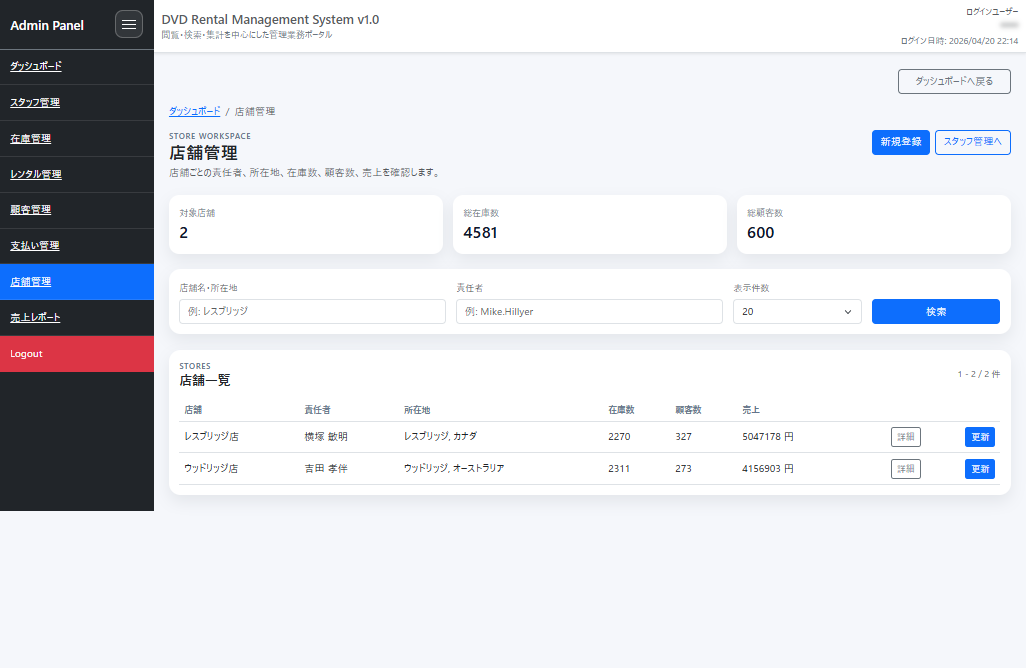
Store Management
Store management ช่วยให้ดู manager, ที่ตั้ง, จำนวน inventory, จำนวน customer, และ sales รวมกัน เนื่องจากมีหลายสถานการณ์ที่อยากเข้าใจสถานะระดับ store จึงรวมข้อมูลที่แสดงขนาดของแต่ละ store ไว้ในหน้าจอเดียว เหตุผลที่ store management จำเป็นคือ staff, customer, inventory, sales ท้ายที่สุดจะรวมเข้าที่ระดับ store การมีหน้าจอที่มองภาพรวมแต่ละ store ได้ ทำให้เข้าใจภาพรวมง่ายขึ้นมาก
การเปรียบเทียบข้อมูลของแต่ละ store ในหน้าจอเดียวทำให้เข้าใจภาพรวมง่ายขึ้นมาก
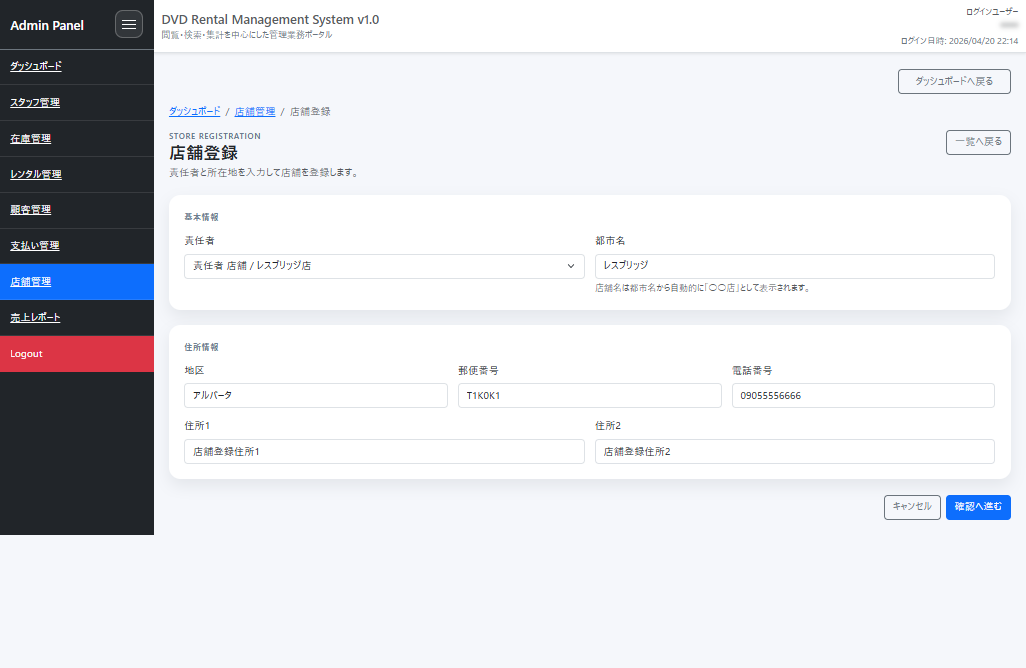
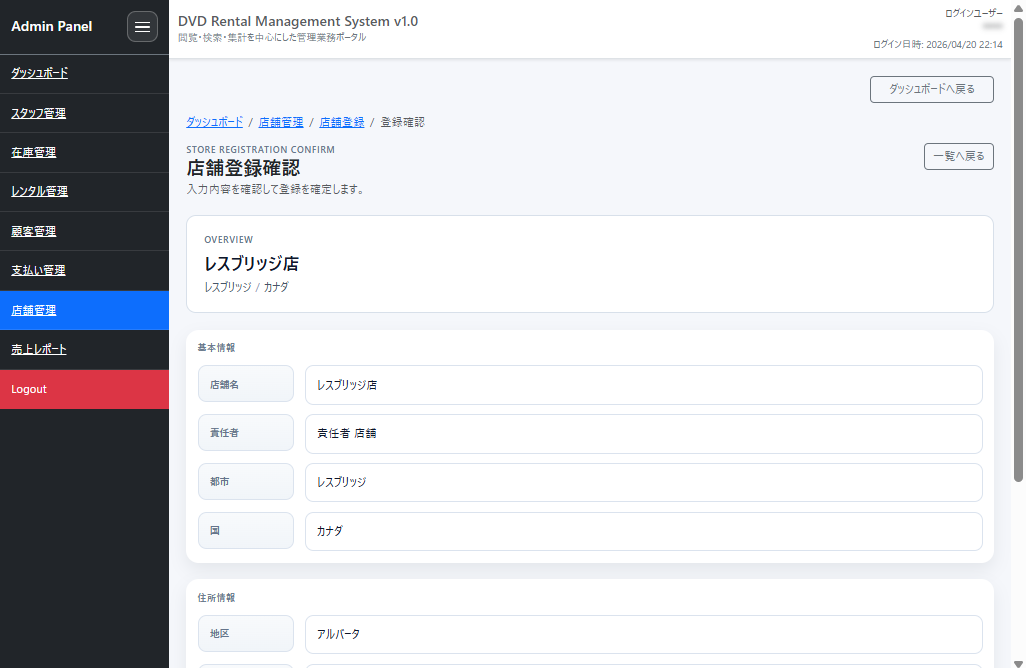
หน้า registration และหน้ายืนยัน registration เป็นแบบนี้
Inventory Management
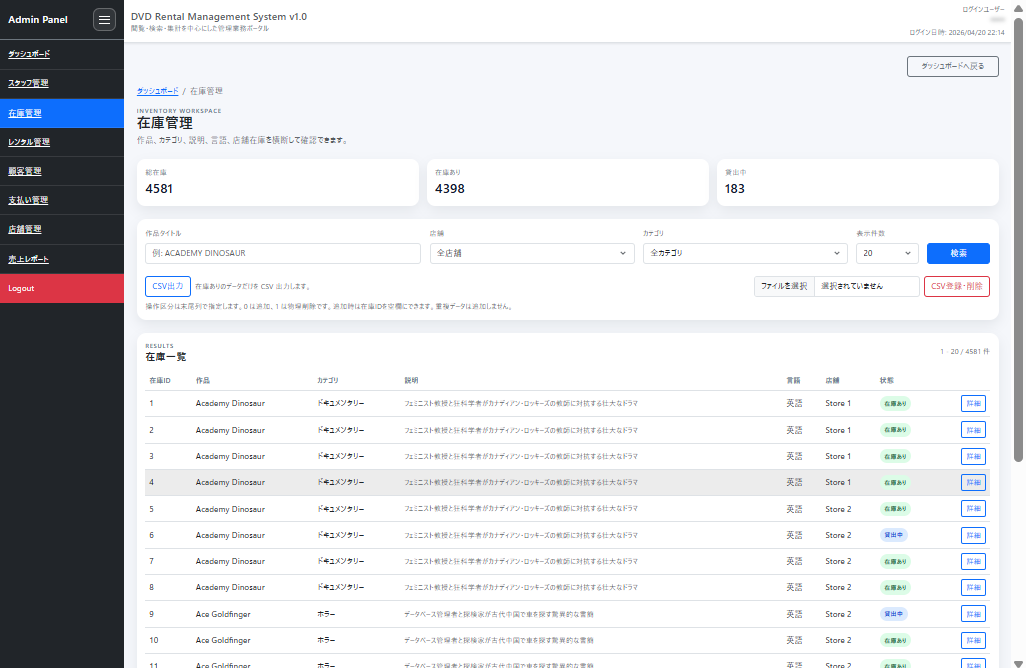
Inventory management ช่วยให้ cross-check films, categories, descriptions, languages, และ store inventory ได้ นอกจากนี้ยังจัดการ CSV export และ CSV registration/deletion ได้ด้วย ทำให้ไม่ใช่แค่หน้าจอ reference แต่จัดการข้อมูลได้ด้วย เหตุผลที่สร้าง inventory management คือแค่ดูข้อมูลผลงานไม่พอสำหรับงานจริง ถ้าไม่เห็นว่า “store ไหน ตอนนี้มีอะไรอยู่” ก็ใช้งานยาก การจัดการ CSV ได้ก็เพราะคาดการณ์สถานการณ์ที่อยากปรับ inventory ทีละมากๆ
Inventory management ให้ความสำคัญสูงสุดกับการเห็นข้อมูลผลงานและ inventory ของแต่ละ store ข้ามกันได้
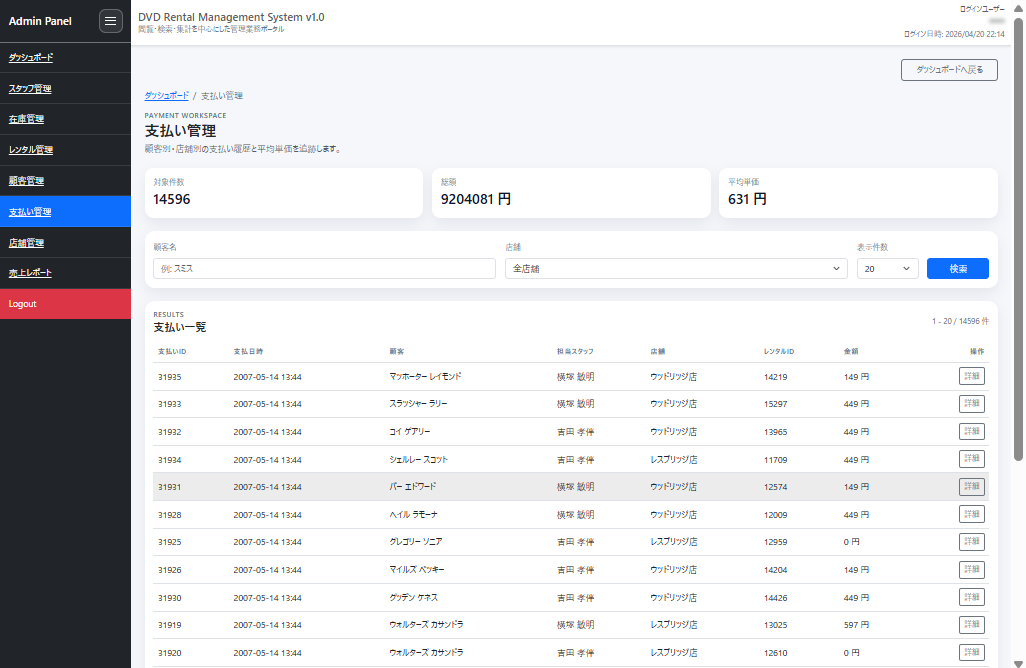
Payment Management
Payment management ช่วยให้ track ไม่เพียงแค่ payment history ตาม customer และ store แต่ยังรวม average unit price และยอดรวมด้วย แทนที่จะดู table payment ตรงๆ ตั้งใจแสดงเป็นกลุ่มที่มีความหมายในฐานะ admin screen เหตุผลที่ใส่ payment management คือเกี่ยวข้องทั้งการดูแลลูกค้าและการยืนยันยอดขาย ข้อมูลจำนวนเงินถ้า track เป็นรายการไม่ได้ ต้นทุนการยืนยันจะสูง จึงทำให้ดู history กับสรุปยอดในขั้นตอนเดียวกันได้
Payment management เน้นความสามารถในการดูเป็นรายการ เพื่อให้ history และความรู้สึกเรื่องจำนวนเงินสื่อสารได้ทันที
Rental Management
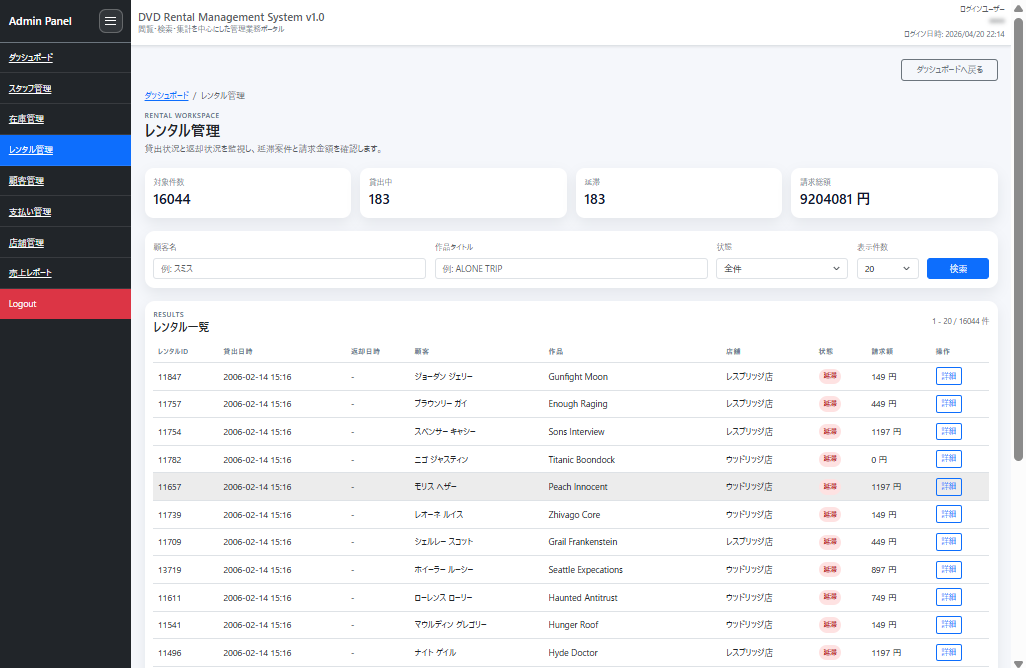
Rental management ช่วยให้สลับระหว่างสถานะ in-rental, returned, และ overdue ขณะตรวจสอบ rental history ตาม customer และ film ได้ จำนวน overdue และยอดเรียกเก็บรวมก็เห็นด้วย จึงเข้าใจสถานการณ์ได้มากจากแค่หน้าจอรายการ เหตุผลที่ให้ความสำคัญกับ rental management คือมันเป็นงานหลักของแอพนี้ ถ้าไม่รู้สถานะการยืมและคืน inventory management กับ payment management ก็เชื่อมกันไม่ได้ จึงให้ความสำคัญกับการเห็นเป็นรายการตั้งแต่ต้น
Rental management ทำให้สลับสถานะและตรวจสอบ history ต่อเนื่องกันเป็นขั้นตอนเดียว
Sales Report
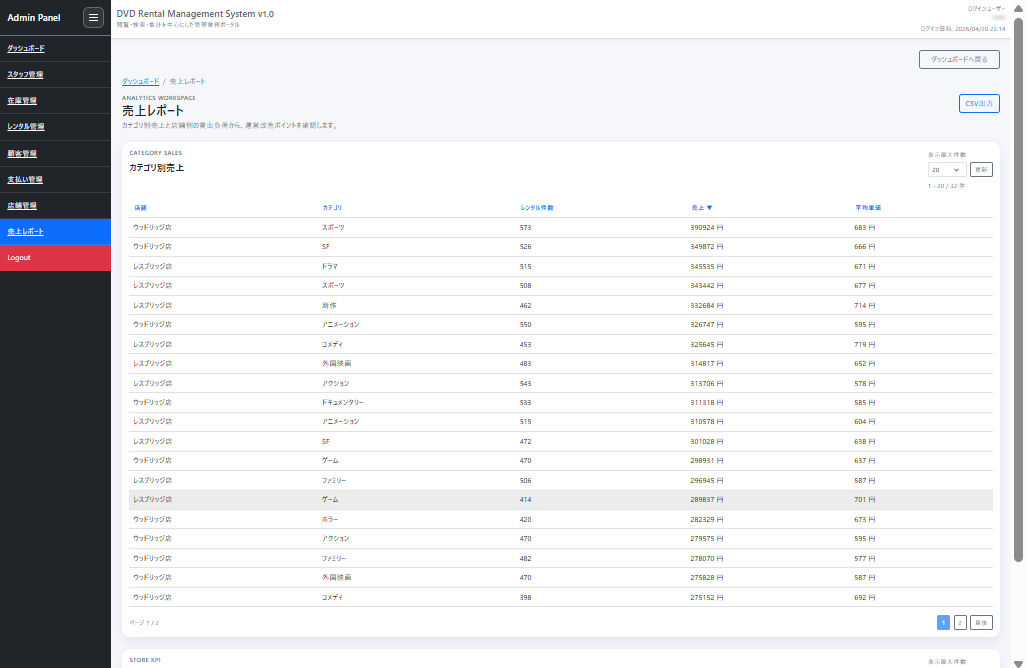
Sales report ช่วยให้ยืนยัน sales ตาม category และ KPI ตาม store ได้ นอกจาก sales, จำนวน rental, average unit price ต่อ category แล้ว ยังดูสถานะการบริหาร store ได้ด้วย วางไว้เป็นจุดสุดท้ายที่ทบทวนภาพรวมด้วยตัวเลข เหตุผลที่ใส่ sales report คือแค่หน้าจอปฏิบัติงานประจำวันมองไม่เห็นแนวโน้มรวม ไม่อยากให้จบแค่ admin screen แต่อยากให้ทบทวนด้วยตัวเลขทีหลังได้ด้วย จึงเตรียมหน้าจอที่เอียงไปทาง analysis ด้วย
Sales report วางไว้เป็นหน้าจอสำหรับทบทวนด้วยตัวเลขในขั้นตอนสุดท้ายของงานที่เป็นรายการ
วิธีการแปลง Sample DB เป็นรูปแบบแอพ
เนื่องจากใช้ table ที่มีอยู่แล้วโดยตรงในแอพ ฉันจึง map table structure เป็น Java entity อย่างตรงไปตรงมาก่อน
เช่น สำหรับ table customer สร้าง entity Customer และ map customer_id, store_id, first_name, last_name, email, address_id, activebool เป็นต้น
สิ่งที่ระวังในขั้นตอนนี้คือไม่รีบทำ domain model ที่ซับซ้อนตั้งแต่แรก ทำให้อ่าน existing schema ได้ถูกต้องก่อน แล้วค่อยเพิ่ม DTO และ Form ตามความต้องการของหน้าจอทีหลัง จะพังยากกว่า
ถ้าสร้างบน sample DB ฉันคิดว่าการที่จะแสดงและให้แก้ไข structure ที่มีอยู่แล้วอย่างไร สำคัญกว่าการเปลี่ยน table design
JPA และ SQL ถูกพิจารณาแยกกัน
เมื่อ implementation ดำเนินไป ชัดเจนว่า registration/update processing และ list/aggregation processing มีรูปแบบการเขียนที่เหมาะสมต่างกัน
ดังนั้นแอพนี้ใช้แบ่งคร่าวๆ ดังนี้
- Registration, updates, และ reference foundation: JPA
- Dashboard และ aggregations: เขียน SQL โดยตรง
Flow อย่าง form input, validation, หน้ายืนยัน, บันทึก ประกอบง่ายกว่าด้วยแนวทาง JPA ในทางกลับกัน หน้าจอที่อยากแสดงผลรวมตั้งแต่แรกอย่าง dashboard หรือ report เขียน SQL ตรงๆ จะสื่อความตั้งใจชัดกว่า
เก็บ Search Condition ไว้ฝั่ง Server
Search condition retention สำหรับ customer management จริงๆ ถูก implement โดยใช้ @SessionAttributes ของ Spring MVC เพราะ business screen ถ้าไปหน้ายืนยันแล้วกลับมา เงื่อนไขหายไป จะใช้งานยากมาก จึงตั้งใจตั้งแต่แรกว่าจะเก็บไว้ฝั่ง server
สิ่งที่โค้ดนี้ทำคือเรียบง่าย: วาง search form ชื่อ customerSearchForm ไว้บน session และใช้ object เดียวกันซ้ำทั้งตอนแสดงรายการและตอน execute search เนื่องจาก @ModelAttribute เตรียมค่าเริ่มต้นไว้ การเข้าถึงครั้งแรกจะเริ่มด้วย search condition ว่างเปล่า หลังจากนั้นค่าที่กรอกจะยังอยู่ทั้งหลัง POST และหลังกลับมาจากหน้าละเอียด
Business screen ถ้าต้องกรอกเงื่อนไขใหม่ทุกครั้งที่ search ใหม่ จะเครียดมาก ส่วนนี้ไม่ใช่ processing ที่หวือหวา แต่ใส่ไว้เป็นฐานที่ support การใช้งานของหน้าจอประเภทรายการ
@Controller
@SessionAttributes("customerSearchForm")
public class CustomerController {

	@GetMapping("/functions/customers")
	public String customers(Model model, @ModelAttribute("customerSearchForm") CustomerSearchForm form) {
		return renderCustomers(form, model);
	}

	@ModelAttribute("customerSearchForm")
	public CustomerSearchForm customerSearchForm() {
		return new CustomerSearchForm();
	}

	@PostMapping("/functions/customers")
	public String customers(@ModelAttribute("customerSearchForm") CustomerSearchForm form, Model model) {
		return renderCustomers(form, model);
	}
}
รวม Dashboard Aggregation ด้วย SQL
ฝั่ง dashboard ในทางกลับกัน ตั้งใจใช้นโยบายดึงมาด้วย SQL รวมทีเดียวตั้งแต่แรก จำนวน rental ที่ยังเปิดอยู่, จำนวน overdue, จำนวน inventory, จำนวน customer ที่ active, ยอดขาย 30 วันล่าสุด เป็น metric ที่อยากเห็นทันทีที่ entry point ของ admin screen จึงรวบรวมมาในครั้งเดียว
ฉันตัดสินใจว่าแทนที่จะไล่ผ่าน JPA entity หลายชั้น การกำหนดตัวเลขที่อยากแสดงบนหน้าจอสุดท้ายด้วย SQL ตรงๆ อ่านง่ายกว่า ใช้ count(*) filter (...) และ subquery เพื่อ return เฉพาะ metric ที่จำเป็นสำหรับการแสดงเป็น card รวมกันเป็นชุดเดียว
ฝั่ง Java ใช้ queryForMap รับมาแค่ 1 row แล้วนำค่านั้นไปใส่ใน display model สำหรับ dashboard พูดอีกแบบคือบทบาทของ layer นี้คือแปลงผลรวมจาก DB ให้เป็น UI metric ตรงๆ
Map<String, Object> summary = jdbcTemplate.queryForMap(
		"""
		select
			count(*) filter (where return_date is null) as open_rentals,
			count(*) filter (
				where return_date is null
				  and rental_date < current_timestamp - (interval '1 day' * 3)
			) as overdue_rentals,
			(select count(*) from inventory) as inventory_count,
			(select count(*) from customer where activebool) as active_customers,
			(select coalesce(sum(amount), 0) from payment where payment_date >= current_date - interval '30 day') as monthly_sales
		from rental
		""",
		new MapSqlParameterSource());
Login ก็ใช้ staff ของ Sample DB ด้วย
Login ใช้ Spring Security
แต่แทนที่จะวาง fixed in-memory user ตั้งค่าให้ login โดยใช้ข้อมูลของ table staff
พูดอีกแบบคือ ข้อมูล staff ที่มีอยู่ใน sample DB ถูกใช้ตรงๆ เป็น user ที่เข้าสู่ admin screen
UserDetailsService implementation โหลด staff ด้วย username และ active flag หลัง authentication จะเปลี่ยนไปยัง admin screen
วิธีนี้ทำให้ authentication ไม่กลายเป็น dummy data ในโลกแยกต่างหาก แต่รักษาความเชื่อมโยงระหว่างข้อมูล staff ที่แสดงบนหน้าจอกับ user ที่ login ไว้อย่างเป็นธรรมชาติ
ลดความเครียดตอน Login ล้มเหลวด้วย
การตั้งค่า login เป็นโครงสร้างตรงไปตรงมาที่เปิดเฉพาะหน้า login เป็น public ส่วนที่เหลือต้อง authentication ทั้งหมด เหตุผลที่เก็บ username ไว้ใน session ตอน login ล้มเหลว คืออยากลดความเครียดจากการต้องกรอกใหม่
สิ่งสำคัญในการตั้งค่านี้คือ authorization rule, login processing URL, และการจัดการตอนล้มเหลว รวมอยู่ใน Spring Security configuration เปิด public เฉพาะ /login และ URL สำหรับ authentication processing เท่านั้น หน้าจอปกติทั้งหมดต้อง authentication
นอกจากนี้ loginFailureHandler จะเก็บ username ที่กรอกไว้แล้วเข้า session ตอน authentication ล้มเหลว ไม่เก็บ password ไว้ คืนแค่ username กลับมา จึงสร้างสมดุลระหว่างการใช้งานง่ายและความปลอดภัยได้ง่าย
http.authorizeHttpRequests(auth -> auth
	.requestMatchers("/login", LOGIN_PROCESSING_PATH).permitAll()
	.requestMatchers("/css/**").permitAll()
	.anyRequest().authenticated()
)
.formLogin(form -> form
	.loginPage("/login")
	.loginProcessingUrl(LOGIN_PROCESSING_PATH)
	.failureHandler(loginFailureHandler())
	.successHandler(loginSuccessHandler())
	.permitAll()
);

@Bean
public AuthenticationFailureHandler loginFailureHandler() {
	return (request, response, exception) -> {
		request.getSession(true).setAttribute(LOGIN_USERNAME_SESSION_KEY, request.getParameter("username"));
		response.sendRedirect(request.getContextPath() + "/login?error");
	};
}
สิ่งที่ระวังในฐานะ Business Screen
แอพนี้ให้ความสำคัญกับการใช้งานได้โดยไม่เครียดในฐานะ business screen มากกว่าการแต่งหน้าตาให้สวย
สิ่งที่ตั้งใจเป็นพิเศษได้แก่
- เงื่อนไขยังอยู่แม้ไปจากรายการสู่ละเอียดแล้วกลับมา
- ค่าที่กรอกยังอยู่แม้ไปจากหน้า update สู่หน้ายืนยันแล้วกลับมา
- เก็บ username ไว้ตอน login ล้มเหลว
- เก็บสถานะ sidebar ไว้แม้เปลี่ยนหน้าแล้ว
Admin screen แบบ server-rendered จุดเล็กๆ แบบนี้เชื่อมโยงตรงกับการใช้งานได้จริง ฉันสร้างโดยตั้งใจว่าไม่ใช่แค่แสดงหน้าจอได้ แต่การทำงานระหว่างปฏิบัติงานไม่ควรถูกตัดขาดกลางคัน
ทำให้ Inventory จัดการผ่าน CSV ได้ด้วย
การทำให้ inventory management จัดการ CSV ได้ก็เป็นส่วนที่สะท้อนความต้องการฝั่งปฏิบัติงาน เพราะแตะทีละรายการจากหน้าจอใช้เวลานาน จึง export ผลการค้นหาที่มี stock เป็น CSV และให้ registration/deletion แบบ bulk ได้เลย
ใน export process นี้ ก่อนอื่นใส่ search condition ของหน้าจอลงใน MapSqlParameterSource แล้วส่งให้ SQL จุดสำคัญคือใช้ flag titleEnabled และ storeEnabled สลับ เปิด/ปิด เงื่อนไข เพื่อให้ SQL เดียวกันใช้ได้ไม่ว่าจะไม่กรอก keyword หรือไม่เลือก store
ผลที่ได้ไม่ได้แปลงเป็น CSV string ตรงๆ แต่ map เข้า InventoryCsvRow ก่อน วิธีนี้ทำให้ความสัมพันธ์ระหว่างผลลัพธ์ SQL กับ column ของ CSV output ชัดเจน และตามได้ง่ายขึ้นเมื่อจะเพิ่ม/ลด item ทีหลัง
public byte[] exportCsv(InventorySearchForm form) {
    MapSqlParameterSource params = new MapSqlParameterSource()
	    .addValue("titleEnabled", StringUtils.hasText(form.getTitleKeyword()))
	    .addValue("titleKeyword", toSqlLike(form.getTitleKeyword()))
	    .addValue("storeEnabled", form.getStoreId() != null)
	    .addValue("storeId", form.getStoreId() != null ? form.getStoreId() : -1);

    List<InventoryCsvRow> rows = jdbcTemplate.query(
	    """
	    select i.inventory_id, i.film_id, f.title, i.store_id
	    from inventory i
	    join film f on f.film_id = i.film_id
	    where (:titleEnabled = false or lower(f.title) like :titleKeyword)
	      and (:storeEnabled = false or i.store_id = :storeId)
	    """,
	    params,
	    (rs, rowNum) -> new InventoryCsvRow(
		    rs.getInt("inventory_id"),
		    rs.getShort("film_id"),
		    rs.getString("title"),
		    "",
		    "",
		    rs.getShort("store_id")));
    // CSV assembly processing
}
สิ่งที่ดีเกี่ยวกับการสร้างบน Sample DB
สิ่งที่ดีจริงๆ ตอนลงมือทำคือเนื่องจากความสัมพันธ์ของข้อมูลมีอยู่แล้วตั้งแต่ต้น จึงไม่ขาดแคลน subject matter เมื่อเพิ่มหน้าจอ
เช่น สามารถขยายไปได้เองตาม flow นี้
- สร้างรายการ customer
- สร้างละเอียด customer
- สร้าง update customer
- ขยายไปยัง store, staff, inventory
- เพิ่มหน้าจอประเภทรายการอย่าง payment, rental, report
- สุดท้ายให้ภาพรวมด้วย dashboard
เมื่อเทียบกับ business สมมติที่สร้างจากศูนย์ การถูกดึงตาม existing schema ไปพร้อมเพิ่มหน้าจอ เหมาะกับทั้งการเรียนรู้และการฝึก implementation มาก
ถ้าจะสร้างต่อจากนี้ ลำดับนี้ทำได้ง่ายกว่า
ถ้าจะสร้าง admin screen โดยใช้ PostgreSQL sample DB เป็น subject matter ไม่พยายามสร้างทุกอย่างตั้งแต่แรกจะไปได้ง่ายกว่า
ถ้าเป็นฉัน จะทำตามลำดับนี้
- เริ่มจากรัน DB แล้วดูเนื้อหาข้างใน
- สร้างหน้ารายการจาก table ที่เข้าใจง่ายอย่าง customer, staff, store ก่อน
- ขยายไปยังหน้าละเอียด, update, ยืนยัน
- หลังจากนั้นเพิ่ม payment, rental, report, dashboard
- สุดท้ายปรับ authentication และการใช้งานโดยรวมของหน้าจอ
การตัดสินใจตั้งแต่แรกว่า “ใช้ PostgreSQL sample DB เป็นฐาน” ทำให้ไม่ค่อยหลงทางว่าจะสร้างอะไร
สรุป
สำหรับการสร้างแอพจัดการ DVD rental ตัวนี้ สิ่งแรกสุดที่กำหนดคือการใช้ PostgreSQL sample DB เป็นฐาน
การใช้ dvdrental หมายความว่า subject matter อย่าง customer, store, staff, inventory, rental, และ payment พร้อมตั้งแต่ต้น ทำให้ง่ายต่อการขยายเป็น screen design, authentication, list, detail, update, และ aggregation
แทนที่จะออกแบบ business data ตั้งแต่ต้น การเข้าใจ existing schema ก่อนแล้วสร้าง admin screen ทับขึ้นไปทำได้ง่ายกว่า
หวังว่าจะเป็นประโยชน์กับคนที่อยากลองสร้าง business app ด้วย Spring Boot + Thymeleaf โดยใช้ PostgreSQL sample DB เป็น subject matter
โครงสร้างและแนวคิดตอนวางบน AWS สรุปไว้ในบทความนี้