สร้าง UI เลือกตัวรถภายในพอร์ตด้วย BottomSheet — การจับคู่ DraggableScrollableSheet + FutureBuilder ของ Flutter
สิ่งที่คุณจะได้เรียนรู้
- รูปแบบการ implement Flutter สำหรับการแสดง “รายการรถ” บน child surface หลังกดพอร์ต
- วิธีเลือก
initialChildSizeเมื่อจับคู่DraggableScrollableSheetกับshowModalBottomSheet - วิธีขั้นต่ำในการจัดการ “loading / error / empty / result” — 4 สถานะ — ด้วย
FutureBuilderสำหรับ list ที่ผ่าน API - วิธีแยก widget ใช้ร่วมกันเพื่อให้หน้าหลักกับหน้า destination มีหน้าตาเดียวกัน
กลุ่มเป้าหมาย
- นักพัฒนา Flutter ที่ implement child surface หลังกด POI บนแผนที่
- คนที่อยากทำให้ BottomSheet โต “จาก modal ชั่วคราว” เป็น “UI การเลือกระดับธุรกิจ”
- นักพัฒนาที่ใช้ Riverpod แต่ยังอยาก fetch async แบบ local ด้วย
FutureBuilderตรง ๆ
สภาพแวดล้อม
| รายการ | เวอร์ชัน |
|---|---|
| Flutter | 3.x (Material 3) |
| flutter_map | 7.x |
| flutter_riverpod | 2.x |
| dio | 5.x |
บทความในชุด (อยู่ระหว่างการพัฒนา) — บทความนี้เป็นส่วนหนึ่งของ สร้าง E-Scooter Sharing ระดับท้องถนนตั้งแต่ศูนย์เพื่อทำความเข้าใจ — ชุดบันทึก Design, Implementation, และ Operations โปรเจกต์ยังดำเนินอยู่และมีการเพิ่มบทความและบันทึก design ใหม่อย่างต่อเนื่อง แรงจูงใจของชุด, technology stack, อภิธานศัพท์ screen ID, และดัชนีบทความถูกรวบรวมไว้ที่ลิงก์ด้านบน
บทนำ
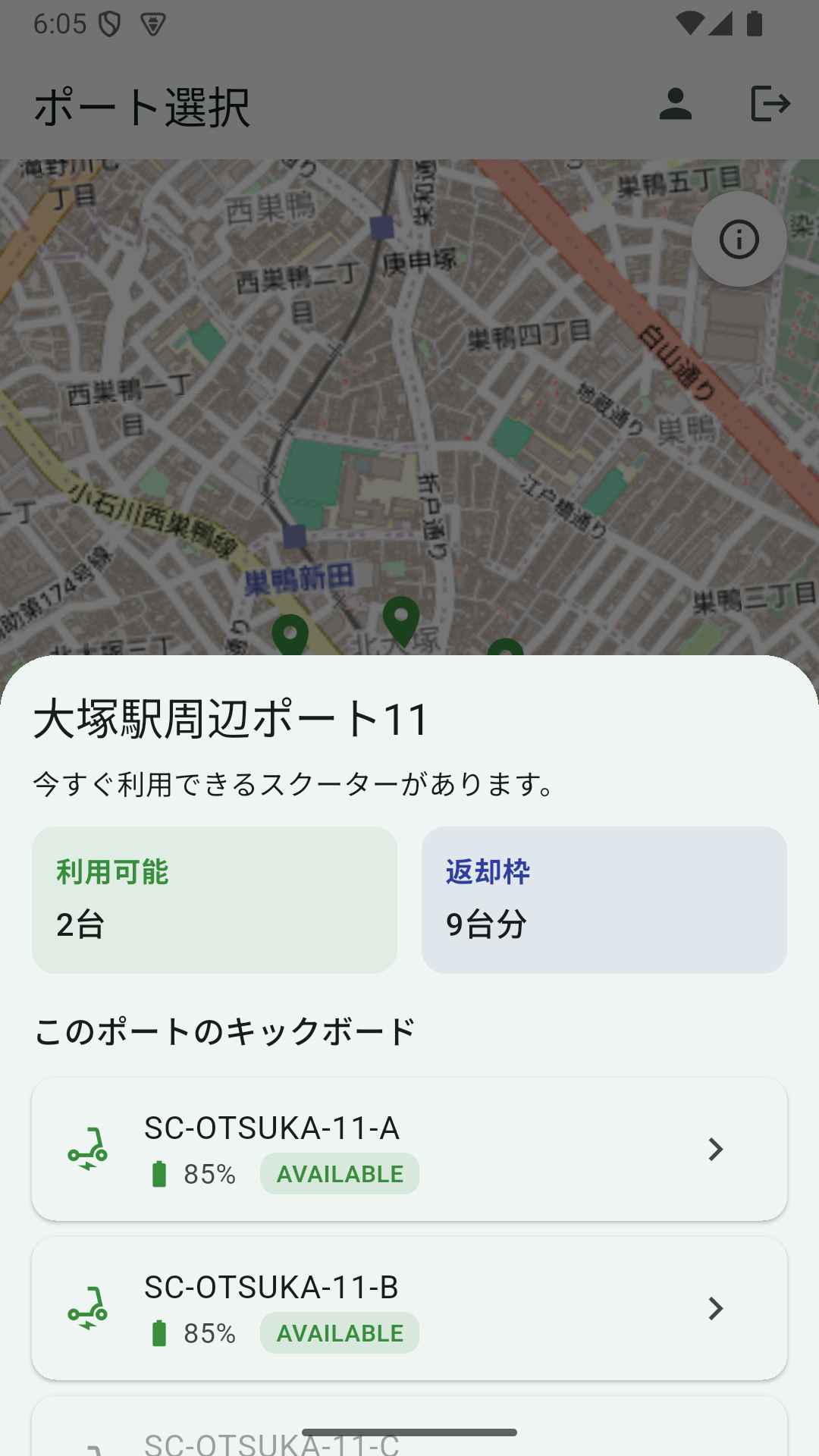
ที่หน้า S02 หน้าหลักของแอป e-scooter sharing การกดหมุดพอร์ตเคยแสดง sheet แบบนี้:
- ชื่อพอร์ต
- บรรทัดเดียว: “มีรถให้ใช้ได้ตอนนี้” หรือ “ไม่มีรถให้ใช้ได้ตอนนี้”
- การ์ด 2 ใบ: “ใช้ได้ N” และ “ช่องว่าง M”
เห็นจำนวนได้ แต่ เลือกตัวรถไม่ได้ child surface ต้องจัดการ “กดหมุด → เห็นรายการรถ → กดรถเพื่อ navigate” ทั้งหมดในจุดเดียว
ทำไม DraggableScrollableSheet
3 ทางเลือก:
showDialogfull-screen dialogpushไปหน้าใหม่showModalBottomSheet+DraggableScrollableSheet
(1) เสีย context ของแผนที่ ความรู้สึก “ใกล้พอร์ตนี้” หายไป
(2) เป็นการเปลี่ยนหน้าหนัก เพิ่มการกดปุ่ม back
(3) คงแผนที่อยู่ในสายตาขณะที่ผู้ใช้สามารถ scroll รายการรถ UX-wise เป็นธรรมชาติที่สุด
เหตุผลที่เลือก DraggableScrollableSheet: ผู้ใช้สามารถ ลากขึ้นเพื่อขยาย sheet ในพอร์ตที่มีรถมาก ผู้ใช้สามารถดึง sheet ขึ้นเพื่อเห็นทั้งหมด
เรียก showModalBottomSheet
void _showPortSheet(PortSummary port) {
  final api = DiscoveryApi(ref.read(apiClientProvider));
  showModalBottomSheet<void>(
    context: context,
    isScrollControlled: true, // ← ไม่มีตัวนี้ sheet จะหยุดที่ครึ่งจอ
    builder: (sheetContext) {
      return _PortDetailSheet(
        port: port,
        api: api,
        onScooterSelected: (scooter) {
          Navigator.of(sheetContext).pop();
          final scooterId = Uri.encodeComponent(scooter.scooterId);
          context.push('/destination?scooterId=$scooterId');
        },
      );
    },
  );
}
ข้อสังเกต:
- ลืม
isScrollControlled: trueจะทำลายการคุมความสูงของDraggableScrollableSheet - แยก
sheetContextกับcontextภายนอก ใช้Navigator.of(sheetContext).pop()ปิด sheet แล้วcontext.push(...)เพื่อ navigate
initialChildSize ของ DraggableScrollableSheet
class _PortDetailSheet extends StatefulWidget {
  // ...
  @override
  Widget build(BuildContext context) {
    return DraggableScrollableSheet(
      expand: false,
      initialChildSize: 0.55,
      minChildSize: 0.3,
      maxChildSize: 0.9,
      builder: (context, scrollController) {
        return SingleChildScrollView(
          controller: scrollController,
          child: Padding(
            padding: const EdgeInsets.all(16),
            child: Column(
              mainAxisSize: MainAxisSize.min,
              crossAxisAlignment: CrossAxisAlignment.start,
              children: [
                Text(port.name, style: Theme.of(context).textTheme.titleLarge),
                // การ์ดสรุป + รายการรถ + footer
              ],
            ),
          ),
        );
      },
    );
  }
}
initialChildSize: 0.55 หมายถึง “ความสูงเริ่มต้นคือ 55% ของจอ” ที่เลือกค่านี้เพราะ:
- 0.4 เห็นรถได้แค่ 1〜2 ตัว และบังคับให้ scroll
- 0.7 ทำให้แผนที่เล็กเกินไป ลดความรู้สึก “พอร์ตตรงนี้”
- 0.55 เห็นการ์ดสรุป + รถ ~3 ตัว และยังคงเห็นแผนที่ครึ่งหนึ่ง — balance ที่ดี
minChildSize: 0.3 เก็บข้อมูลขั้นต่ำเมื่อผู้ใช้ลากลงเพื่อย่อ maxChildSize: 0.9 ให้ผู้ใช้ลากขึ้นเกือบซ่อนแผนที่เพื่อเห็นรายการรถทั้งหมด
หน้า destination (เลือกพอร์ตคืน) ใช้ initialChildSize: 0.55 เหมือนกัน ทั้งกรณีเปิดใช้งานและปิดใช้งานออกในขนาดเดียวกัน
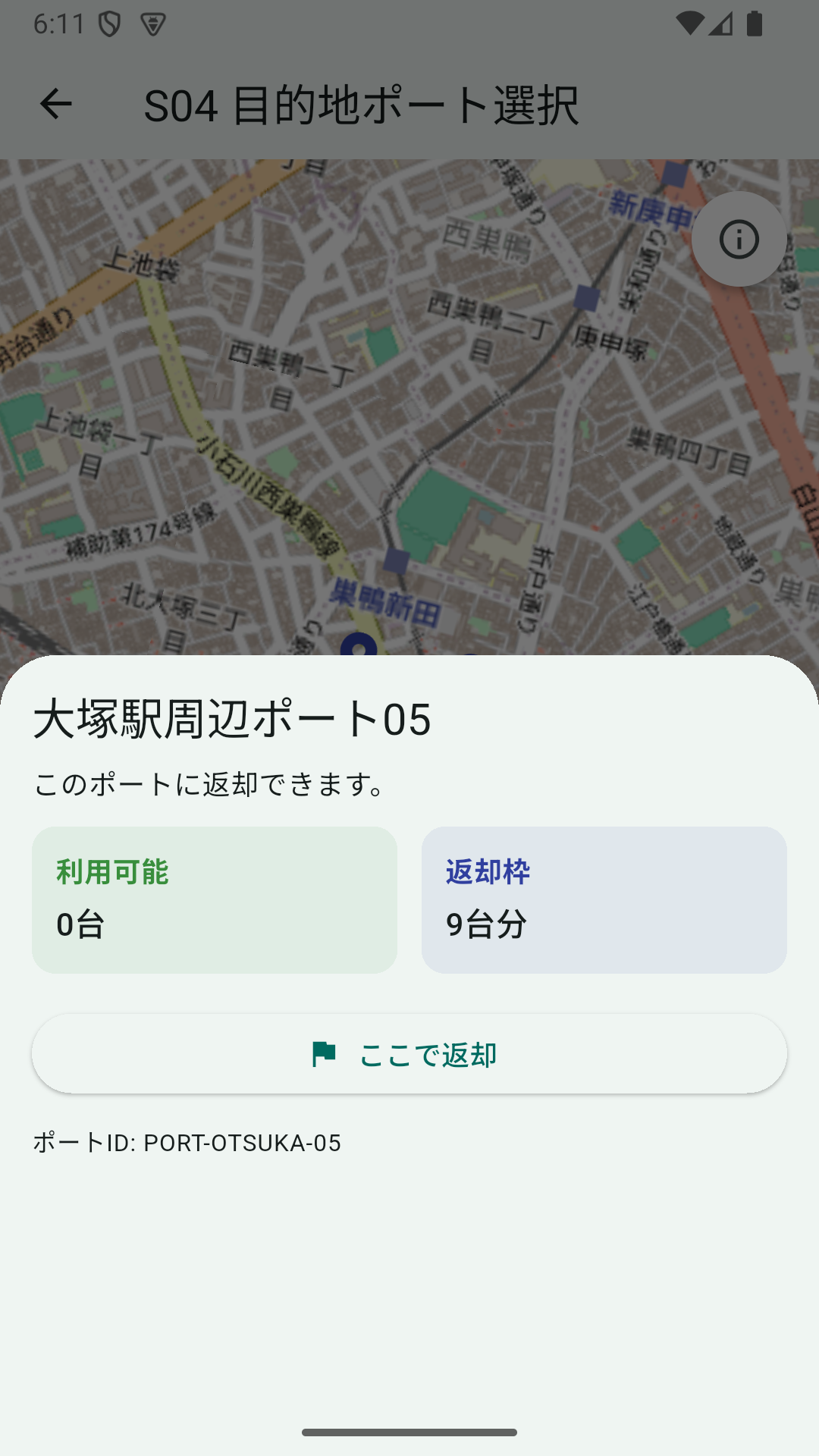
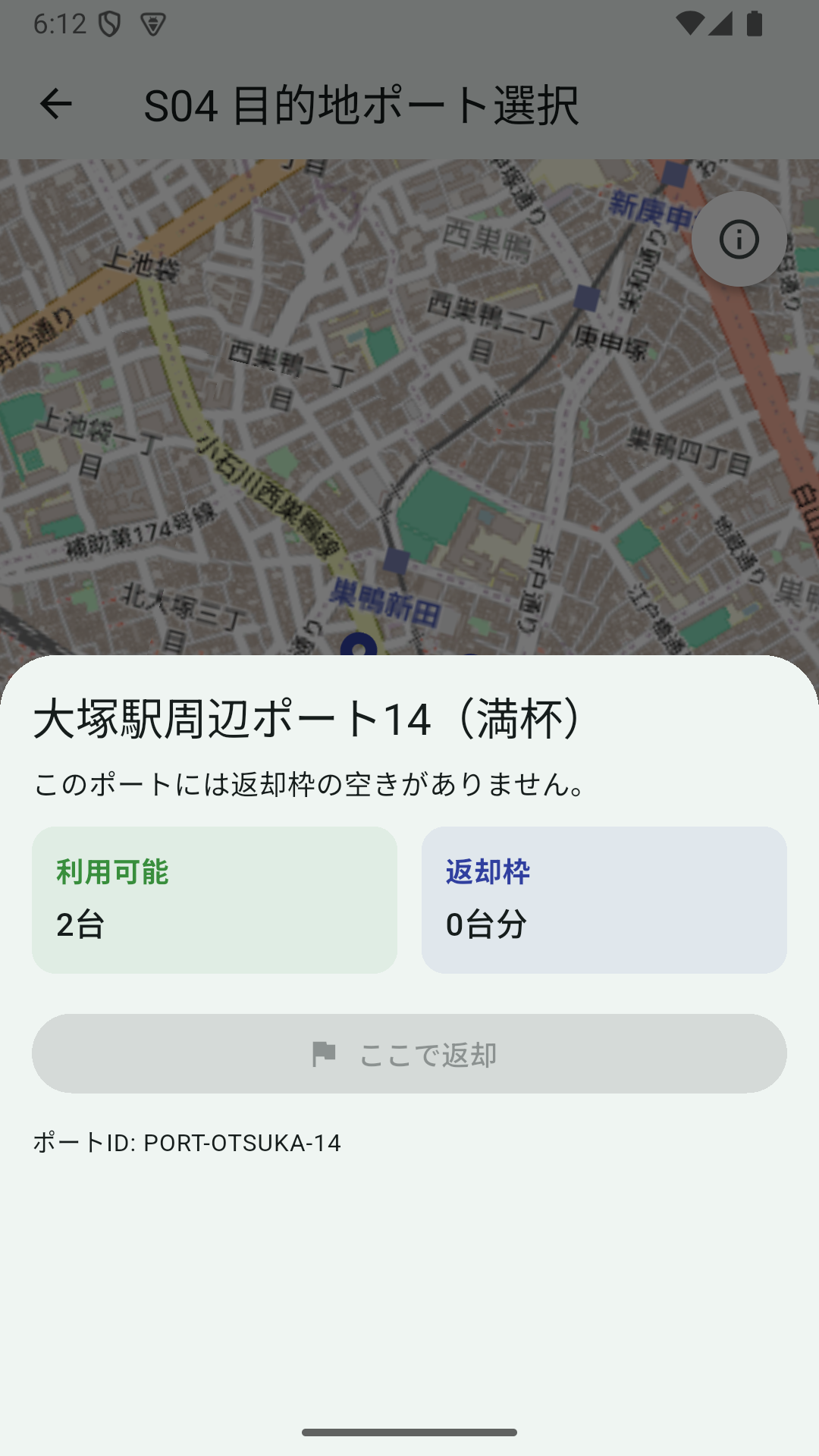
branch ปิดใช้งานคือ port.availableEmptySlots == 0 → ElevatedButton.onPressed: null “ขับไม่ได้ / คืนไม่ได้” ถูกแสดงอย่างสม่ำเสมอเป็น “กดได้หรือไม่” ข้ามหน้าจอ กลายเป็นกฎที่ใช้ได้ในแนวนอน
FutureBuilder สำหรับรายการรถ
รายการรถต้องเรียก API จัดการ 4 สถานะ: loading / error / empty / result
class _PortDetailSheetState extends State<_PortDetailSheet> {
  late Future<List<ScooterSummary>> _scootersFuture;

  @override
  void initState() {
    super.initState();
    _scootersFuture = widget.api.getScootersInPort(widget.port.portId);
  }

  void _retry() {
    setState(() {
      _scootersFuture = widget.api.getScootersInPort(widget.port.portId);
    });
  }

  // ใน build
  FutureBuilder<List<ScooterSummary>>(
    future: _scootersFuture,
    builder: (context, snapshot) {
      if (snapshot.connectionState == ConnectionState.waiting) {
        return const Padding(
          padding: EdgeInsets.symmetric(vertical: 16),
          child: Center(child: CircularProgressIndicator()),
        );
      }
      if (snapshot.hasError) {
        return Column(
          crossAxisAlignment: CrossAxisAlignment.start,
          children: [
            Text('โหลดรายการรถไม่สำเร็จ',
                style: TextStyle(color: Colors.red.shade700)),
            const SizedBox(height: 8),
            OutlinedButton(onPressed: _retry, child: const Text('ลองอีกครั้ง')),
          ],
        );
      }
      final scooters = snapshot.data ?? const <ScooterSummary>[];
      if (scooters.isEmpty) {
        return const Text('ไม่มีรถลงทะเบียนที่พอร์ตนี้');
      }
      return Column(
        children: scooters.map((s) => _ScooterListTile(
          scooter: s,
          onTap: s.isAvailable ? () => widget.onScooterSelected(s) : null,
        )).toList(),
      );
    },
  )
จุดสำคัญ:
- สร้าง
_scootersFutureครั้งเดียวในinitStateการเรียกwidget.api.getScootersInPort(...)ตรง ๆ ในbuildจะ refetch ทุกครั้งที่setState - “Retry เมื่อ error” แค่สร้าง
_scootersFutureใหม่ผ่านsetState - แยก branch สำหรับ array ว่าง ใช้
snapshot.data ?? const <ScooterSummary>[]เพื่อ null safety
Riverpod FutureProvider เป็นทางเลือก แต่สำหรับ “Future ที่อยู่เฉพาะตอน sheet เปิด” FutureBuilder แบบ local ก็ง่ายกว่า
Scooter Tile (เฉพาะ AVAILABLE กดได้)
class _ScooterListTile extends StatelessWidget {
  const _ScooterListTile({required this.scooter, required this.onTap});

  final ScooterSummary scooter;
  final VoidCallback? onTap;

  @override
  Widget build(BuildContext context) {
    final disabled = onTap == null;
    final statusColor = switch (scooter.status.toUpperCase()) {
      'AVAILABLE' => Colors.green.shade700,
      'IN_USE' => Colors.orange.shade700,
      'MAINTENANCE' => Colors.grey.shade600,
      _ => Colors.grey.shade600,
    };
    return Card(
      margin: const EdgeInsets.symmetric(vertical: 4),
      child: ListTile(
        onTap: onTap,
        leading: Icon(Icons.electric_scooter,
            color: disabled ? Colors.grey : statusColor),
        title: Text(scooter.scooterId,
            style: TextStyle(color: disabled ? Colors.grey : null)),
        subtitle: Row(/* battery + status badge */),
        trailing: disabled ? null : const Icon(Icons.chevron_right),
      ),
    );
  }
}
ตั้ง onTap เป็น null ทำให้ ListTile ทั้งหมดไม่ active เป็นพฤติกรรมมาตรฐานของ Material ไม่ต้อง implement prop disabled
switch expression ของ Dart 3 ให้ map state → สีแบบ declarative รู้สึกสะอาด
แยก Widget ใช้ร่วมกัน
สุดท้ายอยากใช้การ์ด “ใช้ได้ / ช่องว่าง” เดียวกันทั้งหน้าหลักและหน้า destination แต่ละหน้ามี _PortStatCard เป็น private แยกเข้า widgets/port_stat_card.dart เป็น widget ใช้ร่วมกัน
class PortStatCard extends StatelessWidget {
  const PortStatCard({
    super.key,
    required this.label,
    required this.value,
    required this.accent,
  });

  final String label;
  final String value;
  final Color accent;

  @override
  Widget build(BuildContext context) {
    return Container(
      padding: const EdgeInsets.all(12),
      decoration: BoxDecoration(
        color: accent.withValues(alpha: 0.08),
        borderRadius: BorderRadius.circular(12),
      ),
      child: Column(
        crossAxisAlignment: CrossAxisAlignment.start,
        children: [
          Text(label, style: TextStyle(color: accent, fontWeight: FontWeight.w700)),
          const SizedBox(height: 4),
          Text(value, style: Theme.of(context).textTheme.titleMedium),
        ],
      ),
    );
  }
}
รับเฉพาะสี accent พื้นหลังกับสีตัวอักษรได้มาจาก accent ส่ง Colors.green.shade700 เป็นการ์ดใช้ได้ ส่ง Colors.indigo.shade700 เป็นการ์ดช่องว่าง widget เดียวคุมทั้งสองหน้าตา
กับดัก: Refactor replace_all
ตอนเปลี่ยนชื่อ _PortStatCard เป็น PortStatCard “replace all” ของ IDE แทนที่เฉพาะ constructor call และทิ้ง class definition (class _PortStatCard) ไว้ — Dart syntax error
class _PortStatCard extends StatelessWidget {  // ← ยังมี underscore นำหน้า
  const PortStatCard({                          // ← แต่ constructor ไม่มี
    // ...
  });
}
เกิดเพราะ “string _PortStatCard(” คือเป้าหมายการแทนที่ (class _PortStatCard ไม่ตามด้วย ()
วิธีแก้: สร้าง widget ใช้ร่วมกันในไฟล์ใหม่ แล้วลบ class เก่าทั้งหมด อย่าเชื่อ replace_all มากเกินไป
บทเรียน
- child surface หลังกดบนแผนที่ที่เป็นธรรมชาติที่สุดคือ
showModalBottomSheet+DraggableScrollableSheet initialChildSize: 0.55คือสมดุลตามประสบการณ์สำหรับ สรุป + หลาย item ใน list + แผนที่ยังเห็นครึ่ง- async fetch แบบ local ก็ใช้
FutureBuilderได้ ไม่ต้องดึงFutureProviderของ Riverpod - การ์ดใช้ร่วมที่รับเฉพาะ
accentแล้วได้สีอื่นมาเอง ใช้ซ้ำได้ง่ายข้ามหน้าจอ
แม้แค่ child surface เดียว มีพื้นที่ให้ขัดเกลาได้เยอะ เมื่อต้องการให้ flow UX ของแผนที่ไม่ขาด แต่จบ business action ได้